Zum Inhalt springen
WordPress.org

Deutsch

  • Themes
  • Plugins
  • News
  • Support
  • Über
    • Learn WordPress
    • Documentation (en)
    • Foren
    • Developers (en)
    • WordPress.tv
  • Meetups
  • Mitmachen
  • FAQ
  • Hol dir WordPress
Hol dir WordPress
WordPress.org

Plugin Directory

Block User Account

  • Plugin einreichen
  • Meine Favoriten
  • Anmelden
  • Plugin einreichen
  • Meine Favoriten
  • Anmelden

Block User Account

Von Dango Web
Herunterladen
  • Details
  • Rezensionen
  • Installation
  • Entwicklung
Support

Beschreibung

Block User Account gives administrators complete control over user account management. Block users temporarily or permanently, set custom block messages, send email notifications, and monitor all blocking activities with detailed logs.

Features:

  • Easy User Blocking: Block any user with one click from the users list or their profile page
  • Temporary Blocks: Set expiry dates for automatic unblocking after hours, days, or months
  • Custom Messages: Show personalized messages to blocked users when they try to login
  • Bulk Actions: Block or unblock multiple users at once with duration options
  • Email Notifications: Automatically notify users and admins about blocking activities
  • Activity Logs: Track all blocking and unblocking actions with detailed logs
  • Dashboard Widget: Quick overview of blocked users and recent activities
  • Admin Bar Menu: See blocked user count at a glance
  • Export Logs: Download activity logs as CSV files
  • Statistics Page: View blocking statistics and trends
  • RTL Support: Fully compatible with right-to-left languages
  • Translation Ready: Includes Persian translation

Credits

Developed by DangoWeb

Screenshots

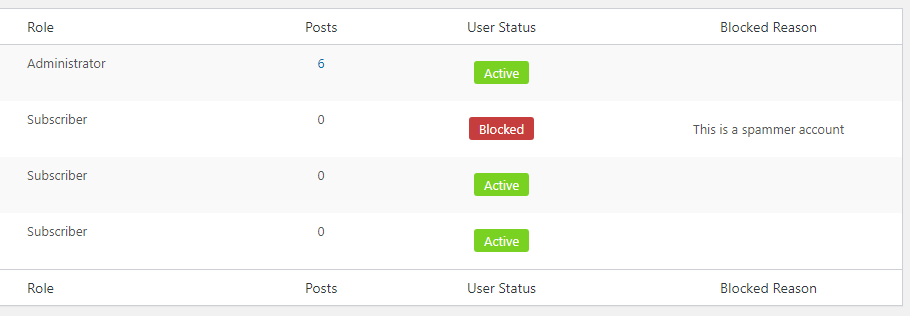
Users list with status columns and quick actions
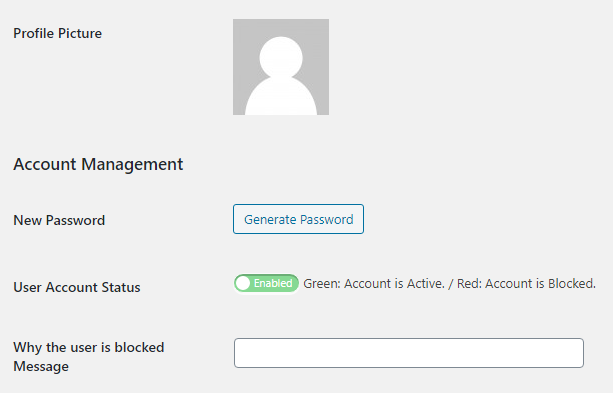
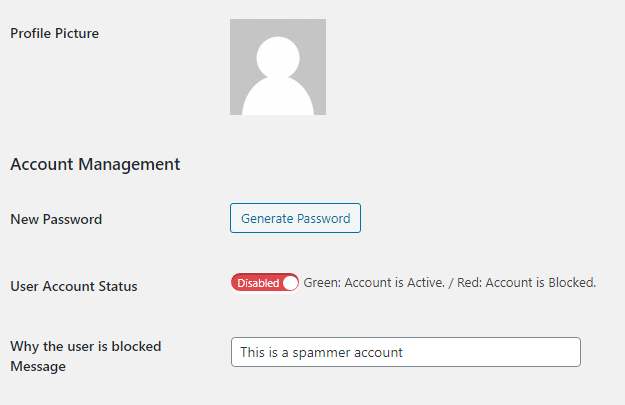
User profile block settings with toggle switch
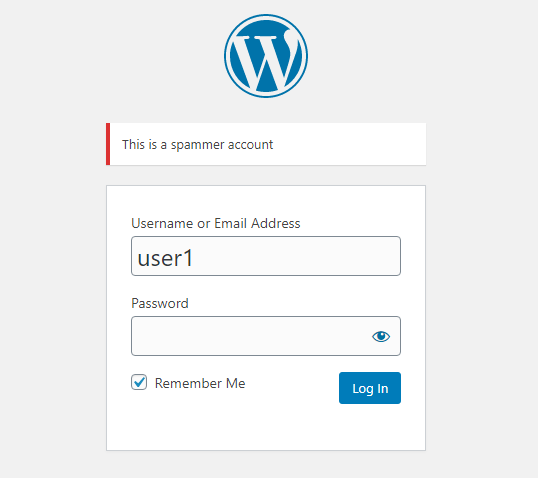
Wordpress login Permanent blockage error
Wordpress login Custom time blockage error
Dashboard widget
Dashboard widget
Settings page
Settings page
Settings page
Settings page
Settings page
Settings page

Installation

  1. Upload block-user-account folder to the /wp-content/plugins/ directory
  2. Activate the plugin through the ‚Plugins‘ menu in WordPress
  3. Go to Users page to see block options
  4. Configure settings in Settings > Block User Account

FAQ

Can I block users temporarily?

Yes, you can set an expiry date for each block. The user will be automatically unblocked when the time expires.

Will blocked users receive notifications?

Yes, you can enable email notifications to inform users when their account is blocked or unblocked.

Can I customize the block message?

Yes, you can set a default message in settings or customize it per user in their profile page.

Is there a log of all blocking activities?

Yes, the plugin maintains a detailed activity log with timestamps, admin users, and reasons.

Can I block multiple users at once?

Yes, use the bulk actions dropdown in the users list to block or unblock multiple users simultaneously.

Rezensionen

Nice! Please add do_shortcode

dlx 5. März 2023
Thanks for that plugin – works great! I added do_shortcode in line 211 of block-user-account.php so the message can have a shortcode included then: $user_message = do_shortcode( get_user_meta($userinfo->ID, ‚user_status_message‘, true) );

It would be great if it could be improved a little more.

aga2442 26. September 2022
I tested 2 more plugins with this feature. This plugin gave the best results. It would be great if it could be improved a little more. e.g; It would be great to see all blocked users on 1 page.

افزونه ساده و کارآمد

Tara 3. August 2022
در عین سادگی بسیار کارآمد است. ممنون

Active/Disactive in bluk action

ahmadegbaria000 5. März 2021 2 Antworten
Hi Very good plugin How can i active or disacrive user by bluk action? Without enter to user profile.. Thanks

افزونه عالی

mahdirabiee 8. Januar 2021
کاربردی است

Needs to some null checks

proximity2008 5. Oktober 2020 1 Antwort
You can’t just blindly hope that $_POST[‚user_status‘] and $_POST[‚user_status_message‘] are going to be there when you call bua_save_user_status It’s causing notices in my dev environments.
Alle 7 Rezensionen lesen

Mitwirkende und Entwickler

„Block User Account“ ist Open-Source-Software. Folgende Menschen haben an diesem Plugin mitgewirkt:

Mitwirkende
  • Dango Web

„Block User Account“ wurde in 2 Sprachen übersetzt. Danke an die Übersetzer für ihre Mitwirkung.

Übersetze „Block User Account“ in deine Sprache.

Interessiert an der Entwicklung?

Durchstöbere den Code, sieh dir das SVN-Repository an oder abonniere das Entwicklungsprotokoll per RSS.

Änderungsprotokoll

=2.0.0=
* Fixed REST API authentication bypass for blocked users (security fix)

2.0.0

  • Complete plugin rewrite with OOP architecture
  • Added temporary block functionality with expiry dates
  • Added activity logging system with CSV export
  • Added email notifications for users and admins
  • Added bulk actions with duration options
  • Added statistics page with charts and trends
  • Added admin bar menu with blocked user count
  • Added dashboard widget with expiring blocks overview
  • Added settings page with professional UI
  • Added user profile block history
  • Added auto-unblock via cron jobs
  • Added tools section (check expired, clean logs, export)
  • Improved security with nonce verification

1.4

  • Added Persian translation
  • Fixed login authentication issues
  • Improved toggle switch design

1.3

  • Added bulk actions
  • Added user status columns

1.0

  • Initial release

Meta

  • Version 2.0.1
  • Zuletzt aktualisiert vor 6 Tagen
  • Aktive Installationen 1.000+
  • WordPress-Version 5.0 oder höher
  • Getestet bis 7.0.3
  • PHP-Version 7.2 oder höher
  • Sprachen

    English (US), German und Persian.

    Übersetze in deine Sprache

  • Schlagwörter
    ban userblock userdisable accountuser management
  • Erweiterte Ansicht

Bewertungen

4.3 von 5 Sternen.
  • 4 5-Sterne-Rezensionen 5 Sterne 4
  • 1 4-Sterne-Rezension 4 Sterne 1
  • 2 3-Sterne-Rezensionen 3 Sterne 2
  • 0 2-Sterne-Rezensionen 2 Sterne 0
  • 0 1-Sterne-Rezensionen 1 Stern 0

Your review

Alle Rezensionen anzeigen

Mitwirkende

  • Dango Web

Support

Behobene Probleme in den letzten zwei Monaten:

0 von 1

Support-Forum anzeigen

Spenden

Möchtest du die Weiterentwicklung dieses Plugins unterstützen?

Für dieses Plugin spenden

  • Über
  • News
  • Hosting (engl.)
  • Datenschutz
  • Showcase (engl.)
  • Themes
  • Plugins
  • Vorlagen
  • Learn
  • Support
  • Entwicklung (engl.)
  • WordPress.tv ↗
  • Mitwirken (engl.)
  • Veranstaltungen
  • Spenden (engl.) ↗
  • Swag ↗
  • WordPress.com ↗
  • Matt (engl.) ↗
  • bbPress (engl.) ↗
  • BuddyPress (engl.) ↗
WordPress.org
WordPress.org

Deutsch

  • Unser X-Konto (früher Twitter) besuchen
  • Unser Bluesky-Konto besuchen
  • Unser Mastodon-Konto besuchen
  • Unser Threads-Konto besuchen
  • Unsere Facebook-Seite besuchen
  • Unser Instagram-Konto besuchen
  • Unser LinkedIn-Konto besuchen
  • Unser TikTok-Konto besuchen
  • Unseren YouTube-Kanal besuchen
  • Unser Tumblr-Konto besuchen
Code ist Poesie.
The WordPress® trademark is the intellectual property of the WordPress Foundation.