
Beschreibung
Free mini-extension for WooCommerce Composite Products that allows you to create dynamic, multi-layer Composite Product images that respond to option changes. The mini-extension leverages Scenarios to conditionally layer additional images over the main Composite Product image.
Documentation
The plugin introduces a new „Overlay Image“ Scenario Action that lets you:
- Choose an image from your Media library.
- Define conditions for layering this image over the main Composite Product image.
This approach makes it possible to utilize either swapping or compositing techniques to conditionally modify the main product image.
For more information and examples, check out the plugin’s repository on GitHub.
Important: The code in this plugin is provided „as is“. Support via the WordPress.org forum is provided on a voluntary basis only. If you have an active subscription for WooCommerce Composite Products, please be aware that WooCommerce Support may not be able to assist you with this experimental plugin.
Image Swapping
If you have previously worked with Variable Products and Variation Images, chances are you are already familiar with this technique. Here’s the idea behind image swapping:
The main product image is swapped with an image that depicts the chosen options as soon as the configuration of the Composite Product is complete.
Instead of replacing the product images, the same effect can be achieved by covering the main product image with a fully opaque (non-transparent) image.
Image Compositing
Compositing is the combination of multiple layers of images into a single image. The final composition creates the illusion that all stacked images are parts of the same scene. For this technique to work, each layered image must include:
- some transparent areas that allow lower layers of the stack to be seen;
- some opaque areas that introduce new elements in the scene by covering the layers below; and
- possibly, some semi-trasparent areas that introduce new elements while partially allowing the layers below to be seen.
Note: When multiple Overlay Image Scenarios exist, each adds its own image to the main product image stack. The layering order of these conditional images depends on the relative position of their Scenarios: If Scenario A is positioned higher than Scenario B under Product Data > Scenarios, then the image added by Scenario A will appear higher in the stack than the image added by Scenario B.
Swapping vs Compositing
The Swapping technique is a viable choice if the number of Component Options is relatively low, as it requires you to capture one picture and create one Scenario for every possible configuration. Its main advantage over the Compositing technique is that it allows you to obtain a natural-looking result, even if you don’t have advanced image processing skills.
The Compositing technique is often a better choice if the number of possible configurations is high, as it requires you to create one „compositable“ image for each Component Option. However, specialized knowledge and tools are required to produce a natural-looking result. For this reason, the Compositing technique is often preferred when 3D product models are available, as 3D modelling software can speed up the production of „compositable“ images.
Limitations
- The product image cannot be opened in a lightbox once the mini-extension has stacked additional images over it.
- The image zooming feature included with WooCommerce is not compatible with the swapping/compositing techniques introduced by the mini-extension. When a Composite Product includes Scenarios with the Overlay Image Scenario Action, the image zooming feature of the Composite Product is disabled.
- The plugin works with themes that declare support for the
wc-product-gallery-sliderfeature.
Screenshots
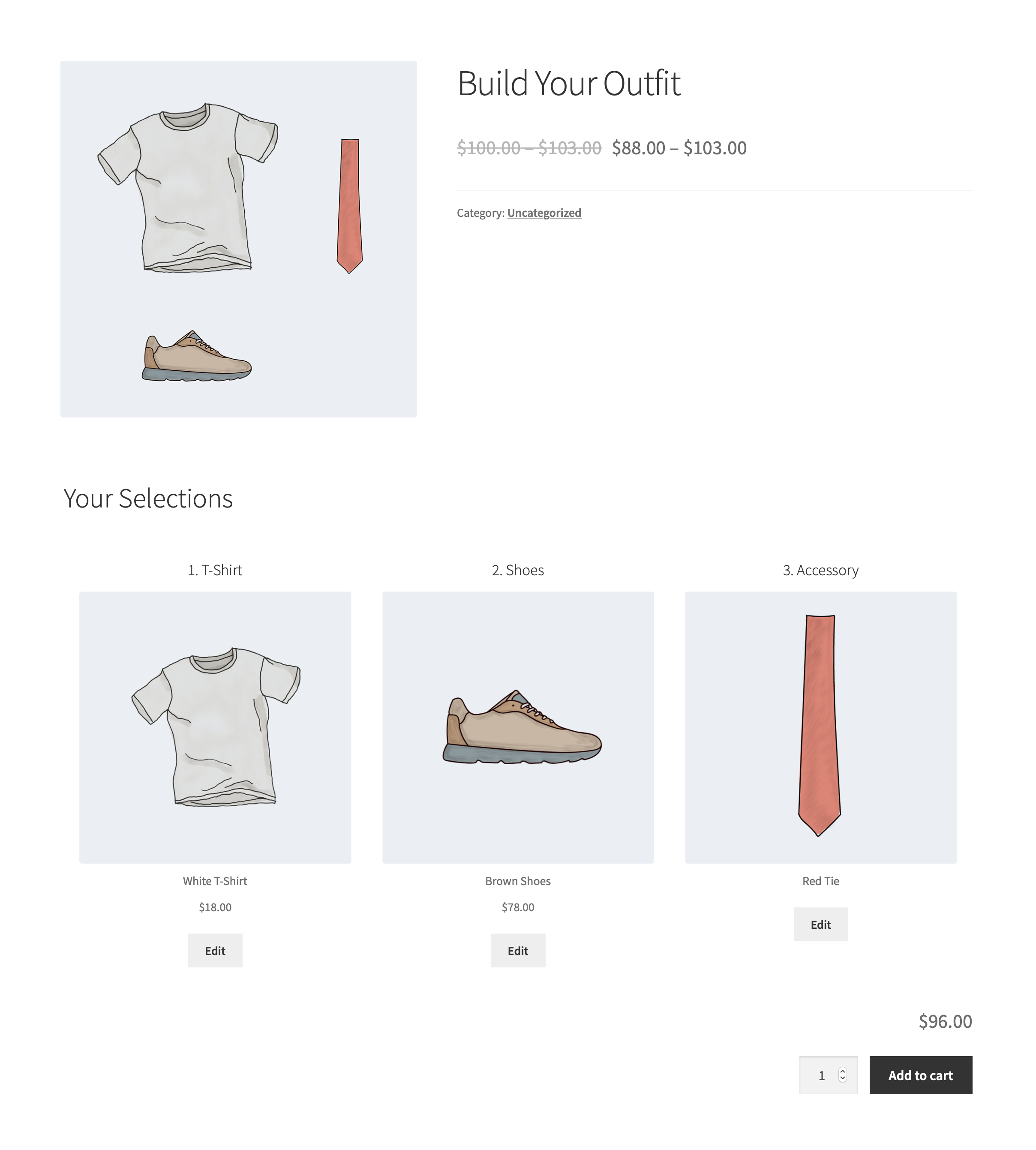
A Composite Product with a dynamic, multi-layer product image. 
Using Scenarios to create conditional image layers.
Installation
Composite Products – Conditional Images:
- Requires the official WooCommerce Composite Products extension. Before installing this plugin, please ensure that you are running the latest versions of both WooCommerce and WooCommerce Composite Products.
- Only works with themes that declare support for the
wc-product-gallery-sliderfeature.
Rezensionen


Mitwirkende & Entwickler
„Composite Products – Conditional Images“ ist Open-Source-Software. Folgende Menschen haben an diesem Plugin mitgewirkt:
Mitwirkende

Übersetze „Composite Products – Conditional Images“ in deine Sprache.
Interessiert an der Entwicklung?
Durchstöbere den Code, sieh dir das SVN Repository an oder abonniere das Entwicklungsprotokoll per RSS.
Änderungsprotokoll
1.3.0
- Feature – Declared compatibility with the new High-Performance order tables.
- Feature – Introduced compatibility with the new block-based Single Product Template.
1.2.6
- Fix – Fixed an issue that prevented the ‚Overlay Image‘ action options from rendering correctly.
1.2.5
- Fix – Make sure that the order of composited images is always following the order of Scenarios.
1.2.4
- Fix – Improved Scenario Action styles when using Composite Products v8.0.
1.2.3
- Fix – Declared compatibility with the latest WooCommerce and WordPress versions.
- Fix – Added support for Composite Products v8.0.
1.2.2
- Fix – Declared WooCommerce 4.2 compatibility.
1.2.1
- Fix – Declared WooCommerce 4.0 compatibility.
1.2.0
- Tweak – Renamed plugin to comply with WordPress.org guidelines.
1.1.1
- Fix – Added support for creating ‚overlay_image‘ scenarios via the REST API.
- Tweak – Declared support for WordPress 5.3 and WooCommerce 3.9.
1.1.0
- Fix – Compatibility with Composite Products 5.0+. Older versions of Composite Products are no longer supported.
1.0.2
- Fix – Resolve issue with Composite Products that do not have a product image set.
1.0.1
- Fix – Resize stacked images when the viewport width changes.
- Tweak – Adjust overlay image width based on main ‚img‘ width.
1.0.0
- Initial Release.