

Beschreibung
Double Youpï Refined Media Library (RML) ist ein kostenloses WordPress-Plugin, das der Mediathek Ordner und Sammlungen hinzufügt. Es ist außerdem in Double Youpï Refined Admin Dashboard enthalten. Installiere daher nur eines der beiden Plugins.
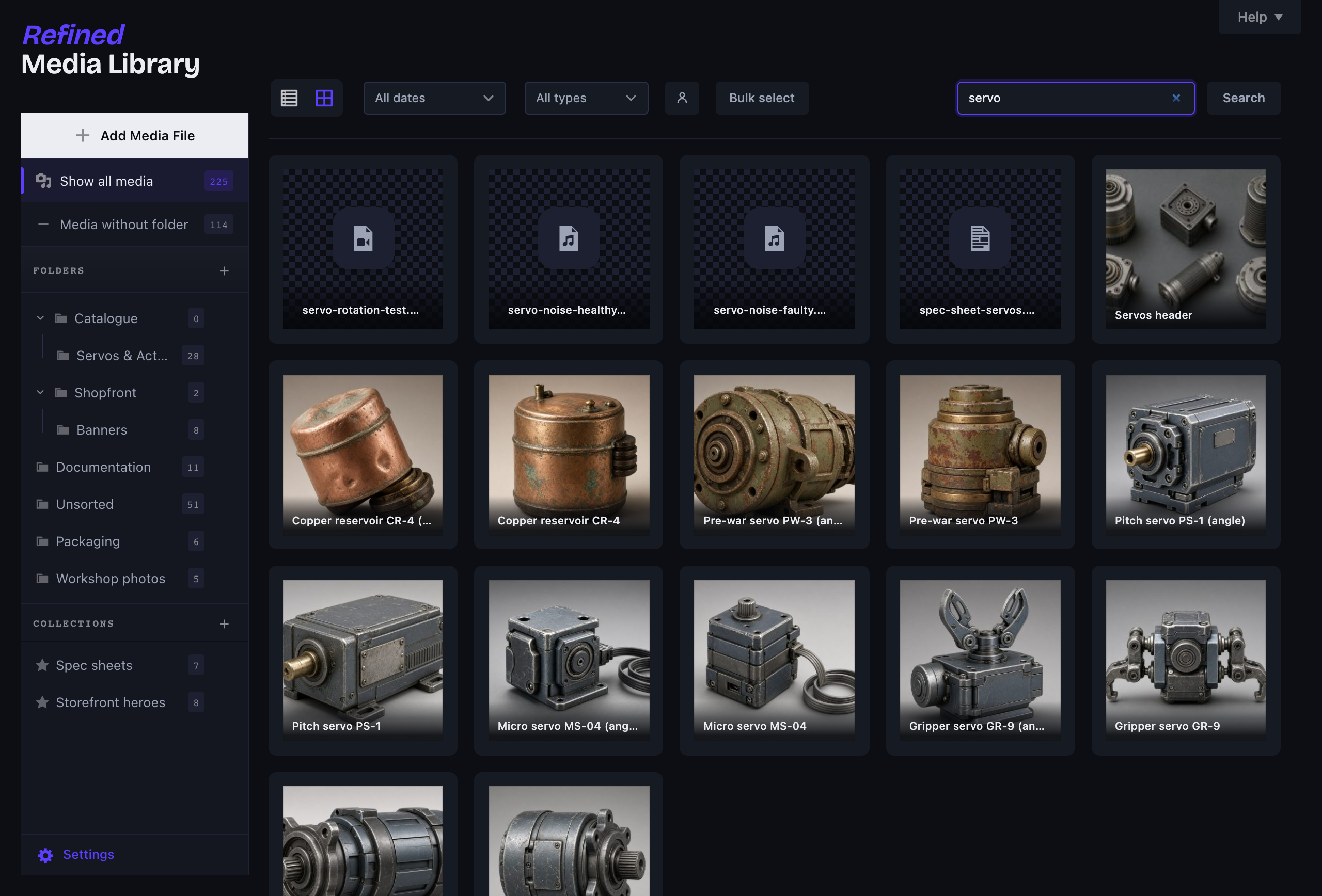
Die WordPress-Mediathek hat sich seit Jahren kaum verändert. Nach ein paar Hundert Uploads verbringst du mehr Zeit mit Scrollen als mit Arbeiten. Refined Media Library macht daraus eine echte Medienverwaltung, ohne dir auch nur eine einzige Einstellung pro Bild aufzubürden.
Ordner, die sich wirklich wie Ordner anfühlen
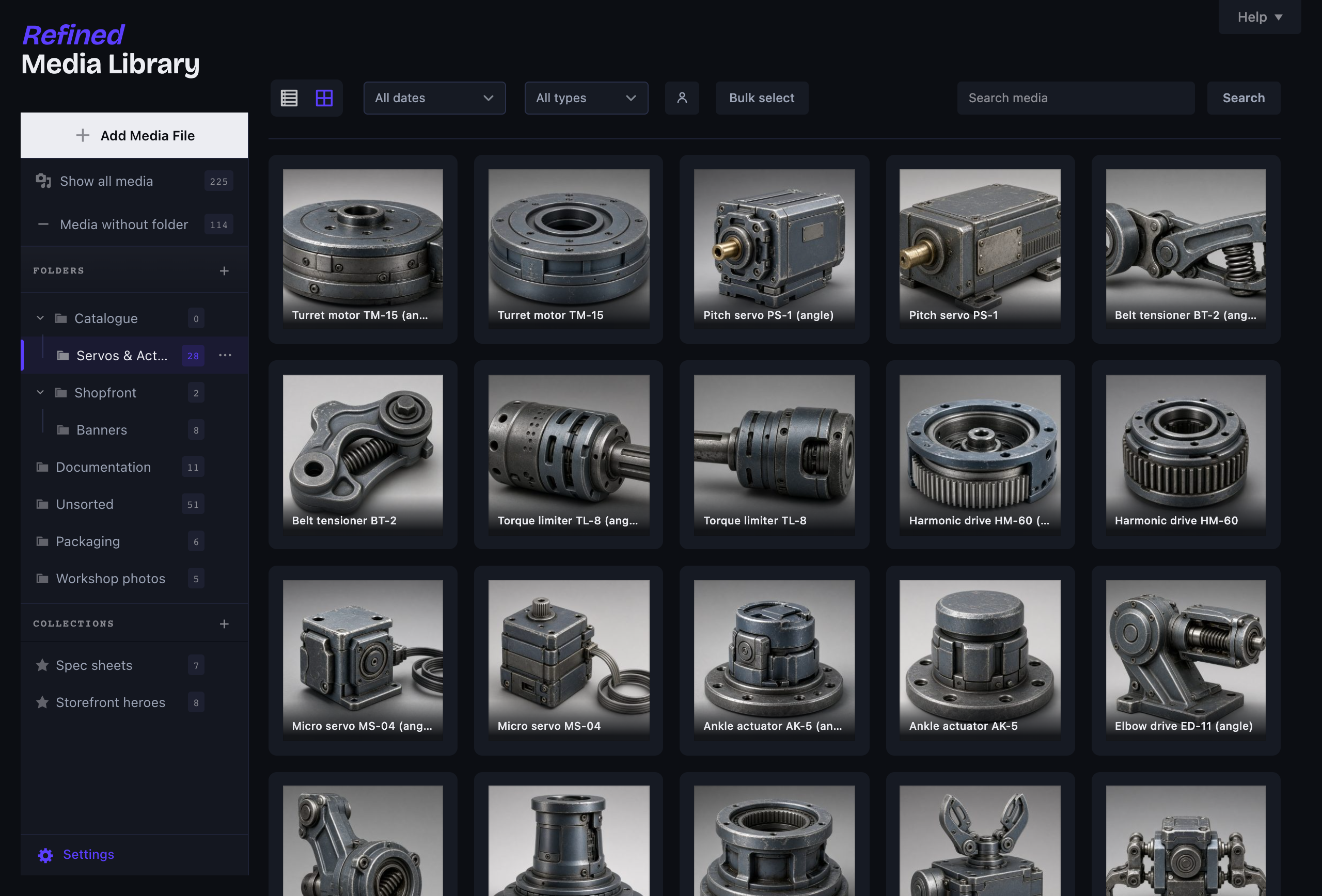
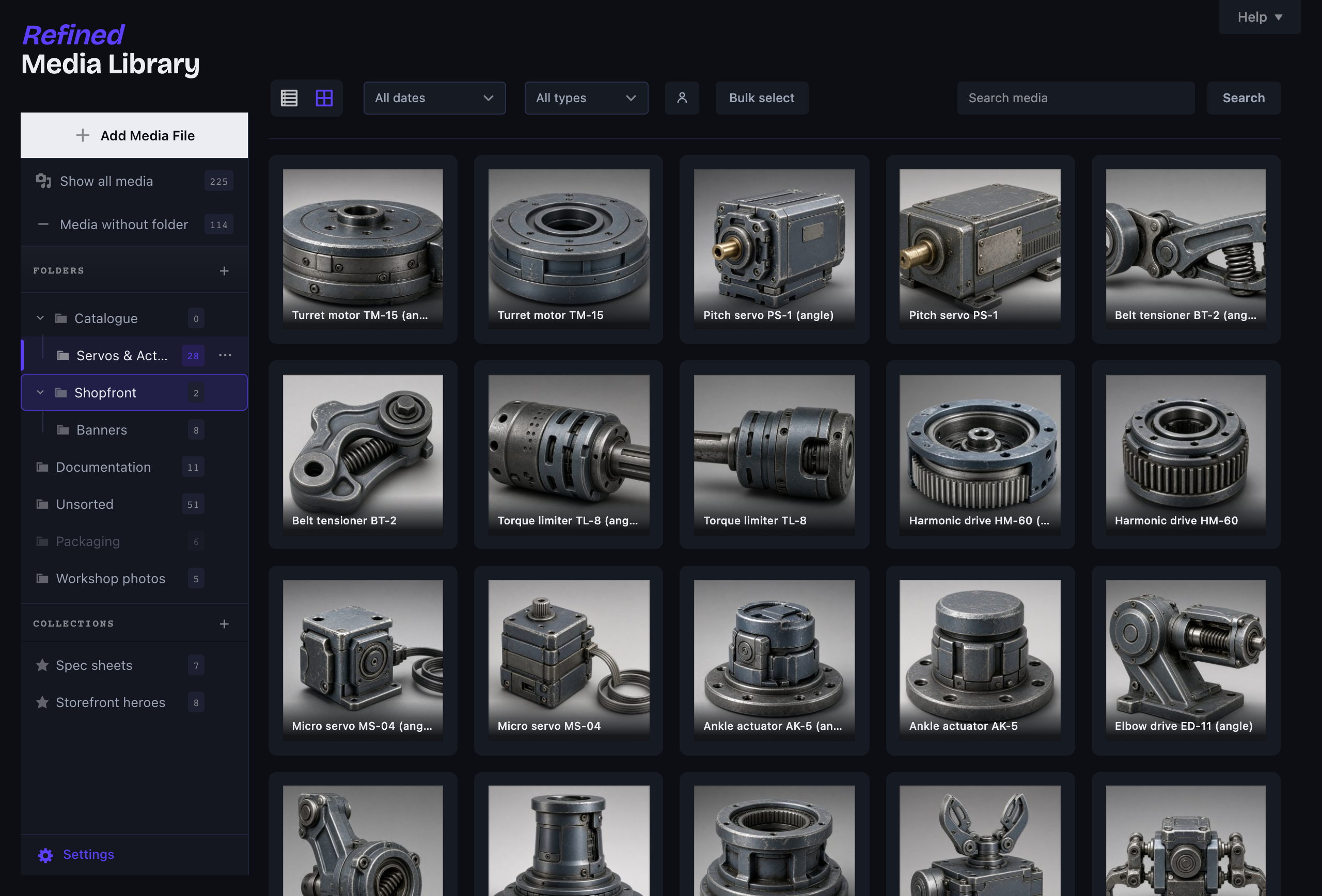
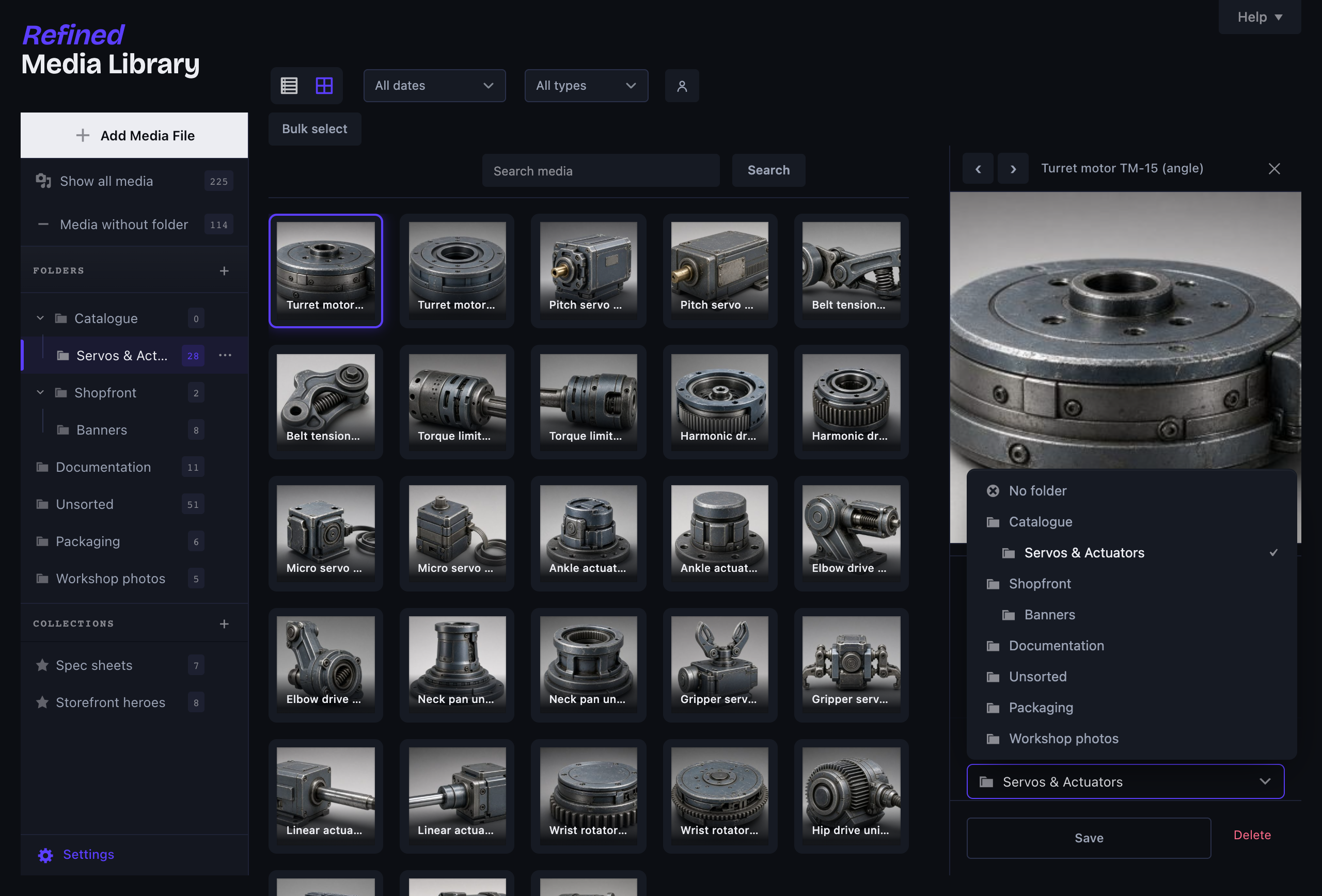
- Echte verschachtelte Ordner: Erstelle Unterordner, ziehe einen Ordner in einen anderen, um ihn diesem unterzuordnen, oder lege ihn zwischen zwei anderen ab, um die Reihenfolge zu ändern. Live-Ablageindikatoren zeigen dir dabei genau, wo er landet.
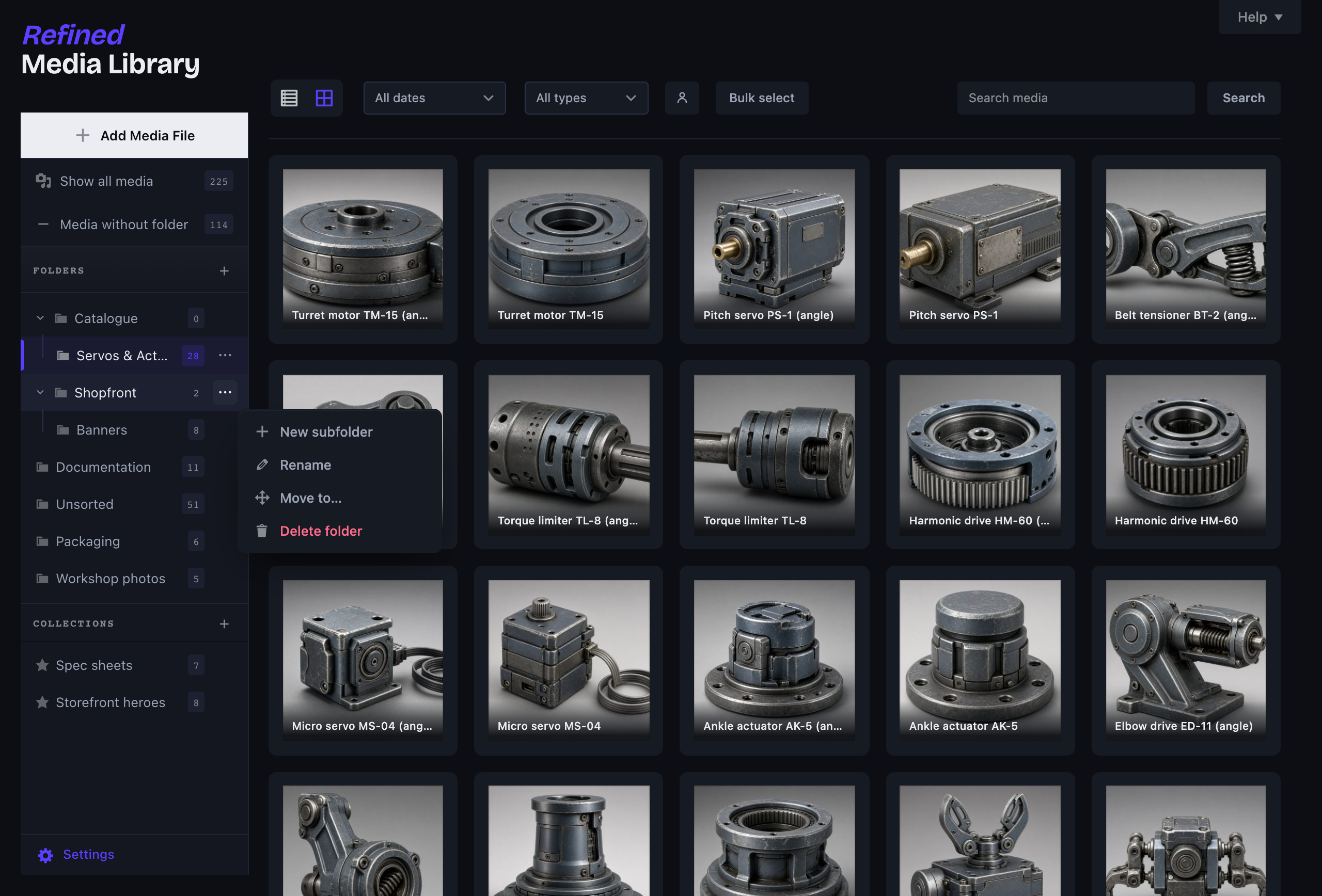
- Klicke mit der rechten Maustaste auf einen beliebigen Ordner (oder auf den ⋯-Button), um einen neuen Unterordner zu erstellen, ihn umzubenennen, zu verschieben oder zu löschen – in sauber gestalteten Dialogen statt in den grauen Pop-ups des Browsers.
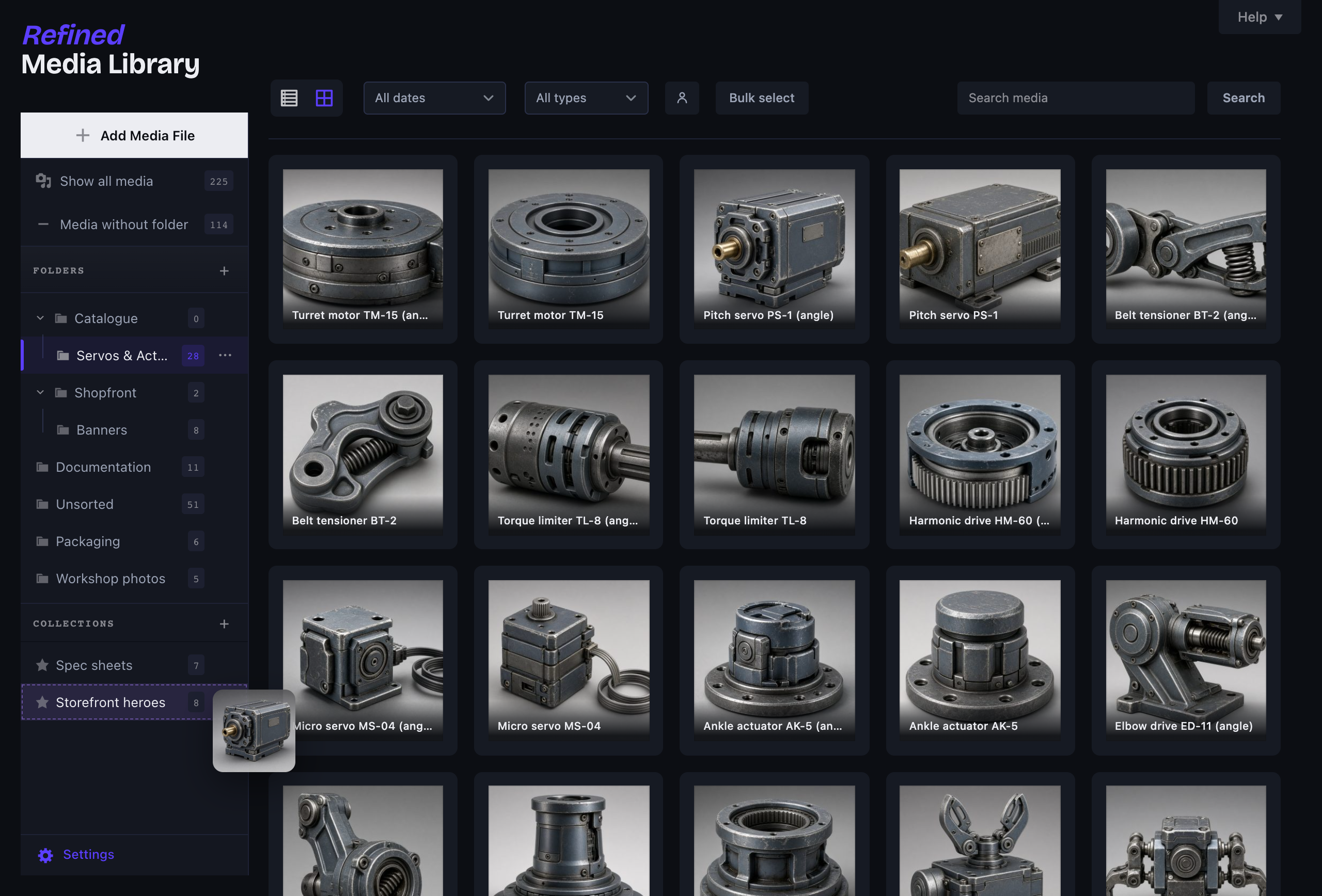
- Sammlungen, die Ordnergrenzen ignorieren, sodass dasselbe Bild gleichzeitig in mehreren Sammlungen enthalten sein kann.
- Ziehe Medien direkt auf einen Ordner oder eine Sammlung, aus dem Raster oder der Liste, und lade Dateien direkt in den aktuell angezeigten Ordner hoch.
- Funktioniert auf Basis der nativen Mediathek, sodass es sich gleich verhält, unabhängig davon, ob du mit Bricks, Elementor, Gutenberg oder Divi arbeitest.
Ein echtes Detail-Bedienfeld
Klicke auf eine beliebige Datei und von rechts wird ein Bedienfeld eingeblendet – kein Vollbild-Modalfenster mehr. Bearbeite den Alternativtext und den Titel, verschiebe die Datei in einen Ordner, füge sie Sammlungen hinzu, kopiere ihre URL und sieh genau, welche Beiträge und Seiten sie verwenden (einschließlich WooCommerce-Galerien). Die Vorschau ist größenveränderbar: Sie wird proportional skaliert, wenn du das Bedienfeld verbreiterst, und du kannst den Griff darunter ziehen, um ihre Höhe festzulegen. Klicke auf das Bild, um es im Vollbildmodus in einer Lightbox zu öffnen, und navigiere mit den Pfeiltasten durch die gesamte Mediathek.
Automatisch weniger Unordnung
- Automatische Alternativtexte und Titel, die beim Hochladen aus dem Dateinamen ausgefüllt werden, aber nur, wenn du sie leer gelassen hast. Dies geschieht auf deinem Server und es werden keine Daten an Dritte übermittelt.
- Duplikaterkennung: Wenn du dieselbe Datei erneut hochlädst, wird sie gekennzeichnet und mit einem Link zum Original versehen.
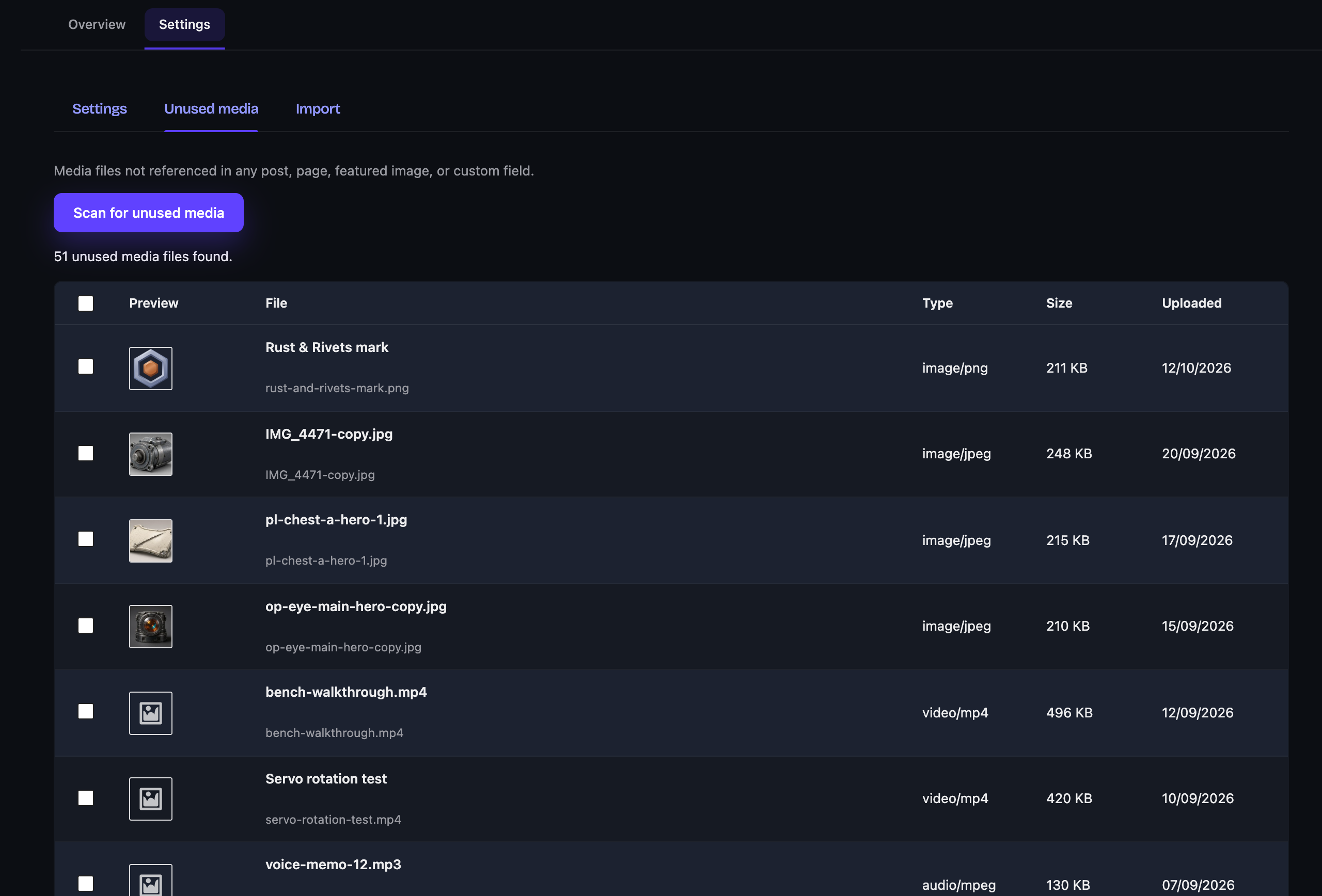
- Ein Scanner für ungenutzte Medien, der Dateien findet, auf die kein Beitrag tatsächlich verweist (Beitragsbilder, Inhalte, individuelle Felder, WooCommerce-Galerien), und dir ermöglicht, sie nach einer bewussten doppelten Bestätigung gesammelt zu löschen. Er geht auf Nummer sicher: Wenn er sich nicht sicher sein kann, lässt er die Datei unverändert.
WebP und AVIF beim Hochladen
Konvertiere Bilder direkt beim Hochladen in WebP und/oder AVIF, nachdem kurz geprüft wurde, ob dein Server dies tatsächlich unterstützt. Die Qualität wird mit einem einzigen Schieberegler eingestellt, nicht mit einem Assistenten. Wenn bereits ein anderes Plugin die Bildkonvertierung übernimmt, tritt Refined Media Library zurück.
Wechselst du von einem anderen Plugin?
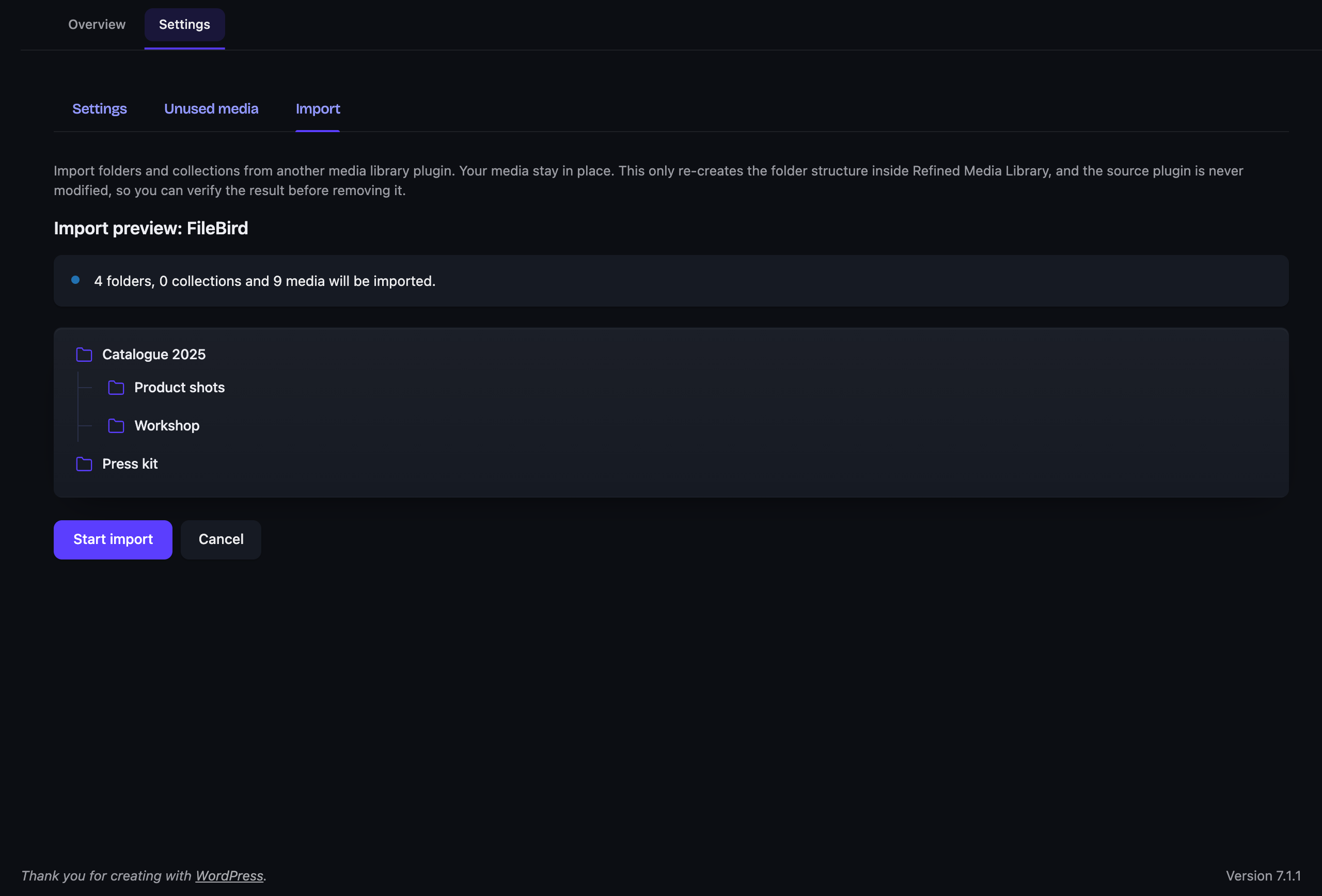
Ein-Klick-Import aus FileBird, Real Media Library, HappyFiles, Folders (Premio) und Enhanced Media Library. Die Daten werden direkt gelesen, selbst wenn das Plugin bereits deaktiviert ist, niemals verändert und der Import ist umkehrbar. Zuerst Vorschau anzeigen, jederzeit rückgängig machen.
Keine Einstellungen pro Bild
Genau darum geht es. Ein paar Umschalter an einer zentralen Stelle und überall sonst sinnvolle Standardeinstellungen.
Für Teams und Kunden-Websites
- Redakteure und Administratoren verwalten Ordner und Sammlungen; alle, die Dateien hochladen dürfen, verwalten ihre eigenen Medien.
- Behalte die Einstellungen für dich und blende den Feedback-Button sowie den Rezensions-Link mit einem Klick aus.
- Ordner, Sammlungen und WebP-/AVIF-Kopien stehen Headless-Frontends über WPGraphQL und die REST-API zur Verfügung.
Kostenlos und darauf ausgelegt, es auch zu bleiben
Keine gesperrten Funktionen, kein „Upgrade, um Ordner freizuschalten“, keine aufdringlichen Hinweise. Es handelt sich weder um eine Test- noch um eine Lite-Version: das gesamte Plugin, dauerhaft kostenlos und aktiv gepflegt.
Der gesamte Adminbereich, auf dieselbe Weise neu gestaltet
Diese Mediathek ist auch Teil von Double Youpï Refined Admin Dashboard, das den Rest der WordPress-Administration im selben Stil neu gestaltet: Navigation, Listen, Editor, Hinweise und Dashboard, in dunkler oder heller Darstellung. Es ist ebenfalls kostenlos. Wenn du es installierst, tritt dieses Plugin zurück und das Dashboard übernimmt deine Ordner und Sammlungen. Wenn du es verwendest, benötigst du dieses Plugin nicht zusätzlich.
Mehr erfahren
Dokumentation und Neuigkeiten: doubleyoupi.com/plugins/refined-media-library.
Mitwirken
Der Code jeder Version ist auf GitHub verfügbar: github.com/double-youpi/refined-media-library. Einen Fehler gefunden? Erstelle dort ein Issue. Fragen und Hilfeanfragen gehören weiterhin in das Support-Forum hier.
Externe Dienste
Dieses Plugin sendet einen Bericht an doubleyoupi.com, wenn du den Tab „Feedback senden“ verwendest, und nur dann. Während du die Mediathek einfach verwendest, wird nichts gesendet, und auch im Hintergrund wird nichts gesendet.
Wann dies geschieht. Nur wenn du den Feedback-Tab öffnest, eine Nachricht schreibst und das Zustimmungs-Kontrollkästchen aktivierst. Der Dialog zeigt dir vor dem Senden den genauen Bericht an und du kannst jedes Feld einsehen.
Was gesendet wird. Deine Nachricht und, falls du einen angehängt hast, dein Screenshot. Der Titel und die Adresse der Admin-Ansicht, in der du dich befandest, wobei etwaige Token entfernt werden. Das Plugin oder Theme, zu dem die Ansicht gehört. Versionsnummern von WordPress, PHP, deinem Theme und diesem Plugin. Der User-Agent-String deines Browsers und die Fenstergröße. Eine Website-Kennung, die aus einem gekürzten Einweg-Hash deiner Website-Adresse besteht, sodass Berichte einer Installation zugeordnet werden können, ohne zu wissen, um welche Website es sich handelt. Nur wenn du um eine Antwort bittest, werden außerdem deine E-Mail-Adresse und deine Website-Adresse gesendet.
Was niemals gesendet wird. Keine Beiträge, Seiten, Mediendateien, Benutzer, Passwörter oder Datenbankinhalte. Niemals irgendwelche Inhalte deiner Website.
Berichte werden 24 Monate lang aufbewahrt und anschließend einschließlich des Screenshots gelöscht. Du kannst jederzeit Auskunft, Berichtigung oder Löschung verlangen.
Dienstanbieter: Double Youpï, https://doubleyoupi.com
Nutzungsbedingungen: https://doubleyoupi.com/terms
Datenschutzerklärung: https://doubleyoupi.com/privacy
Screenshots
Installation
- Installiere es über die Plugin-Ansicht oder lade es manuell nach
/wp-content/plugins/doubleyoupi-refined-media-libraryhoch, wenn dir das lieber ist. - Aktiviere es.
- Öffne Double Youpï Refined Media Library > Einstellungen und aktiviere, was du möchtest. Es gibt nicht viel zu aktivieren – und genau das ist der Sinn der Sache.
FAQ
-
Wie organisiere ich die WordPress-Mediathek in Ordnern?
-
Erstelle einen Ordner in der Seitenleiste der Mediathek und ziehe anschließend Dateien darauf, um sie dort abzulegen. Ordner können beliebig tief verschachtelt werden und du kannst sie neu organisieren, indem du einen Ordner in einen anderen oder zwischen zwei andere ziehst. Eine Datei kann außerdem zu einer oder mehreren Sammlungen gehören, die ordnerübergreifend funktionieren, sodass dasselbe Bild gleichzeitig an mehreren Stellen vorhanden sein kann.
-
Wie konvertiere ich Bilder beim Hochladen in WordPress in WebP oder AVIF?
-
Aktiviere die Konvertierung in den Einstellungen und jedes hochgeladene Bild wird automatisch in WebP und/oder AVIF konvertiert, nachdem kurz geprüft wurde, ob dein Server dies mit Imagick oder GD unterstützt. Die Qualität wird mit einem einzigen Schieberegler eingestellt. Wenn bereits ein anderes Plugin die Bildkonvertierung übernimmt, erkennt Refined Media Library dies und tritt zurück.
-
Wie finde und lösche ich ungenutzte Bilder in WordPress?
-
Führe den Scanner für ungenutzte Medien aus. Er listet Dateien auf, auf die kein Beitrag, keine Seite, kein Beitragsbild, kein individuelles Feld und keine WooCommerce-Galerie verweist, und ermöglicht dir, sie nach einer bewussten doppelten Bestätigung gesammelt zu löschen. Wenn nicht sicher festgestellt werden kann, dass eine Datei ungenutzt ist, wird sie nicht verändert.
-
Erstellt es echte Ordner oder nur Kategorien und Filter?
-
Echte Ordner. Du verwaltest sie per Drag-and-drop und über ein Kontextmenü, und sie können beliebig tief verschachtelt werden. Im Hintergrund handelt es sich um standardmäßige WordPress-Taxonomien, sodass auf dem Datenträger nichts verschoben wird und deine Dateien portabel bleiben. Deaktivierst du das Plugin, kehrst du einfach zur Standard-Mediathek zurück, ohne dass etwas verloren geht.
-
Kann ich meine Ordner aus FileBird, Real Media Library oder HappyFiles importieren?
-
Ja. Der Ein-Klick-Import wird für FileBird, Real Media Library, HappyFiles, Folders (Premio) und Enhanced Media Library unterstützt. Die Quelldaten werden direkt gelesen, auch wenn das betreffende Plugin deaktiviert ist, niemals verändert und der gesamte Import kann rückgängig gemacht werden.
-
Funktioniert es mit meinem Page-Builder?
-
Ja. Es verbessert die native Mediathek, anstatt sie zu ersetzen, sodass Bricks, Elementor, Gutenberg, Divi und alles andere dieselben Inhalte sehen.
-
Werden meine Bilder irgendwohin gesendet?
-
Nein. Der Alternativtext wird direkt auf deinem Server aus dem Dateinamen erstellt. Die Konvertierung verwendet Imagick oder GD und erfolgt ebenfalls lokal. Nichts von deinen Medien verlässt deine Website.
-
Wo ist der Haken bei „kostenlos“?
-
Es gibt keinen Haken. Dies ist die eigenständige Version, ohne Bedingungen. Wenn sie dir einen Nachmittag Arbeit erspart und dir danach ist, gibt es irgendwo einen Kaffee-Button. Vollkommen optional.
-
Ist der Code Open Source?
-
Ja. Es wird unter der GPL (Version 2 oder neuer) veröffentlicht, und der Code jeder Version ist auf GitHub verfügbar: github.com/double-youpi/refined-media-library. Fehlerberichte sind dort als Issues willkommen; für Hilfe nutze bitte das Support-Forum hier.
Rezensionen

Mitwirkende und Entwickler
„Double Youpï Refined Media Library – Media Folders, Collections & WebP“ ist Open-Source-Software. Folgende Menschen haben an diesem Plugin mitgewirkt:
Mitwirkende
„Double Youpï Refined Media Library – Media Folders, Collections & WebP“ wurde in 4 Sprachen übersetzt. Danke an die Übersetzer für ihre Mitwirkung.
Übersetze „Double Youpï Refined Media Library – Media Folders, Collections & WebP“ in deine Sprache.
Interessiert an der Entwicklung?
Durchstöbere den Code, sieh dir das SVN-Repository an oder abonniere das Entwicklungsprotokoll per RSS.
Änderungsprotokoll
0.3.26
- Fix: when Refined Admin Dashboard is also active, the note saying this copy stepped aside is shown only to those who can manage plugins, no longer to editors.
- Change: folder and collection messages quote names with curly quotes in English.
0.3.25
- Fix: WebP and AVIF conversion on upload keeps working when another plugin hands back an unexpected value for the image metadata.
- Fix: in the settings, a setting the server cannot use (AVIF) no longer shows a stray checkbox next to its switch.
0.3.24
- Fix: a theme’s or plugin’s welcome notice no longer lands in the folder column (Hello Elementor).
- Fix: in the media list, the „Attach“ link reads as a link when Refined Admin Dashboard is also active.
0.3.23
- Fix: right-to-left languages (Arabic, Hebrew, Persian): the folder panel runs along the menu on the right, the detail panel opens on the left, and both resize in the right direction.
- Fix: keyboard focus is visible on the settings cards and in the media library’s search and filters; the hidden „Add Media File“ button no longer takes the focus.
0.3.22
- Faster: the plugin’s settings are read with WordPress’s own settings in one database query, instead of separate queries on every page, the public site included.
0.3.21
- Fix: in the media list, every file shows its own thumbnail again (WordPress 7.1 changed the table’s markup and they piled up in one place).
- Fix: the „Attach“ and „Detach“ links of the media list look like links.
0.3.20
- Fix: when Refined Media Library is in charge of the media library and HappyFiles is also active, HappyFiles‘ folder column is hidden properly and the list takes the full width.
0.3.19
- Change, for sites already in use: creating, renaming, moving and deleting folders and collections is now for editors and administrators. Authors and contributors can no longer change the folder tree; anyone who can upload still files media into folders and collections. The doubleyoupi_filter_manage_folders_cap filter sets another capability.
- New: keep the media library settings to yourself (Settings, Team). Other administrators keep the media library and its folders, without these settings, the Feedback button or the review link. Locked out? Add define( ‚DOUBLEYOUPI_UNLOCK_SETTINGS‘, true ); to wp-config.php.
- The settings group „Feedback“ is now called „Team“.
0.3.18
- New: hide the Feedback button and the review link in one click (Settings, Feedback). Handy on sites you hand over to clients.
0.3.17
- New: folders, collections and the WebP/AVIF copies are available to headless fronts through WPGraphQL and the REST API. Folder names can be kept private with the doubleyoupi_filter_media_folders_public filter.
0.3.16
- New: Russian translation. It follows WordPress’s own Russian vocabulary but has not yet been reviewed by a native speaker: corrections are welcome on translate.wordpress.org.
0.3.15
- Fixed: secondary text in the media library (empty folder and collection messages, detail panel labels, counts) now meets WCAG AA contrast, in the dark and light themes.
- Fixed: text in the accent colour (sorted column, collection tags) stays readable whatever the accent.
- Fixed: on the Settings and Unused media pages, tabs, descriptions and the note about Refined Admin Dashboard are readable in the dark theme, and the accent stays readable in the light theme.
- Fixed: the quality slider in Settings and the type filter of the media screen are now named for screen readers.
0.3.14
- New: a „Leave a review“ link beside the Feedback button.
0.3.13
- New: a light theme for the media library, in Settings > Appearance. Dark stays the default.
- Tweak: in the light theme, the „Add Media File“ button takes the accent colour.
- Fixed: the warning and danger colours of the Overview buttons show again.
- Translations: the bundled language files no longer carry strings the plugin does not use, and plurals follow the rule of each language (in French and Portuguese, zero is now singular).
0.3.12
- Fixed: the list view pagination buttons no longer show a dropdown arrow.
0.3.11
- New: your folders and collections now appear in the Bricks 2.4 media browser. Open a folder or a collection to filter, create, rename, move and delete folders, and move files, all from the builder.
- New: a file uploaded from the Bricks media browser lands in the folder you have open.
- New: in the builder’s „WordPress: Media library“ window, the folder panel is there too.
0.3.10
- Fixed: the duplicate badge now shows on duplicate files, in the media grid and in media windows. It did not appear before.
- Fixed: the duplicate badge and its column are translated, and read as a noun in German, Spanish, Italian and Portuguese.
- The Duplicate column is back in the list view when the duplicate badge is on, with a link to the original file.
- Translations: a few Hindi lines were tidied.
0.3.9
- New: Double Youpï Refined Admin Dashboard is now on WordPress.org, free like this plugin. The Overview shows it with an install button, and Settings mentions it.
- New: a Settings link in the plugin’s row on the Plugins screen.
- Fixed: in media windows (such as „Add Media“ or „Set featured image“), with infinite scrolling turned off („Load more“), the thumbnails no longer slide under the folder column.
- The close button of the file details panel in media windows now sits at the same place as in Double Youpï Refined Admin Dashboard.
- French: the bundled translation now matches the one validated on translate.wordpress.org.
- Under the hood: the feedback form reads the admin address from WordPress instead of assuming /wp-admin/.
0.3.8
- Security: the Unused Media actions (move to the trash, restore, delete for good) are now reserved to administrators, and checked file by file.
- Filing an upload into a folder or a collection now requires the right to edit that file.
- Under the hood: inline styles and scripts go through the WordPress APIs, and admin output is escaped where it is printed.
0.3.7
- New: a switch for the duplicate badge, in Settings. The badge reads every uploaded file to recognise one already in the library, so a new install now starts with it off. Sites that already use the plugin keep it on, including after a reinstall.
- When Double Youpï Refined Admin Dashboard is active, this plugin now steps aside as soon as it loads, and says so. Your folders, collections and settings stay where they are, and the dashboard uses them.
- Fixed: PHP 8.5 logged a deprecation notice each time an image was converted to WebP or AVIF.
- The Overview no longer lists modules that are not released yet, and says what turning the media library off would change.
- The brand is spelled Double Youpï everywhere, menu included.
- The Preview column of Unused Media no longer cuts its heading short.
0.3.6
- Counted messages read properly when there is only one file. „1 files moved to the trash“ is gone, in every language, and a count of zero is simply left unsaid rather than announced.
0.3.5
- Unused Media no longer erases anything. What you remove goes to the trash: it leaves the media library, but the file stays on the server, so a page still showing it keeps working, and one click puts it back with its folders. Erasing for good is now a separate, deliberate act on that trash, and WordPress clears what is left after 30 days.
- Fixed: the screen reported files that are in fact in use. Nine ways of using a file were invisible to it: a file used by another site of a network, a URL kept in a custom field by a page builder, a file whose resized copy alone appears on a page, the site logo, an image set in a widget or a theme option, a [gallery] shortcode, a gallery field holding a list of IDs, a builder storing only the ID, and an image carrying nothing but the class WordPress writes on it.
- Removing now re-checks each file at that moment instead of trusting the list on screen, and leaves alone anything that has been put to use since the scan.
- On a network, „Used by“ looks at every site and says which one holds the page. It used to answer „used nowhere“ for a file another site was displaying.
0.3.4
- Fixed: the folder panel appeared on post lists and on taxonomy term lists, where it covered the page title and swallowed the „Add New“ button. It happens on sites where another plugin loads the media library across the whole admin, which many page builders and custom field plugins do. The panel now shows on the Media screen and inside the media picker, and nowhere else.
- Fixed: on those same screens, the plugin also claimed the area where WordPress prints admin notices, so notices from other plugins could land inside it.
- Fixed: the plugin restyled the search field of the plugin and theme installation screens, and the drop overlay of the content editor.
- French translation: formal address throughout, and wording aligned with the official WordPress French glossary.
0.3.3
- Your folders are now in the media picker, wherever it opens: inserting an image into a post, setting a featured image, choosing a file in a page builder. They were meant to be there and were not.
- The picker now looks like the rest of the plugin, instead of a stock white dialog with a dark panel bolted to its side. Thumbnails, filters and buttons all match the Media screen.
- „All media“ and „Media without folder“ now show how many files they hold, like every folder already did.
- Fixed: after closing the media picker, the folder panel stayed on top of the post editor until the page was reloaded.
- Fixed: long file names were cut off mid-word under each thumbnail in the picker. They now end in an ellipsis, as on the Media screen.
- Fixed: with a file selected in the picker, bulk buttons appeared two and three times over and landed on top of the date filter.
- Fixed: in the picker, the date filter, the type filter and the search field each sat at a different height.
0.3.2
- Fixed: installing this plugin next to Double Youpï Refined Admin Dashboard brought the whole site down, front end included. The two run side by side now.
- Fixed: with both plugins active, the folder panel sat on top of the page title and the thumbnails covered the file names.
- Feedback sent from a media screen is now filed under this plugin instead of WordPress, so a report about folders or collections lands in the right place.
- The Unused Media screen now carries the same accent colour as every other screen of the plugin. It had kept an older blue.
- French translation: apostrophes are typographic throughout, as most of the interface already was.
0.3.1
- Fixed: on sites where another plugin or some custom CSS changes the width of the WordPress admin sidebar, the folder panel sat behind it. The panel now measures the sidebar instead of assuming its width, and follows it when it is collapsed or resized.
- Fixed: a notice about translations being loaded too early could appear at the top of the Media screen, on the first page load after an update.
- Fixed: on a site that forces one text colour across the whole admin, the folder panel turned unreadable. It now restores its own colours on those screens.
- Fixed: with a long list of folders, the Add Media button and the section headers were squeezed to a fraction of their height. They keep their size now, and the lists scroll instead.
- Fixed: a folder or a collection whose name contains an ampersand displayed it as „&“.
0.3.0
- New: a feedback tab on every admin screen, to report a bug or ask for something without leaving the page. It shows you the exact report before it leaves, and sends nothing until you agree. See „External services“ above.
- A file you are not allowed to edit now opens read-only, with its information and a line explaining why, instead of an error code.
- The folder panel no longer shows a Settings link to people who cannot open that page.
- When a competing media library plugin is active and holds folders, the notice offers to import them rather than only to switch.
- Fixed: competing plugins were only recognised by their free edition’s folder name, so a paid edition went unnoticed and its interface overlapped ours.
- Fixed: menu labels stayed in English on WordPress 6.5 and 6.6.
- Fixed: three strings had lost their translations in every language, including the text of the Import tab.
0.2.0
- Caption and description are now editable straight from the detail panel, next to the title and alt text. Everything a file carries is in one place.
- The four text fields sit in one section, in the order you actually write them: title, alternative text, caption, description. Their labels are clickable.
- Moving to the next file saves what you typed, and drops the cursor back in the same field, so a long captioning run never needs the mouse. Cmd/Ctrl + arrow moves on from inside a field.
- The Save button now tells you something: quiet when there is nothing to save, lit when there is. Each edited field is marked next to its label.
- Folders and Collections sit side by side once you drag the panel wider.
- Fixed: on a site left on Plain permalinks, opening a file from the grid answered 404 and the panel stayed empty.
- Fixed: admin notices printed over the page title instead of lining up with the grid.
- Fixed: pressing Escape in the folder picker closed the whole detail panel.
- Fixed: in list view, the switch between list and grid did not show which view you were on.
- Tidier surfaces: lighter borders in the library, fields that rest on the panel instead of being boxed in, redrawn file-type icons.
- Confirmed with WordPress 7.1.
- French translation aligned with the official WordPress.org glossary and typography.
0.1.3
- New „Mine“ filter in the media library toolbar (shown only when several people upload) to quickly narrow to your own files.
- Removed a redundant media-type dropdown so the filters bar is cleaner.
- Fixed a stray horizontal scrollbar above the media grid.
- Lightbox navigation arrows are now crisp SVG icons.
0.1.2
- Readme and wording refresh, clearer feature descriptions and an expanded FAQ. No functional changes.
0.1.1
- Detail panel: the image preview now scales proportionally as you widen the panel, a drag handle underneath resizes the image, and clicking it opens a full-screen lightbox gallery with keyboard navigation.
- Buttons added to the media screen by other plugins (such as Elementor) now move neatly into the folder panel instead of crowding the page title.
0.1.0
- First public release. Nested folders with drag-to-reorganise and a right-click menu, collections, a Finder-style detail panel, duplicate and orphan cleanup, automatic alt text and titles, WebP/AVIF conversion on upload, and one-click import from FileBird, Real Media Library, HappyFiles, Folders and Enhanced Media Library.