Title: Frontend Dashboard
Author: M A Vinoth Kumar
Published: 9. August 2017
Last modified: 13. November 2026
---
Plugins suchen

# Frontend Dashboard
Von [M A Vinoth Kumar](https://profiles.wordpress.org/vinoth06/)
[Herunterladen](https://downloads.wordpress.org/plugin/frontend-dashboard.3.4.2.zip)
[Live-Vorschau](https://de.wordpress.org/plugins/frontend-dashboard/?preview=1)
* [Details](https://de.wordpress.org/plugins/frontend-dashboard/#description)
* [Rezensionen](https://de.wordpress.org/plugins/frontend-dashboard/#reviews)
* [Installation](https://de.wordpress.org/plugins/frontend-dashboard/#installation)
* [Entwicklung](https://de.wordpress.org/plugins/frontend-dashboard/#developers)
[Support](https://wordpress.org/support/plugin/frontend-dashboard/)
## Beschreibung
#### Frontend Dashboard — Built for Modern WordPress Portals
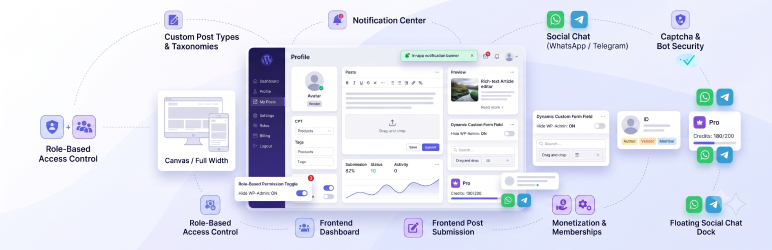
Frontend Dashboard provides a complete frontend portal for WordPress sites with
modular controls for user management, post publishing, custom menus, and branding.
Take full control of the user experience by allowing members, authors, and customers
to manage their profiles, submit posts, and navigate custom dashboards directly
on the frontend — without ever accessing the `wp-admin` dashboard.
#### Key Features
* **Modern App Shell & Responsive Layout**: Clean, fast frontend dashboard interface
powered by Tailwind CSS with responsive slide-over navigation.
* **Modern Rich Text & Block Editors**: Choose between **Editor.js** (block editor
with headers, images, quotes, lists, tables), **TipTap** (WYSIWYG modern editor),
or the classic WordPress Editor for frontend post publishing.
* **Custom Authentication Flow**: Custom Login, Registration, and Forgot Password
pages with custom redirects before/after login, register, and logout.
* **WP Admin Restriction**: Restrict access to the WordPress backend (`/wp-admin/`)
and admin toolbar based on user roles.
* **Custom User Roles**: Create, manage, and assign custom user roles with specific
dashboard capabilities.
* **Custom Profile & Post Fields**: Create unlimited custom fields for user profiles
and post types with role-based visibility and permissions.
* **Built-in Templates & Page Mappings**: Built-in modern dashboard templates,
extra form fields, and page loaders merged directly into Core.
* **File Upload Controls**: Role-based permissions to allow or restrict media uploads
in the frontend dashboard.
* **Frontend Post & Taxonomy Management**: Add, edit, and delete posts or custom
post types and taxonomies with role permissions.
* **Add-ons & Extensions Hub**: Browse, install, and activate official Frontend
Dashboard add-ons with 1-click management and real-time catalog updates.
* **System Status & Diagnostics**: Built-in system environment diagnostic tools,
database health checks, and activity logging.
* **Theme Matching & Custom Styling**: Customize dashboard theme colors and UI
options to seamlessly match your site design.
#### Official Add-ons & Extensions
* [Custom Post and Taxonomies](https://buffercode.com/plugin/frontend-dashboard-custom-post-and-taxonomies)(
Free)
* [Notification](https://buffercode.com/plugin/frontend-dashboard-notification)(
Free)
* [Captcha](https://buffercode.com/plugin/frontend-dashboard-captcha) (Free)
* [Social Chat](https://buffercode.com/plugin/frontend-dashboard-social-chat) (
Free)
* [Frontend Dashboard for WooCommerce](https://buffercode.com/plugin/frontend-dashboard-for-woocommerce)(
Free)
* [Membership](https://buffercode.com/plugin/frontend-dashboard-membership) (Pro)
* [Pay Per Post](https://buffercode.com/plugin/frontend-dashboard-pay-per-post)(
Pro)
* [User Management](https://buffercode.com/plugin/frontend-dashboard-user-management)(
Pro)
* [Social Connect](https://buffercode.com/plugin/frontend-dashboard-social-connect)(
Pro)
_Note: Frontend Dashboard Templates, Extra, and Pages have been merged directly
into Core in v3.0.0._
## Screenshots
[⌊Frontend Dashboard Control Center.⌉⌊Frontend Dashboard Control Center.⌉[
Frontend Dashboard Control Center.
[⌊User Profile fields⌉⌊User Profile fields⌉[
User Profile fields
[⌊Frontend Dashboard Settings — Register⌉⌊Frontend Dashboard Settings — Register⌉[
Frontend Dashboard Settings — Register
[⌊Frontend Dashboard Settings — Restrict Username⌉⌊Frontend Dashboard Settings —
Restrict Username⌉[
Frontend Dashboard Settings — Restrict Username
[⌊Frontend Dashboard Settings — Restrict WP Admin area⌉⌊Frontend Dashboard Settings—
Restrict WP Admin area⌉[
Frontend Dashboard Settings — Restrict WP Admin area
[⌊Post Form fields⌉⌊Post Form fields⌉[
Post Form fields
[⌊Login, Register page⌉⌊Login, Register page⌉[
Login, Register page
[⌊Frontend Dashboard⌉⌊Frontend Dashboard⌉[
Frontend Dashboard
## Blöcke
Dieses Plugin bietet 6 Blöcke.
* Frontend Dashboard
* Frontend Login & Register
* Transactions & Invoices
* Role-Restricted Content
* Social Login Buttons
* Frontend User Management
## Installation
1. Upload the `frontend-dashboard` directory to your `/wp-content/plugins/` directory,
or upload `frontend-dashboard.zip` via **WordPress Admin Plugins Add New Upload
Plugin**.
2. Activate the plugin through the **Plugins** menu in WordPress.
3. Navigate to **Frontend Dashboard Settings** to configure your login, registration,
and dashboard pages.
4. Save settings and assign your custom dashboard pages.
## FAQ
### How do I create a custom login, register, and forgot password page?
1. Go to **Admin Dashboard Pages Add New**.
2. Title the page (e.g., „Login“).
3. Add the shortcode `[fed_login]` into the page content.
4. Set the Page Template to **FED Login** (in the right-hand Page Attributes panel).
5. Publish the page.
6. Navigate to **Frontend Dashboard Settings Login Settings** and select your newly
created page as the Login Page URL.
7. Save your settings.
### Can I separate Login, Register, and Forgot Password onto different pages?
Yes! Create individual pages and use dedicated shortcodes:
* Login only: `[fed_login_only]`*
Register only: `[fed_register_only]` * Forgot Password only: `[fed_forgot_password_only]`
### How do I create the main user dashboard page?
1. Go to **Admin Dashboard Pages Add New**.
2. Enter a title (e.g., „User Dashboard“).
3. Add the shortcode `[fed_dashboard]` into the page content.
4. Set the Page Template to **FED Dashboard** under Page Attributes.
5. Publish the page.
6. Go to **Frontend Dashboard Settings Login Settings** and set the „Redirect After
Logged in URL“ or dashboard page.
### Which rich text editors are supported for frontend post publishing?
Frontend Dashboard v3 supports:
* **Editor.js**: A modern block-based editor supporting
headings, images, lists, quotes, and tables. * **TipTap**: A fast, extensible WYSIWYG
rich text editor with interactive bubble menus. * **Classic WP Editor**: The familiar
WordPress TinyMCE visual/text editor.
You can configure editor preferences under **Frontend Dashboard Settings Post
Settings**.
### How do I add custom user profile fields?
1. Go to **Frontend Dashboard User Profile**.
2. Click **Add New Extra User Profile Field**.
3. Select the desired field type from the dropdown (text, textarea, select, checkbox,
radio, date, etc.).
4. Configure the field label, meta key, and role permissions.
5. Click **Save**.
### How do I add custom post fields?
1. Go to **Frontend Dashboard Post Fields**.
2. Click **Add New Extra User Post Field**.
3. Select the input type, enter field settings, and specify which post types and user
roles can view or edit the field.
4. Click **Save**.
### How do I create custom dashboard menus?
1. Go to **Frontend Dashboard Dashboard Menu**.
2. Click **Add New Menu**.
3. Configure the menu title, icon, URL, and user roles permitted to access it.
4. Click **Add New Menu**.
### How can I retrieve custom fields in theme templates?
* To retrieve user custom fields:
$user_meta = get_user_meta( $user_id, ‚your_custom_field_key‘,
true );
* To retrieve post custom fields:
$post_meta = get_post_meta( $post_id, ‚your_custom_field_key‘,
true );
### Where are Payments and Invoices configured?
Payment Gateways, Invoices & Billing profiles, and Transaction Ledgers are now dedicatedly
powered and managed by the **GateFuz** plugin. The legacy Payments menu in Frontend
Dashboard has been deprecated and centralized into GateFuz (under **GateFuz > Gateways**
and **GateFuz > Invoices**). All existing company invoice settings (`fed_invoice_settings`)
and transaction tables are automatically preserved and loaded by GateFuz with zero
data loss.
### List of Available Shortcodes
* `[fed_login]` — Complete authentication portal (login, registration, password
reset).
* `[fed_login_only]` — Standalone login form.
* `[fed_register_only]` — Standalone registration form.
* `[fed_forgot_password_only]` — Standalone password recovery form.
* `[fed_dashboard]` — Main frontend user dashboard portal.
* `[fed_user role="user_role"]` — Role-specific user directory / profile page.
* `[fed_transactions]` — Frontend user transaction and payment history.
* `[fed_list_taxonomy taxonomy="category"]` — Displays taxonomy terms in a list
layout.
For more documentation and FAQs, visit [https://faq.frontenddashboard.com](https://faq.frontenddashboard.com).
## Rezensionen

### [Amazing plugin and support](https://wordpress.org/support/topic/amazing-plugin-and-support-191/)
[soth78](https://profiles.wordpress.org/soth78/) 13. November 2026
if you want a simple plugin to customize member experience, this is it. And support
is great and veeeery fast

### [Great and quick support](https://wordpress.org/support/topic/great-and-quick-support-45/)
[bmbalabb](https://profiles.wordpress.org/bmbalabb/) 15. Oktober 2026
Great quick support and prompt support

### [Clean profesional plugin](https://wordpress.org/support/topic/clean-profesional-plugin/)
[Dawn](https://profiles.wordpress.org/selik/) 10. Oktober 2026
this plugin is clean and easy to use, issues/bugs are fixed regularly.

### [Plugin not working](https://wordpress.org/support/topic/plugin-not-working-1127/)
[dongreen](https://profiles.wordpress.org/dongreen/) 6. Juni 2022
This plugin is not working anymore. Front end login is not working, support is not
helpful and developer is not responding.

### [Need update](https://wordpress.org/support/topic/my-favorite-plugins-best-frontend-dashboard-plugins/)
[Sudipto Mahmud](https://profiles.wordpress.org/sudiptomahmud/) 24. Mai 2022
Need update

### [Best plugin to use guys.](https://wordpress.org/support/topic/best-plugin-to-use-guys/)
[jeff0504](https://profiles.wordpress.org/jeff0504/) 18. Mai 2021
For a freemium plugin, this has a lot of functionalities. Hats off to the plugin
author. Thanks, mate.
[ Alle 137 Rezensionen lesen ](https://wordpress.org/support/plugin/frontend-dashboard/reviews/)
## Mitwirkende und Entwickler
„Frontend Dashboard“ ist Open-Source-Software. Folgende Menschen haben an diesem
Plugin mitgewirkt:
Mitwirkende
* [ M A Vinoth Kumar ](https://profiles.wordpress.org/vinoth06/)
* [ buffercode ](https://profiles.wordpress.org/buffercode/)
„Frontend Dashboard“ wurde in 4 Sprachen übersetzt. Danke an [die Übersetzer](https://translate.wordpress.org/projects/wp-plugins/frontend-dashboard/contributors)
für ihre Mitwirkung.
[Übersetze „Frontend Dashboard“ in deine Sprache.](https://translate.wordpress.org/projects/wp-plugins/frontend-dashboard)
### Interessiert an der Entwicklung?
[Durchstöbere den Code](https://plugins.trac.wordpress.org/browser/frontend-dashboard/),
sieh dir das [SVN-Repository](https://plugins.svn.wordpress.org/frontend-dashboard/)
an oder abonniere das [Entwicklungsprotokoll](https://plugins.trac.wordpress.org/log/frontend-dashboard/)
per [RSS](https://plugins.trac.wordpress.org/log/frontend-dashboard/?limit=100&mode=stop_on_copy&format=rss).
## Änderungsprotokoll
#### 3.4.2 (2026-11-13)
* Fix: Dashboard Menu Restrictive Slug Validation on Updates: Resolved an issue
where updating default or system dashboard menus (such as „Posts“ with default
slug `post`, or `profile`, `payment`, `logout`) triggered a false-positive restrictive
slug validation error („Sorry, You cannot use the restrictive slug name ‚post’“).
Menu updates now verify whether the existing menu slug is unchanged, preserving
system slug protection while allowing label, icon, sort order, and role permission
updates.
#### 3.4.1 (2026-11-12)
* Fix: Dashboard Menu External URL & Role Access Persistence: Resolved an issue
where serialized form bracket syntax (`%5B`, `%5D`) in AJAX menu submissions
was prematurely stripped during raw query ingestion, preventing External URLs(`
fed_menu_value_url`) and specific Role Access permissions (`user_role`) from
persisting upon menu creation or update.
* Fix: External URL Direct Redirect & Link Attributes: Added `target` and `rel="
noopener noreferrer"` attributes to frontend dashboard menu anchor tags and implemented
automatic server-side redirection (`wp_redirect()`) when accessing routes assigned
to an external destination.
* Enhancement: Menu Configuration Validation & Visibility: Added real-time client-
and server-side validation ensuring valid URLs are provided when the external
URL toggle is active, and enhanced admin menu cards with inline External URL
badge previews.
#### 3.4.0 (2026-11-12)
* Feature: Default Values & Dynamic Smart Tags Engine: Added dedicated Default
Value configuration across all Form Field Builder types with support for both
static defaults and dynamic smart tags.
* Feature: Rich Contextual Smart Tags: Seamlessly pre-fill fields on profile, registration,
and post forms using smart tags:
- User: {current_user_name}, {current_user_email}, {current_user_display_name},{
current_user_first_name}, {current_user_last_name}, {current_user_id}, {current_user_role}.
- Date & Time: {current_date}, {current_time}, {current_year}, {current_month},{
current_day}.
- Site & System: {site_title}, {site_url}, {admin_email}.
- Post Context: {post_id}, {post_title}, {post_type}, {post_author}.
- URL Parameters: {query_param:key} to pre-fill incoming marketing queries or
referral codes (e.g. {query_param:ref}).
* Feature: Searchable Smart Tags Dropdown: Added searchable, categorized dropdown
menu directly inside the Form Field Builder with real-time query filtering, scroll-
constrained layout, keyboard navigation (Escape to close, Enter to select), and
one-click tag insertion at cursor position.
* Enhancement: Multi-Type Builder Value Memory: Switching field types in the palette
seamlessly preserves and synchronizes configured default values.
#### 3.3.1 (2026-11-06)
* Fix: Target Page Post Context & Shortcode Compatibility: Resolved shortcode execution
issues (including Groups plugin [groups_member] and [groups_user_groups]) on
pages displayed in the frontend dashboard via „Menu Content & Target Link“ by
ensuring global $post is properly bound to the target page via setup_postdata()
and restored with wp_reset_postdata().
#### 3.3.0 (2026-11-05)
* Feature: Responsive Grid & Field Layout Controls: Added flexible field width
selection (100% Full Width, 50% Half Width, 33% One-Third Width, and 25% One-
Quarter Width) to the Form Field Builder across all 15 input field types.
* Feature: Multi-Column Form Layout Engine: Upgraded frontend user profile forms,
registration cards, frontend post authoring screens, and WordPress admin metaboxes
to support modern multi-column responsive grid alignment (Tailwind and Bootstrap
12-column grids).
* Enhancement: Palette Width Memory: Switching field types in the builder palette
dynamically preserves and synchronizes the selected layout width across forms.
* Compatibility: Seamless Backward Compatibility: Existing fields gracefully default
to intuitive proportions (100% for multiline textareas, code editors, and tables;
50% for standard single-line inputs) without requiring database migrations.
#### 3.2.0 (2026-11-05)
* Feature: Smart Auto-Slugify for Meta Keys: Added real-time automatic slug generation
from the Label Name to Input Meta Key (supporting up to 32 characters conforming
to database schema) with an „Auto-Generate“ trigger button.
* Feature: Dedicated Field Help & Description Text: Added a dedicated „Help / Description
Text“ configuration across all 15 field types in the Form Field Builder, rendered
directly beneath form inputs on user profile forms, registration forms, post
submission forms, and WordPress admin metaboxes.
* Feature: Keyboard Productivity Save Shortcut: Added instant keyboard saving via
Ctrl+S (Cmd+S on macOS) anywhere inside the form field builder with animated
toast notification and visual badge.
* Enhancement: Multi-Type Value Persistence: Seamlessly preserved typed labels,
meta keys, sort orders, and help text across field type changes in the left-hand
palette.
#### 3.1.1 (2026-10-30)
* Fix: Background Email Queue Idempotency: Enforced pending-UUID short-circuit
guard in MailQueueManager::dispatch() to guarantee multiple calls with an identical
UUID prior to processing do not insert duplicate queued records.
* Fix: Email Deliverability Logs Table Constraint: Enforced database-level UNIQUE
KEY uuid (uuid) constraint via migration AddUniqueConstraintToFedEmailLogsTable
to eliminate race conditions and duplicate key collisions at the storage layer.
* Fix: Concurrency & Worker Claim Guard: Implemented an atomic conditional transition(
UPDATE wp_fed_email_logs SET status = ‚processing‘ … WHERE status IN (‚queued‘,‚
failed‘)) before driver execution in MailQueueManager::processQueue(), preventing
double-dispatch across concurrent WP-Cron executions.
* Enhancement: In-Batch Deduplication & Stale Recovery: Added in-memory UUID tracking
during queue runner batch loops, along with automated reclamation for orphaned
in-flight tasks exceeding 15 minutes.
#### 3.1.0 (2026-10-28)
* Feature: Pluggable Email Driver Architecture: Introduced extensible `MailDriverInterface`
supporting native `wp_mail` transport, direct authenticated SMTP relay with STARTTLS/
SSL, and extensible third-party drivers via the `fed_email_drivers` filter.
* Feature: Asynchronous WP-Cron Queue & Exponential Auto-Retries: Added background
queueing for sub-50ms user checkout and form submission responses, with automatic
exponential backoff retries at 2m, 10m, and 30m intervals.
* Feature: Deliverability & Audit Logs Subsystem: Introduced database table `wp_fed_email_logs`
and interactive admin UI with live recipient search, delivery status filters,
attempts counter, and bulk management.
* Feature: Dedicated Top-Level Email Menu: Created a dedicated admin management
page under `WP-Admin > Frontend Dashboard > Email` with responsive controls,
enterprise confirmation modals, and toast notifications.
* Feature: Deliverability Diagnostic Tool: Added real-time test email dispatch
tool with immediate SMTP TLS handoff verification and failure detail exposure.
* Enhancement: Pre-Send Cancellation Hooks: Added `fed_pre_send_mail` and `fed_pre_send_forgot_password_mail`
filters allowing developers to inspect or suppress delivery prior to transport.
#### 3.0.22 (2026-10-28)
* Fix: Safe Payment Settings & Role Pricing Lookup: Resolved PHP 8.x warnings („
Trying to access array offset on false / null“) in user-profile.php and function-
admin.php when rendering authentication portals without active payment configuration.
* Fix: reCAPTCHA Script Synchronization: Improved frontend callback binding for
Google reCAPTCHA v2 checkbox challenge rendering on login and registration pages.
#### 3.0.21 (2026-10-27)
* Enhancement: Floating Help & Quick Resources Redesign: Redesigned the Quick Resources
Hub into a sleek right-center floating vertical tab with uppercase „HELP“ badge,
resolving UI positioning collisions with bottom-corner notification bells, chat
widgets, and third-party floating action buttons.
* Enhancement: Interactive Slide-Out Resource Drawer: Upgraded the Quick Resources
menu into an accessible slide-out drawer featuring dual close controls (top-header
and bottom-footer close buttons), outside-click dismiss, Escape shortcut, and
smooth animated transitions.
#### 3.0.20 (2026-10-21)
* Feature: Add-ons Marketplace Pro Extension Catalog: Extended the official Add-
ons & Extensions marketplace (`WP-Admin > Frontend Dashboard > Add-ons`) to display
official BufferCode Pro extensions (Membership, Pay Per Post, User Management,
and Social Connect) alongside free extensions directly from the BufferCode API.
* Enhancement: Add-ons Marketplace Category Navigation: Added dedicated category
tabs for „Monetization“ and „User Management“ to the Add-ons marketplace filter
bar for instant category browsing.
* Enhancement: Add-on Version & Status Detection: Improved local version detection
across varied constant naming patterns (`_PLUGIN_FILE`, `_PLUGIN`, `_VERSION`)
and plugin file headers, with cross-platform directory normalization.
#### 3.0.19 (2026-10-19)
* Feature: Centralized Pro Licensing & Automated Updates Engine: Integrated automated
package delivery and version metadata inspection connecting Frontend Dashboard
Core directly with the Buffercode API (`https://buffercode.com/api/v2/plugin/
update/`) via WordPress core `plugins_api` and `pre_set_site_transient_update_plugins`
pipelines for active Pro extensions.
* Fix: Direct Renew URL: Updated Centralized License Hub to route addon renewals
directly to the Buffercode Downloads dashboard (`https://buffercode.com/dashboard/
dashboard/downloads`).
* Enhancement: Pro Add-on Registry: Coordinated unified license registration across
official Pro extensions (Membership, Pay Per Post, User Management, and Social
Connect).
* Fix: Mobile Logout Access: Added a dedicated 1-tap sign-out button directly to
the mobile top navigation header (`.fed_mobile_header`) next to the user avatar,
and added safe area inset padding (`env(safe-area-inset-bottom)`) to the off-
canvas drawer footer to ensure logout remains visible and accessible across all
mobile viewports.
* Fix: Registration Field Access: Ensured admin-only edit restrictions (`disable_user_access`)
apply strictly to post-registration profile updates, preventing enabled registration
fields (such as email) from being rendered as disabled or uneditable during user
sign-up.
* Enhancement: Protected Non-Editable Profile Fields: Extended user profile model
validation to automatically enforce and protect fields filtered through `fed_no_update_fields`
against unauthorized updates by non-admin users.
* Enhancement: Profile Metadata Customization: Introduced `fed_show_profile_member_since`
filter hook and `.fed_profile_member_since` CSS class to allow toggling or styling
the „Member Since“ badge in the profile header banner.
* Enhancement: Brand Subtitle Customization: Introduced `fed_show_sidebar_brand_subtitle`
filter hook to allow toggling the „Frontend Dashboard“ subtitle text in the sidebar
brand header when no custom logo is uploaded.
#### 3.0.18 (2026-10-19)
* Feature: Universal Client-Side PDF First-Page Preview Rendering. When WordPress
core does not generate thumbnail images for PDF attachments (such as hosting
and local environments without Ghostscript or ImageMagick), Frontend Dashboard
custom media picker asynchronously renders a crisp first-page thumbnail in the
browser using Mozilla PDF.js. Displays document cover previews across media grid
cards, single attachment inspection details, and multi-selection trays with an
overlay badge.
* Fix: Enhanced `MediaController.php` attachment formatting with multi-tier fallback
to resolve generated preview images from attachment metadata sizes, `wp_prepare_attachment_for_js()`,
or post thumbnail IDs.
* Feature: Post Submission Workflow: Automatically redirect frontend authors and
users directly to the post list view upon successful post submission or review
request.
* Compatibility: Fully compatible with Frontend Dashboard Custom Post and Taxonomies
v3.0.6, GateFuz v1.1.3, and Frontend Dashboard Pay Per Post v3.0.0.
#### 3.0.17 (2026-10-19)
* Fix: Resolved PDF Embedder preview thumbnail display in the custom media picker.
When WordPress or plugins generate image previews for PDF documents, the custom
media picker now retrieves and displays the rendered preview image consistently
with the WordPress core Media Library instead of falling back to a generic document
placeholder icon.
* Fix: Resolved PHP warning `Undefined variable $hasFullQuery` in `DashboardRoutes.
php` by properly defining `$has_full_query` for menu request validation and applying
defensive parameter sanitization across fallback dashboard routes.
* Fix: Resolved PDF Embedder compatibility regression where inserting a PDF via
Frontend Dashboard custom media picker was inserting a plain file link instead
of the `[pdf-embedder url="..."]` shortcode. Ensured `window.frontend_dashboard`
is localized on the enqueued Vite bundle, synchronized media configuration and
nonces across Classic Visual (TinyMCE) and Code (Quicktags/Textarea) modes, added
a fail-safe server-side shortcode fallback when PDF Embedder is active, and automatically
normalized raw viewer wrapper HTML back to shortcode syntax to prevent attribute
stripping on save.
* Enhancement: Added `fed_is_system_menu` filter and locked system menu protection
in Dashboard Menu manager (`?page=fed_dashboard_menu`), ensuring extension modules
like Frontend Dashboard Pay Per Post („My Submissions“) and Frontend Dashboard
Membership („My Membership“) are locked against accidental deletion while remaining
fully customizable for title/label, icon, drag-and-drop order sorting, and role
permissions.
* Fix: Resolved menu label spacing in Dashboard Menu manager, ensuring menu names
with spaces (e.g. „My Membership“, „Custom Menus“, „My Submissions“) preserve
user-entered spacing without being trimmed or combined into single words.
* Fix: Prevented modal closing (Close ‚X‘ button, Cancel button, backdrop click,
Escape key) while save or update is in progress, adding in-modal spinner and
loading state.
* Enhancement: Persisted success toast notifications across page reloads via session
storage so confirmation messages display reliably after updating menu details.
* Enhancement: Added fallback support for `menu_tab` parameter in dashboard URL
router (`DashboardRoutes.php`).
* Fix: Enhanced `PaymentGatewayManager::getEnabledGateways()` to verify gateway
configuration state (`isConfigured()`) alongside enabled status (`isEnabled()`),
ensuring unconfigured or inactive payment gateways are excluded from frontend
checkout screens.
* Compatibility: Fully compatible with GateFuz v1.1.3 and Frontend Dashboard Pay
Per Post v3.0.0.
#### 3.0.16 (2026-10-17)
* Fix: Corrected mobile top navigation header alignment where the hamburger menu
toggle and dashboard brand title were pushed into the center of the mobile screen
due to WordPress `wpautop` injecting phantom paragraph tags into flex containers;
enforced strict left-aligned flex containers, auto margins, and automatic tag
pruning.
* Fix: Resolved vertical spacing distortion and gap in the mobile drawer brand
header between the Dashboard title and subtitle caused by rogue `
` and `<
p>` tags injected by WordPress `wpautop`; enforced rigid text resets, whitespace
pruning, and scoped paragraph margin resets.
* Fix: Corrected frontend login, logout, and registration notification modal layout,
centering icon badges defensively and preventing external addon styles or theme
flex-shrink rules from misaligning the icon to the left.
* Enhancement: Modernized notification modal appearance with soft ambient icon
halo rings, polished typography hierarchy, and an integrated progress bar track
for automated redirects.
* Enhancement: Centralized Payment Gateways & Invoices into GateFuz: Deprecated
the legacy built-in Payments menu in Frontend Dashboard in favor of the dedicated
GateFuz payment gateway engine. When GateFuz is active, legacy Payments submenus
are suppressed and bookmarks to `?page=fed_payments` seamlessly redirect to GateFuz
Invoices (`?page=gate-fuz-invoices`). All existing company billing profiles and
invoice settings remain fully preserved.
#### 3.0.15 (2026-10-16)
* Fix: Resolved header breadcrumb text unexpectedly displaying centered in the
dashboard canvas by neutralizing rogue empty paragraph tags generated by WordPress`
wpautop`, enforcing strict left-aligned flex containers, and removing conflicting
spacing classes.
* Fix: Corrected vertical misalignment in the sidebar brand header between the
dashboard icon and site title text, adding defensive vertical centering and typography
resets against theme style conflicts.
* Enhancement: Connected the Dashboard Brand Logo (configured under Frontend Dashboard
> Settings > Dashboard > Settings) to display automatically centered above all
frontend authentication forms (`[fed_login]`, `[fed_login_only]`, `[fed_register_only]`,
and `[fed_forgot_password_only]`), with smart fallback to theme custom logo and
developer filters (`fed_brand_logo_url`, `fed_brand_logo_html`).
* Fix: Restored full compatibility with PDF Embedder plugin, routing custom media
modal insertion through WordPress native `media_send_to_editor` pipeline.
* Enhancement: Introduced extensible media picker developer API (`window.FedMedia`,`
fed_send_media_to_editor`, `fed_media_format_attachment`, and toolbar action
hooks) for seamless third-party plugin integrations.
#### 3.0.14 (2026-10-15)
* Fix: Resolved category and hierarchical taxonomy selection not updating when
creating or editing posts from Frontend Dashboard view.
* Fix: Preserved associative array term IDs in select field options builder, ensuring
taxonomy term IDs are saved instead of term names.
* Fix: Guaranteed taxonomy term assignment across user roles (Subscribers, Authors,
Contributors) by ensuring terms in tax_input are explicitly set after post insertion.
#### 3.0.13 (2026-10-14)
* Fix: Resolved `Unauthorized class execution` error on Payments Dashboard (`?page
=fed_payments&menu=dashboard`) by registering payment controller methods in the
authorized action hooks map.
* Fix: Eliminated raw `// phpcs:ignore` comment leak in payment layout output and
cleaned embedded comments inside database query strings.
* Enhancement: Removed legacy Membership Pro admin menu (`?page=fed_membership_pro`)
and deprecated mock upsell teaser classes to streamline admin navigation.
#### 3.0.12 (2026-10-11)
* Fix: Resolved syntax error (`Uncaught SyntaxError: Invalid or unexpected token`)
caused by WordPress `wptexturize` formatting ampersands in inline script tags,
by moving all mobile drawer controllers to the external enqueued frontend script.
* Fix: Prevented mobile hamburger header from appearing on desktop viewports (>
= 1024px) by enforcing strict scoped desktop display rules.
* Fix: Resolved mobile drawer click collision and double-toggle race condition
with debounce throttling and native event delegation.
* Enhancement: Optimized responsive layout for ultra-small mobile screens (320px
width), fixing avatar sizing and enabling responsive stacking for the profile
identity card to prevent horizontal text clipping.
* Enhancement: Added defensive left-alignment CSS resets to prevent parent theme
styles from centering dashboard breadcrumbs, titles, and headers.
#### 3.0.11 (2026-10-10)
* Fix: Resolved mobile layout display regression on mobile viewports (< 1024px)
where the desktop sidebar width was forcing side-by-side horizontal compression.
* Feature: Added responsive mobile navigation top bar with hamburger menu toggle,
off-canvas slide-over drawer navigation, and dismissible backdrop.
* Enhancement: Optimized mobile viewport padding across main dashboard cards, ensuring
clean full-width content rendering across all mobile phone and tablet screen
sizes.
* Fix: Resolved a JavaScript reference error (`emptyState` variable) in the media
modal that prevented the single-item Attachment Details sidebar from displaying
the Alt Text, Title, Caption, and Description fields.
* Enhancement: Multi-select thumbnail badges now display clean document indicators,
and selecting a single item reliably populates all metadata and display settings
with live auto-saving.
#### 3.0.9 (2026-10-09)
* Enhancement: Upgraded upload queue with individual animated progress bars, live
transfer percentages, file badges, and concurrent upload tracking (Thanks to
Muhammad Umer).
* Enhancement: Added full Attachment Details sidebar enabling live editing of Alt
Text, Title, Caption, Description, Alignment (none/left/center/right), Link To(
none/file/page/custom URL), and Size (full/large/medium/thumbnail) before inserting
into the editor.
* Fix: Resolved filter dropdown performance and media filtering: enforced strict
client-side type isolation so PDFs are completely excluded when the Images filter
is active, added AbortController request cancellation, and bypassed disk I/O
with cached metadata.
* Fix: Resolved media library empty state overlapping the dropzone on the Upload
tab, and prevented initial modal open from flashing „No media files found“ while
loading.
* Enhancement: Enhanced „Load More Media“ pagination with inline loading indicators
and item deduplication without blanking out the grid.
* Enhancement: Enabled automatic AJAX persistence for attachment Alt text, Title,
Caption, and Description edits in the media modal.
#### 3.0.8
* Security: Enforced strict capability and authorization checks across all AJAX,
admin-post, and API request dispatchers.
* Security: Replaced generic prefix callable matching with strict allowlists mapped
to required capabilities (`manage_options`, `edit_posts`, etc.).
* Security: Hardened user registration against privilege escalation by preventing
elevated role assignments and enforcing WordPress `users_can_register` option.
* Security: Added explicit capability checks across all admin setting handlers,
invoice operations, and role management functions (Thanks to Đỗ Trung Kiên –
patchstack.com).
* Fix: Modernized Classic Editor media modal with support for multi-upload, multi-
select media insertion, and non-image previews (PDFs, docs, audio, and video)(
Thanks to Muhammad Umer – https://github.com/mavinothkumar/frontend-dashboard/
issues/16).
* Fix: Prevented smart quote (`”`) conversion and attribute corruption during post
publishing and updates, keeping image tags and attributes fully preserved across
save and reload cycles.
#### 3.0.7
* Fix: Resolved „Sorry, you are not allowed to access this page“ permission error
by correcting Add-ons marketplace URL to `fed_plugin_pages` in compatibility
notices.
* Enhancement: Registered `fed_addons` as a fallback submenu alias to guarantee
seamless access on legacy or bookmarked URLs.
* Fix: Restricted frontend stylesheet and script loading strictly to Frontend Dashboard
screens to prevent CSS collisions (including table.fixed overrides) on third-
party pages.
#### 3.0.6
* Security: Enforced strict capability and permission checks on REST API post creation,
editing, and publishing endpoints (credit: Ali Hidayat).
#### 3.0.5
* Security: Fixed user registration parameter handling to prevent unauthorized
user updates and privilege escalation.
* Security: Hardened AJAX / Post API dispatch routing and function execution handlers
with strict allowlist and capability checks.
#### 3.0.4
* Feature: Introduced „More WordPress Plugins by BufferCode“ section in Add-ons
marketplace to showcase standalone ecosystem plugins (AdFuz & GateFuz).
* Feature: Added support for WordPress 6.5+ native plugin dependency declarations(`
required_plugins`) to dynamically separate official add-ons from standalone ecosystem
plugins.
* Enhancement: Streamlined Add-ons marketplace grid with unified 4-column responsive
card layouts and dedicated ecosystem filter tab.
* Fix: Resolved „Class FEDInstallAddons does not exist“ error during extension
1-click install and activation.
* Fix: Loaded missing module dependencies into core bootstrapper including orders,
pro plugin placeholders, and standalone shortcodes.
* Enhancement: Hardened AJAX extension installer with explicit capability checks
and clean JSON error response handling.
#### 3.0.3
* Fix: WordPress.org plugin review standards and code quality compliance improvements.
* Fix: Addressed input unslashing, sanitization, and nonce verification checks
across admin and frontend requests.
* Fix: Removed obsolete array_column polyfill and auto_update_plugin hook alteration.
* Enhancement: Added comprehensive `.gitignore` rules for modern development workflows.
#### 3.0.2
* Enhancement: Extended hook architecture to support modular extension registration,
automated update checks, and decoupled addon management.
* Enhancement: Modernized Extensions Hub interface with smart section categorization,
live search filtering, native confirmation dialogs, and real-time status feedback.
* Performance: Optimized admin menu filter pipeline and background cron worker
workflows.
#### 3.0.1
* Fix: WordPress.org plugin review and security compliance improvements.
#### 3.0.0
* Major Release: Complete frontend architecture redesign with Tailwind CSS and
modern App Shell layout.
* Feature: Integrated modern rich text editors — Editor.js (block editor) and TipTap(
WYSIWYG editor) alongside classic WP Editor.
* Feature: Merged Templates, Extra Form Fields, and Custom Pages directly into
Core.
* Feature: Brand new Add-ons & Extensions marketplace with 1-click install, activation,
and real-time catalog caching.
* Feature: System Status & Diagnostic tools with Database health checks and comprehensive
Activity/Audit Logging.
* Feature: Enhanced role-based admin bar controls, custom menu management, and
advanced redirection settings.
* Enhancement: Streamlined responsive mobile navigation with slide-over drawer
menus.
* Security: Comprehensive nonce validation, strict capability checks, and robust
data sanitization across all AJAX endpoints.
* Compatibility: Fully tested and compatible with WordPress 6.7 and PHP 8.0 / 8.1/
8.2 / 8.3.
More Changelogs:
https://faq.frontenddashboard.com/changelog/overview/
## Meta
* Version **3.4.2**
* Zuletzt aktualisiert **vor 3 Tagen**
* Aktive Installationen **500+**
* WordPress-Version ** 6.1 oder höher **
* Getestet bis **7.1.4**
* PHP-Version ** 8.0 oder höher **
* Sprachen
* [Croatian](https://hr.wordpress.org/plugins/frontend-dashboard/), [English (US)](https://wordpress.org/plugins/frontend-dashboard/),
[French (France)](https://fr.wordpress.org/plugins/frontend-dashboard/), [Hebrew](https://he.wordpress.org/plugins/frontend-dashboard/)
und [Spanish (Mexico)](https://es-mx.wordpress.org/plugins/frontend-dashboard/).
* [Übersetze in deine Sprache](https://translate.wordpress.org/projects/wp-plugins/frontend-dashboard)
* Schlagwörter
* [custom dashboard](https://de.wordpress.org/plugins/tags/custom-dashboard/)[custom login](https://de.wordpress.org/plugins/tags/custom-login/)
[dashboard](https://de.wordpress.org/plugins/tags/dashboard/)[frontend-dashboard](https://de.wordpress.org/plugins/tags/frontend-dashboard/)
* [Erweiterte Ansicht](https://de.wordpress.org/plugins/frontend-dashboard/advanced/)
## Bewertungen
4.9 von 5 Sternen.
* [ 130 5-Sterne-Rezensionen ](https://wordpress.org/support/plugin/frontend-dashboard/reviews/?filter=5)
* [ 1 4-Sterne-Rezension ](https://wordpress.org/support/plugin/frontend-dashboard/reviews/?filter=4)
* [ 2 3-Sterne-Rezensionen ](https://wordpress.org/support/plugin/frontend-dashboard/reviews/?filter=3)
* [ 1 2-Sterne-Rezension ](https://wordpress.org/support/plugin/frontend-dashboard/reviews/?filter=2)
* [ 3 1-Sterne-Rezensionen ](https://wordpress.org/support/plugin/frontend-dashboard/reviews/?filter=1)
[Deine Rezension](https://wordpress.org/support/plugin/frontend-dashboard/reviews/#new-post)
[Alle Rezensionen anzeigen](https://wordpress.org/support/plugin/frontend-dashboard/reviews/)
## Mitwirkende
* [ M A Vinoth Kumar ](https://profiles.wordpress.org/vinoth06/)
* [ buffercode ](https://profiles.wordpress.org/buffercode/)
## Support
Behobene Probleme in den letzten zwei Monaten:
2 von 2
[Support-Forum anzeigen](https://wordpress.org/support/plugin/frontend-dashboard/)
## Spenden
Möchtest du die Weiterentwicklung dieses Plugins unterstützen?
[ Für dieses Plugin spenden ](https://www.paypal.com/paypalme2/buffercode)