

Beschreibung
Product Badges For WooCommerce is the most powerful and flexible badge and label plugin for WooCommerce stores. Whether you want to highlight a sale, announce a new arrival, flag out-of-stock products, or run a time-limited promotion, this plugin gives you complete control over every badge — its shape, color, text, position, display conditions, and schedule — all from a clean, intuitive admin panel with a real-time Live Preview.
Stop losing customers to missed promotions and unnoticed products. Eye-catching product badges guide shoppers, boost click-through rates, and increase conversions across your shop page, category pages, and single product pages — without writing a single line of code.
🌟 Documentation | 🌟 Live Demo | 🌟 Support
🏷️ Why Product Badges For WooCommerce?
Most badge plugins offer a basic „Sale“ sticker and nothing more. Product Badges For WooCommerce gives you:
- 10 professionally designed badge shapes — rendered pixel-perfectly on the frontend
- Full color, font, and size control — every visual property is customizable
- Conditional display rules — show the right badge to the right product at the right time
- Scheduled badge visibility — set exact start and end dates and times for any badge
- Text and image badge types — use custom text or upload your own badge graphic
- Real-time Live Preview — see exactly how your badge looks before you save
- Zero coding required — everything is managed through a visual, tab-based admin interface
✨ Features
10 Fully Customizable Badge Shapes
Choose from 10 distinct shapes to match your store’s style:
Square, Rectangle, Diamond (rotated square), Star Burst, Tag / Bookmark, Collar, Rounded Rectangle, Oval, Circle, and Corner Badge (triangle ribbon). Every shape is rendered using mathematically correct dimensions and clip-path values so the frontend always matches the Live Preview exactly.
Text Badges
Add any custom text to your badge — discount amounts, product labels („New“, „Hot“, „Trending“, „Limited“), seasonal announcements, and more. Control font size, font weight (normal or bold), text color, and background color independently for each badge.
Image Badges
Switch from text to an image badge in one click. Choose from 4 built-in badge images (badge.png, badge1.png, badge2.png, badge3.png) or upload any custom graphic from your WordPress media library. Ideal for brand-specific stickers, award seals, and illustrated labels.
Real-Time Live Preview
As you adjust shape, color, text, size, and position in the admin form, the Live Preview panel updates instantly — no page reload, no guessing. What you see in the admin is exactly what your customers see on the frontend.
Flexible Badge Positioning
Place your badge at four standard corners: Top Left, Top Right, Bottom Left, or Bottom Right. Need pixel-perfect placement? Use the Custom Position option and enter exact top, right, bottom, and left offset values in pixels for fine-grained control.
Conditional Display Rules — Show Badges on the Right Products
Each badge has its own independent conditional display logic. Available conditions in the free version:
- All Products — apply the badge store-wide, automatically
- Selected Products — search for and select specific individual products by name with live product search
Additional conditions (By Price, By Category, By Tag, and Out of Stock) are available in the Pro version. See the Pro section below for details.
Badge Schedule — Start & End Date / Time
Set an exact start date, start time, end date, and end time for every badge. Badges appear and disappear automatically based on your schedule — perfect for flash sales, seasonal promotions, Black Friday campaigns, and limited-time offers. No manual toggling required.
Show on Shop & Category Pages
Enable or disable each badge independently for the main WooCommerce shop loop and category archive pages, giving you precise control over badge visibility.
Manage Multiple Badges
Create and manage an unlimited number of badges from the Badge List view. Edit, duplicate logic, or delete any badge with one click.
Lightweight & Performance-Friendly
CSS and JavaScript assets are enqueued only on pages where badges are actually displayed. Badge markup is generated server-side in PHP, keeping your frontend fast and lean. The plugin replaces only the specific WooCommerce product-image template it needs — all other templates remain untouched.
Developer-Friendly Architecture
Built using a React-powered admin UI (WordPress block editor components), a custom REST API (pbfw/v1), and standard WooCommerce hooks and filters. No shortcodes to memorize, no widget blocks to drag — just a clean admin page at WooCommerce Product Badges.
🛒 Perfect For
- Highlighting sale, clearance, and discount products
- Marking new arrivals, bestsellers, featured items, and trending products
- Displaying „Out of Stock“, „Low Stock“, or „Coming Soon“ warnings
- Running time-limited flash sales and seasonal promotional campaigns
- Distinguishing product categories visually across a large catalog
- Any WooCommerce store that wants to increase product page engagement and conversion rates
🔧 How It Works
- Install and activate the plugin (WooCommerce must be active).
- Go to WooCommerce Product Badges in your WordPress admin.
- Click Add New Badge and fill in the Badge Name.
- Use the four setting tabs — Default Settings, Label Design, Product Settings, and Badge Schedule — to configure every aspect of your badge.
- Watch the Live Preview update in real time on the right side of the screen.
- Set your display conditions and optional schedule, then click Save.
- Your badge is immediately live on your store — no cache clearing required.
📋 Admin Interface Overview
The badge form is organized into four intuitive tabs:
Default Settings
Toggle badge visibility on/off, choose badge position (Top Left, Top Right, Bottom Left, Bottom Right, or Custom), and enter custom pixel offsets.
Label Design
Select badge type (Text or Image), choose a badge shape, set badge text, pick background and font colors using the color picker, and adjust font size and font weight. The Live Preview panel on the right reflects every change in real time.
Product Settings
Choose your conditional display rule: All Products (site-wide) or Selected Products (with live product search). Additional Pro conditions — By Price, By Category, By Tag, and Out of Stock — are unlocked in the Pro version.
Badge Schedule
Set an optional start date + time and end date + time. Leave blank to show the badge indefinitely.
🚀 Pro Version Features
The Pro version of Product Badges For WooCommerce unlocks powerful conditional display rules and advanced features for stores that need more targeting precision and flexibility.
Show Badge on Single Product Page
In the free version, badges appear on shop and category listing pages only. The Pro version adds the ability to independently enable or disable each badge on the single product page — giving you full control over where every badge appears across your entire store.
By Category — Target Products in Specific Categories
Show a badge only on products that belong to one or more chosen categories. The Pro category picker includes a live search so you can find and assign categories instantly, even in large stores. Add as many categories as you need per badge.
By Tag — Target Products by Product Tag
Display a badge only on products that carry specific WooCommerce product tags. Like the category rule, the tag picker supports live search and multi-tag selection. Perfect for tagging „New Arrival“, „Staff Pick“, or any custom label-driven tag.
By Price — Show Badges Based on Product Price
Trigger a badge automatically based on the product’s price using one of three rules:
- Greater Than — show on any product priced above a set value
- Less Than — show on any product priced below a set value
- Between — show on products whose price falls within a minimum and maximum range
Ideal for surfacing budget picks, premium products, or mid-range highlights without manually selecting products.
Out of Stock — Automatically Badge Unavailable Products
Automatically display a custom badge on any product that is out of stock. No manual selection needed — the rule checks WooCommerce stock status in real time, so your badge appears and disappears as stock changes.
Priority Support
Pro users get access to dedicated, fast-track support from the plugin development team. Skip the queue and get answers when you need them.
All Future Pro Updates Included
The Pro roadmap includes badge animation effects, additional display conditions, multi-language badge text, and more. Pro license holders receive all future updates at no extra cost.
👉 Upgrade to Pro to unlock all features.
Screenshots

Badge management list — view, edit, and delete all your product badges in one place. 
Text badge settings — shape selector, color pickers, font controls, and real-time Live Preview. 
Image badge settings — choose one of the 4 built-in badge images. 
Custom image badge — upload any graphic from your WordPress media library. 
Conditional display settings — target by product, category, tag, price, sale status, or stock status. 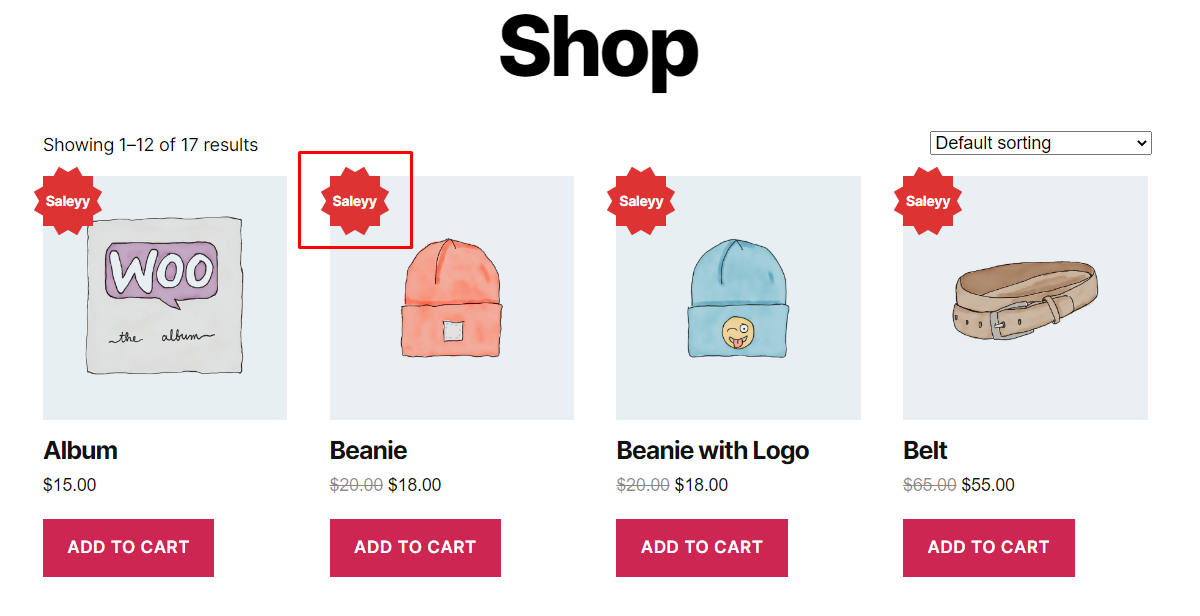
Badge schedule settings — set start date/time and end date/time for automatic badge visibility.
Installation
Automatic Installation (Recommended)
- Log in to your WordPress admin dashboard.
- Navigate to Plugins Add New.
- Search for Product Badges For WooCommerce.
- Click Install Now, then Activate.
- Ensure WooCommerce is installed and activated.
- Go to WooCommerce Product Badges to create your first badge.
Manual Installation
- Download the plugin ZIP file.
- Upload the
product-badges-for-woocommercefolder to/wp-content/plugins/via FTP or the Plugins Add New Upload Plugin screen. - Activate the plugin through the Plugins screen.
- Navigate to WooCommerce Product Badges.
FAQ
-
Do I need to know how to code to use this plugin?
-
No. Everything is managed through a visual, tab-based admin interface with a real-time Live Preview. No CSS, PHP, or JavaScript knowledge is required.
-
Can I show different badges on different products?
-
Yes. Each badge has its own independent conditional display rules. You can target specific products, categories, tags, price ranges, sale status, or stock status for each individual badge.
-
Can I use the same badge on multiple categories at once?
-
Yes. The Category condition supports selecting multiple categories in one badge — just search for and add as many categories as you need.
-
Can I schedule a badge to appear only during a promotion?
-
Yes. Every badge supports a start date + time and an end date + time. The badge will appear and disappear automatically — no manual intervention needed.
-
Will the badge look the same as the Live Preview?
-
Yes. The frontend PHP renderer uses the exact same shape dimensions, clip-path values, aspect ratios, and CSS properties as the React-based Live Preview, so what you see in the admin is precisely what your customers see.
-
Can I upload my own badge image?
-
Yes. When you choose the Image Badge type, you can either select one of the 4 built-in badge images or upload your own custom image from the WordPress media library.
-
How many badges can I create?
-
There is no hard limit on the number of badges you can create. You can build an unlimited badge library and target each one to different products, categories, or conditions.
-
Does the plugin conflict with other WooCommerce badge or label plugins?
-
The plugin overrides only the
single-product/product-image.phpWooCommerce template, and only for the specific purpose of inserting badge markup. It uses standard WooCommerce hooks and filters everywhere else. If you experience a conflict, please open a support ticket and we will investigate promptly. -
Does this plugin work with all WooCommerce themes?
-
The plugin is compatible with the vast majority of WooCommerce-compatible themes. If you experience a layout issue with your specific theme, please open a support ticket.
-
Will the plugin slow down my store?
-
No. Assets (CSS and JS) are enqueued only on pages that display badges. Badge markup is generated server-side in PHP, keeping the frontend overhead minimal and page load times fast.
-
Where can I find the settings?
-
Go to WooCommerce Product Badges in your WordPress admin sidebar.
-
Is WooCommerce required?
-
Yes. WooCommerce must be installed and activated for this plugin to function. The plugin will display a notice if WooCommerce is not detected.
Rezensionen


Mitwirkende und Entwickler
„Product Badges For WooCommerce“ ist Open-Source-Software. Folgende Menschen haben an diesem Plugin mitgewirkt:
Mitwirkende
„Product Badges For WooCommerce“ wurde in 1 Sprache übersetzt. Danke an die Übersetzer für ihre Mitwirkung.
Übersetze „Product Badges For WooCommerce“ in deine Sprache.
Interessiert an der Entwicklung?
Durchstöbere den Code, sieh dir das SVN-Repository an oder abonniere das Entwicklungsprotokoll per RSS.
Änderungsprotokoll
1.1
- Added real-time Live Preview for both text and image badge types.
- Added scheduled badge visibility with start date, start time, end date, and end time fields for each badge.
- Fixed badge shape rendering on the frontend to match the Live Preview output exactly — includes clip-path corrections for Star Burst and Tag shapes, inline-flex centering for all shapes, and counter-rotation fix for the Diamond shape text.
- Improved conditional display logic for price, category, tag, on-sale, and out-of-stock conditions.
1.0
- Initial release — core badge creation, 10 badge shapes, text and image badge types, conditional display rules, and four position options.