

Beschreibung
Your best posts stopped bringing traffic. Not from a penalty: the prices, the statistics and the year references inside them grew outdated while fresher pages took the rankings. A content refresh fixes that, and Unstale runs one with real AI, through the AI provider you already connected to WordPress.
Point it at a published post. It reads the post, searches the live web, checks every figure and price against what it finds, rewrites the text, updates the SEO metas, adds internal links, and hands you the result as a diff to approve. Then it republishes with a fresh date, without breaking your URLs.
What one content refresh actually does
- Live web research. The refresh searches the web while it runs, so the rewrite is based on what is true today and not on what the model remembers.
- Fact-check of every number. Outdated figures, prices and dates are fact-checked against the sources the refresh just read. A step that cannot verify a claim says so in the journal instead of inventing one.
- Rewrite at the level you choose. Minimal fixes typos, facts, internal links and the date. Balanced adds the SEO work: optimized metas, JSON-LD when no SEO plugin already emits it, key-takeaway callouts, readability.
- Internal linking. Up to 10 relevant internal links per refresh, with natural, varied anchors, one link per target page.
- A journal per article. Every step, every token count and the real cost, each on its own line.
You keep the keys, and you keep the bill
Since WordPress 7.0, providers and credentials live in Settings > Connectors and are managed by WordPress itself. Unstale uses whatever you set up there, so this plugin stores no API key of its own and never sees your credentials.
Your WordPress talks to that provider directly. Your content, published or draft, never passes through our servers. We do not see it.
You pay your provider directly, at its own rates, and nothing to us per refresh. No credits, no monthly quota, no cap on how many old posts you refresh. Unstale shows an estimated cost before each launch and logs the real one after.
Nothing goes live without you
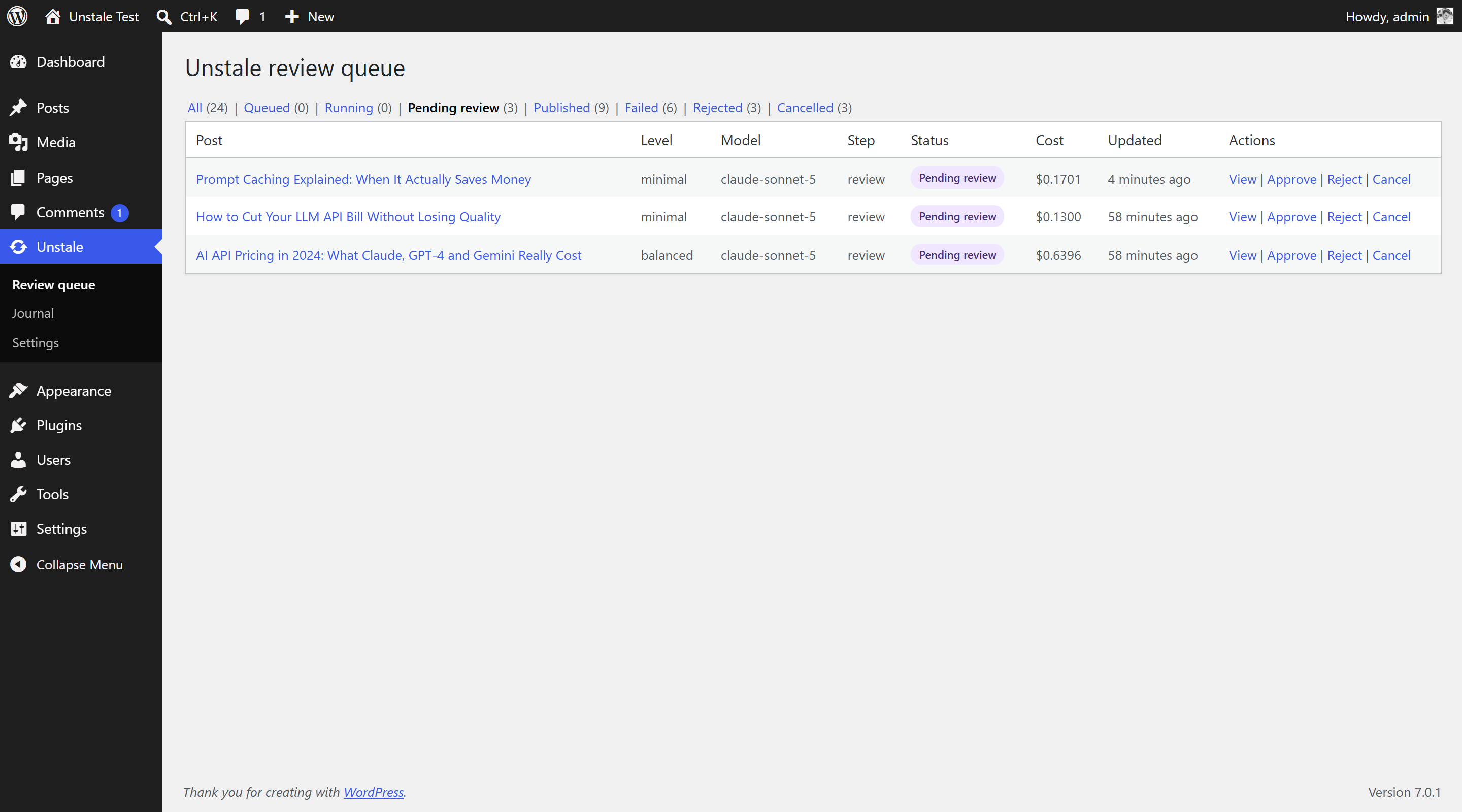
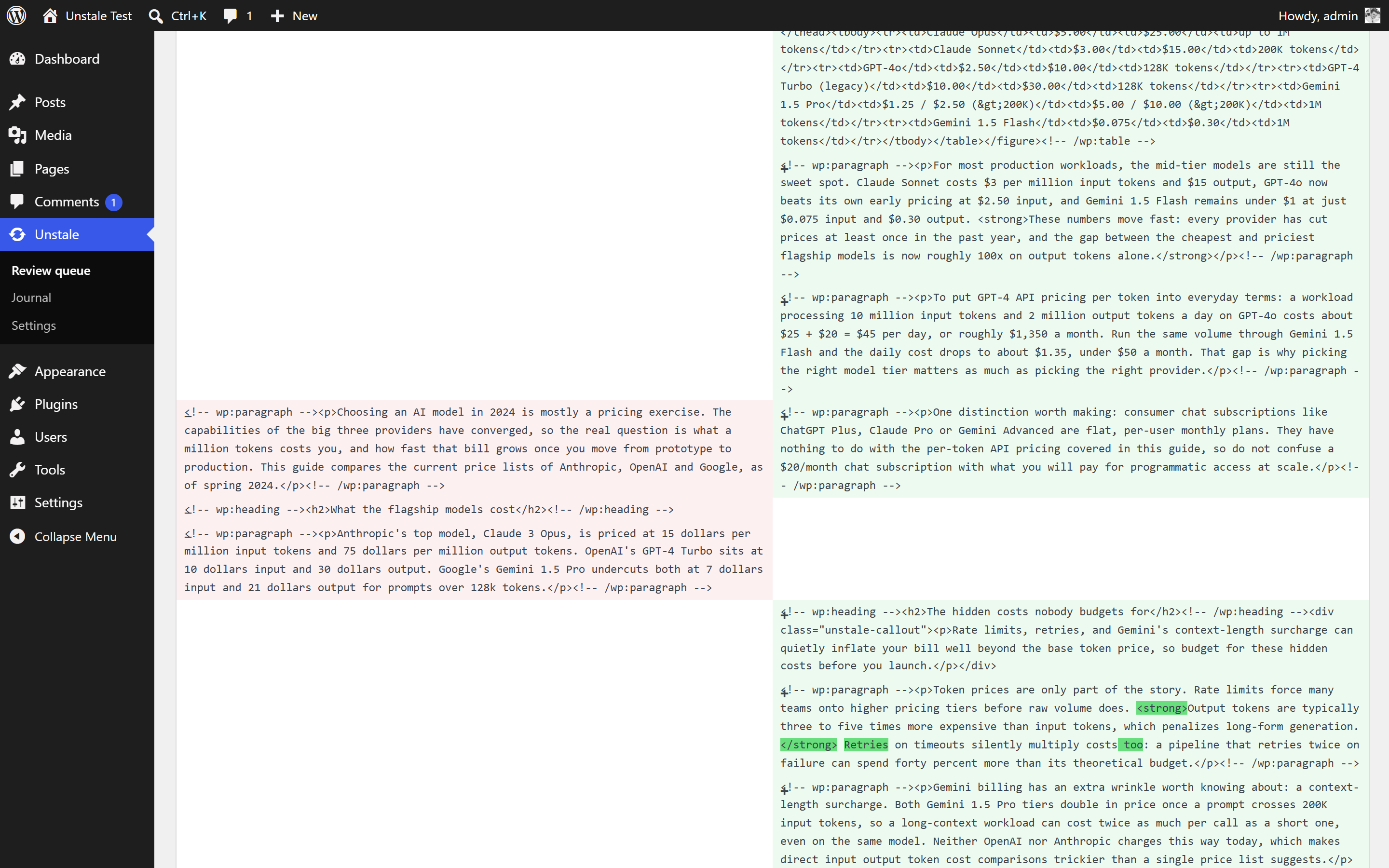
Every refresh waits in a review queue with a side-by-side diff of the current post and the proposed one. You approve it or you discard it. An optional full-auto mode exists for people who want it, off by default. Approved changes are applied as a normal WordPress revision, so one click rolls them back when revisions are enabled on your site.
Republishing that does not break your URLs
Republishing plugins usually warn you not to use them when your permalinks contain the post date, because bumping the date moves the URL. Unstale skips the bump automatically when your permalink structure uses the core date tags. To keep dated URLs and still refresh the date, switch to the %unstale_year%, %unstale_monthnum% and %unstale_day% tags: they freeze the original date in the URL for good. Republication also carries position control, randomized timing, allowed days and time windows.
What Unstale does not do
It does not write new articles. It works only on posts you already published, which is the point: the traffic is easier to win back on an evergreen post that once ranked than on a new one nobody has read. It does not read Search Console and does not rank your archive by traffic lost, so you choose which old posts to refresh, one by one or through the bulk rules in Unstale Pro. And there is no account to create anywhere.
Two refresh levels are free: Minimal and Balanced. The Strong and Maximal levels, scheduled automation and bulk rules for your old posts are part of Unstale Pro. Automation of the free levels is available through the REST API (unstale/v1) and WP-CLI (wp unstale refresh).
Unstale is developed by Web & SEO Ltd, the company that owns and operates unstale.ai.
External services
This plugin relies on one external service.
The Unstale model catalog (unstale.ai)
What it is: a public, static JSON file at https://unstale.ai/api/v1/models.json listing the supported model ids, their prices per million tokens and their notes. It exists so that a new provider model becomes available in your settings without waiting for a plugin update, and so the plugin can show you a cost estimate before each refresh.
What is sent, and when: nothing but the HTTP request itself. It is an unauthenticated GET, fired by a single scheduled task once every 24 hours. No content, no credentials, no personal data, no site identifier is transmitted, and there is no manual refresh button that could trigger it more often. If the request fails the plugin keeps using the catalog bundled in the plugin files.
This service is provided by Unstale: Terms, Privacy
A note on AI providers
Unstale does not contact Anthropic, OpenAI or Google itself and declares none of them as its own external service. Prompts are handed to the WordPress AI Client, which routes them to the provider you connected in Settings > Connectors. That provider, its terms and its billing are the relationship between you and them, set up in WordPress and not in this plugin.
Screenshots

Installation
- Install and activate the plugin. WordPress 7.0 or newer is required.
- Go to Settings > Connectors and connect an AI provider if you have not already. Unstale will tell you if none is connected.
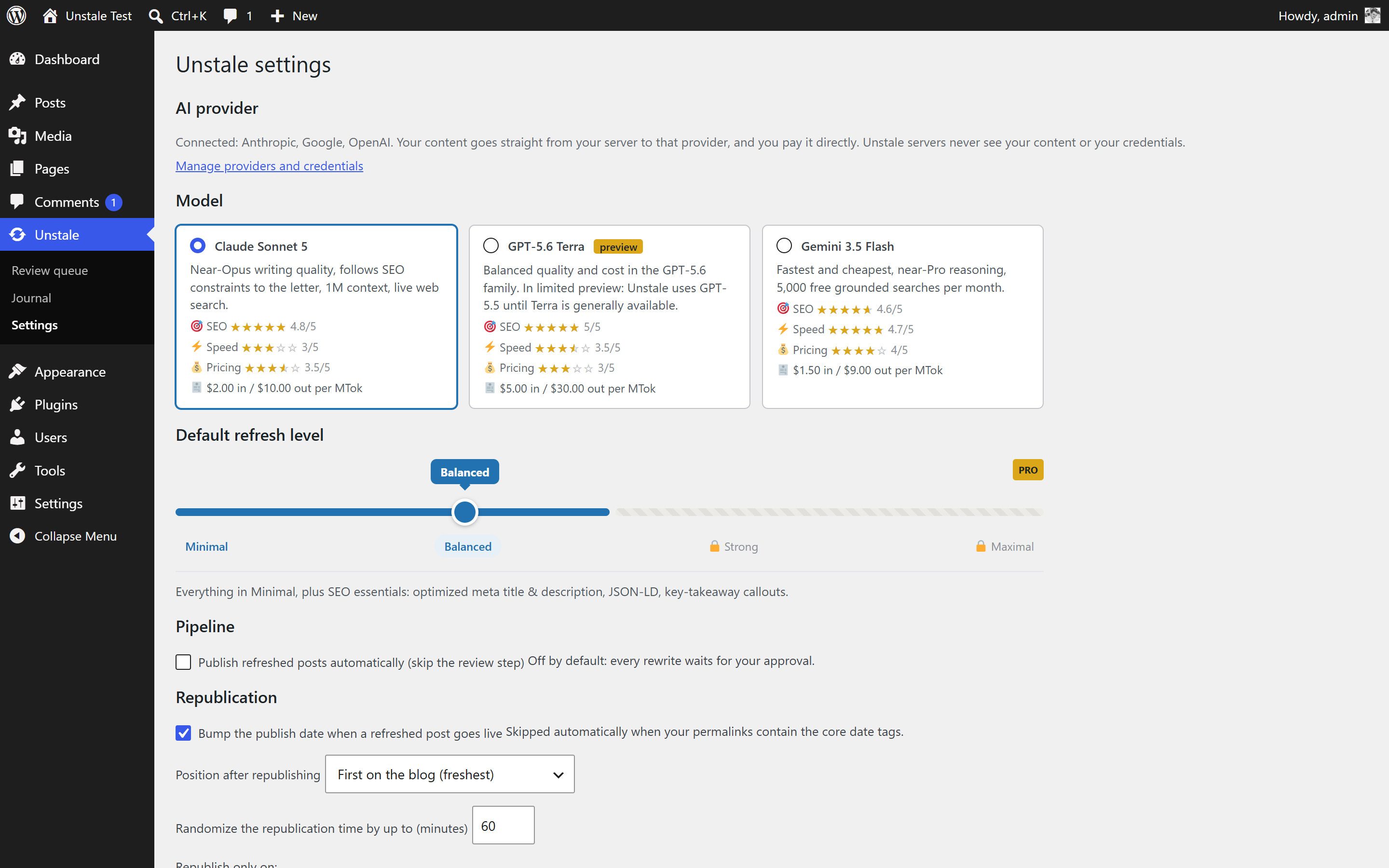
- Go to Unstale > Settings, pick a default model and refresh level.
- In the Posts list, click „Refresh with Unstale“ on any published post. Review the estimated cost, confirm, then approve the proposed rewrite in Unstale > Review queue.
FAQ
-
How much does a refresh cost?
-
You pay your AI provider directly, per token. Unstale shows an estimate BEFORE each launch and logs the real cost after. For a 1000-word article at the Balanced level the estimate runs from roughly $0.50 to $1.50 depending on the model you pick. That estimate bounds the worst case (it assumes every web search the level allows is spent), so the cost logged after the run is usually lower.
Web search fees are part of the estimate but only appear in the logged cost when your provider reports how many searches it ran. WordPress does not standardise that number, so the logged cost can understate searches on some providers.
-
How is this different from a plugin that just changes the publish date?
-
A date bump moves an old post back to the top of your feeds, but the text stays exactly as outdated as it was. Unstale rewrites the content first: it researches the subject on the live web, corrects the figures and prices that aged, updates the metas and the internal links, and only then republishes. The date bump is the last step of the job, not the whole job.
-
Can I try it on a single post before touching my archive?
-
Yes, and that is the default path. The Posts list has no bulk action: you refresh one post at a time, review the diff, and approve or discard. Nothing sweeps your archive unless you ask for it, either from WP-CLI (wp unstale refresh –all, which asks you to confirm first, because every job spends money at your provider) or through the scheduled rules in Unstale Pro.
-
Does my content go through your servers?
-
No. WordPress calls the provider you connected, directly. The only request to unstale.ai is the public model catalog (no content, no personal data).
-
Which API key does it use?
-
None of its own. Since WordPress 7.0, credentials live in Settings > Connectors and are managed by WordPress. Unstale never sees, stores or transmits them. If you used an older version of this plugin, the API keys it had stored are deleted automatically when you update.
-
Can it publish without my approval?
-
Not by default. Every refresh waits in the review queue with a side-by-side diff. You can enable full-auto publishing in the settings if you want it.
-
My permalinks contain the post date. Will the date bump break my URLs?
-
No: the bump is skipped automatically when your permalink structure uses the core date tags. To keep dated URLs AND bump dates, switch your structure to the %unstale_year%, %unstale_monthnum% and %unstale_day% tags: they freeze the original date in the URL forever. If you deactivate Unstale later, the plugin automatically restores the core date tags so your site keeps routing (posts whose date was bumped will then use the bumped date in their URL). Deleting the plugin files manually without deactivating skips that safety net: re-save your permalink structure in that case.
-
Which models are supported?
-
Whichever models the provider you connected exposes. Unstale ships model cards for Claude Sonnet 5 (default), GPT-5.6 Terra and Gemini 3.5 Flash, with pricing and ratings to help you choose. GPT-5.6 Terra is still in limited preview: if you pick it, Unstale runs GPT-5.5 instead and states the substitution on the model card and in the job log. The catalog is updated remotely: when a provider ships a new model, it appears in your settings without a plugin update.
Rezensionen
Zu diesem Plugin liegen noch keine Rezensionen vor.
Mitwirkende und Entwickler
„Unstale – Refresh Old Posts with AI, Fact-Check & Republish“ ist Open-Source-Software. Folgende Menschen haben an diesem Plugin mitgewirkt:
Mitwirkende
Übersetze „Unstale – Refresh Old Posts with AI, Fact-Check & Republish“ in deine Sprache.
Interessiert an der Entwicklung?
Durchstöbere den Code, sieh dir das SVN-Repository an oder abonniere das Entwicklungsprotokoll per RSS.
Änderungsprotokoll
1.0.6
- Fixed: on a long article, the step that writes your metas and structured data could hit the model’s output limit mid-answer. The refresh then reported an unreadable reply, which was misleading, and tried again under the same limit. That limit is now high enough for the job, a cut-off answer says so plainly in the journal, and the step is retried.
1.0.5
- Fixed: a refresh could die on an article that has nothing to fact-check. The model was answering correctly, but explaining in a sentence that it had found no figures to verify before giving its answer, and the plugin could not read a reply written that way. Three such replies in a row and the refresh gave up. Those answers are now understood.
1.0.4
- Fixed: a model that answered with reasoning only, and no readable content, killed the refresh outright. The journal said nothing useful about it and the call it had already paid for was never counted. That answer is now treated like any other step failure: the reason appears in the journal, the tokens appear in the cost, and the step is tried again.
1.0.3
- Fixed: the cost shown for a refresh could be lower than what your AI provider actually billed you. A step that failed after the model had already answered dropped the tokens it had just spent, and because a step is tried up to three times, a refresh could pay for three calls and report none of them. Every call that reaches the provider is now counted, on its own line in the journal.
- Fixed: when a model replied with something the plugin could not read, the journal only said the answer was invalid. It now quotes what the model actually sent back, so a failed step can be diagnosed from the journal instead of guessed at.
1.0.2
- Fixed: a refresh that died in the middle of a step always reported the same generic reason, whatever had really happened. The journal now records what the worker actually reported, so a provider error, a memory limit and a scheduler timeout no longer look alike and a failed refresh can be understood from the journal alone.
1.0.1
- Fixed: a refresh could fail for good when the AI provider stopped responding. All three attempts used to fall inside a 90-second window, so a short provider outage exhausted them and the job died. Retries are now spaced 2 and 10 minutes apart, which carries a refresh through an outage instead of losing it.
1.0.0
- Initial release: pipeline on the WordPress AI Client (analyze, web research, fact-check, rewrite, enrich, internal links, cleanup, review, publish), review queue with diff, journal, SEO-safe republication, targeted cache purge, REST API and WP-CLI.