

Beschreibung
DevDome Affiliate Manager is an Amazon affiliate link manager for WordPress blogs, product review sites and WooCommerce stores using Amazon Associates. Manage affiliate links from one dashboard: automatically apply tracking IDs, localize destinations, monitor product availability, recover broken links and track clicks. Use it on an affiliate website to manage Amazon links in existing and new content, with control over which features you enable.
Amazon Associates Tagging
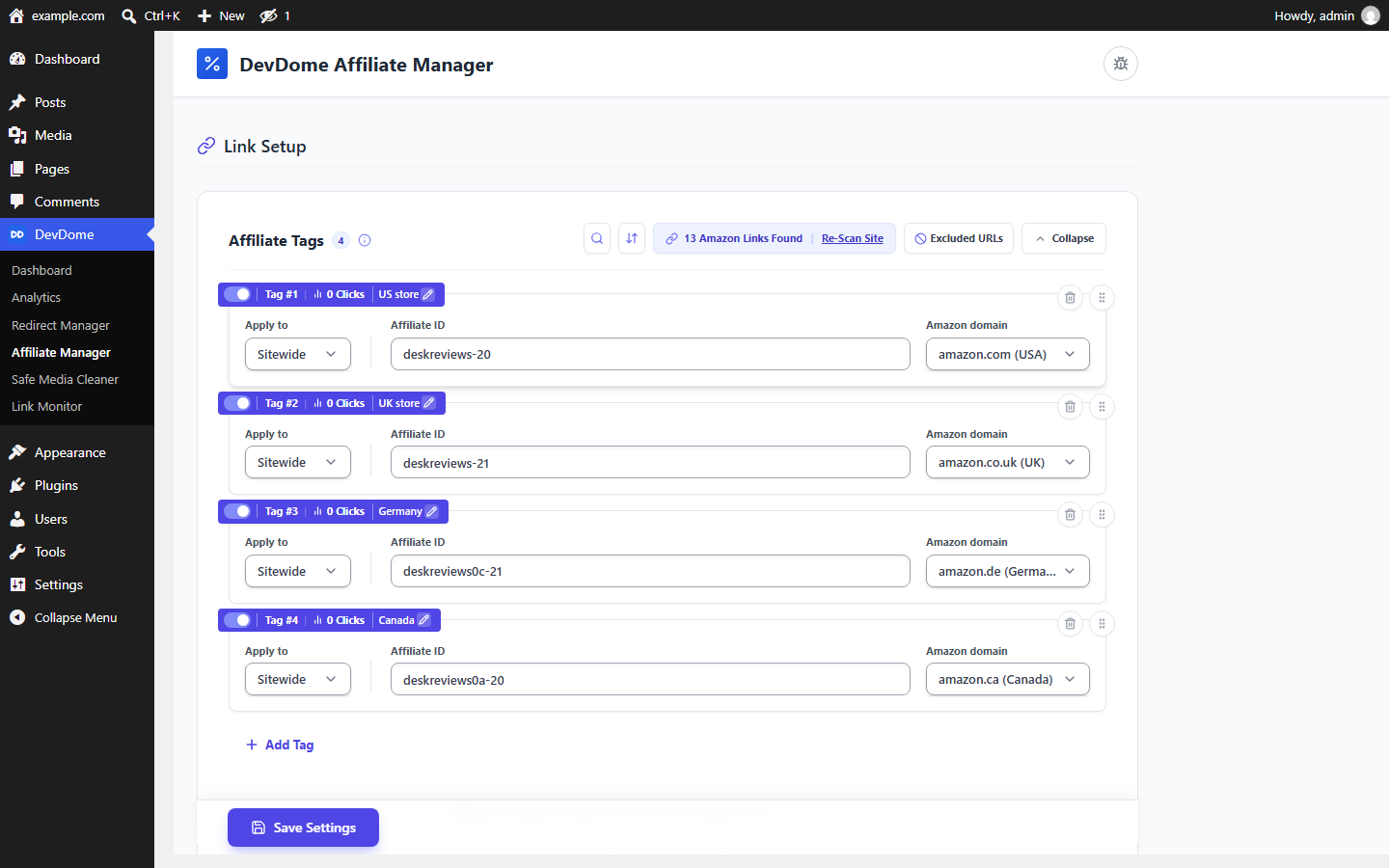
Add your Amazon Associates tracking IDs once and apply them automatically to Amazon outbound links. Changing or adding an ID does not require manually editing every Amazon link.
- Auto-tag existing and new Amazon affiliate links.
- Set different Associates IDs for 22 supported Amazon marketplaces.
- Apply tags sitewide or create rules for individual posts, pages and categories.
- Automatically add
rel="nofollow sponsored"for sponsored, nofollow links. - Open affiliate links in a new tab.
Amazon Buy Button
Create a tagged Amazon buy button from an ASIN or a custom Amazon URL. The button shortcode is [devdaffi_button].
The Button Link setting lets you choose the Amazon marketplace for generated links through Edit / Regenerate, with an option to omit the affiliate tag. Custom button links support an {ASIN} placeholder, filled with the product’s ASIN when rendered.
Amazon Geo Localization
Localize qualifying Amazon links based on the visitor’s country while keeping your affiliate tracking tag. Add your IDs for the stores you use, and the plugin can send international visitors to the appropriate Amazon store directly from WordPress.
If you have not configured a tag for the visitor’s local store, the original link is preserved.
Geo localization requires a connected DevDome account with geo routing included in its plan. Geo store-routing is free with a connected account and is off by default. See External services for the country lookup and data sent.
Amazon Link Checker and Link Radar
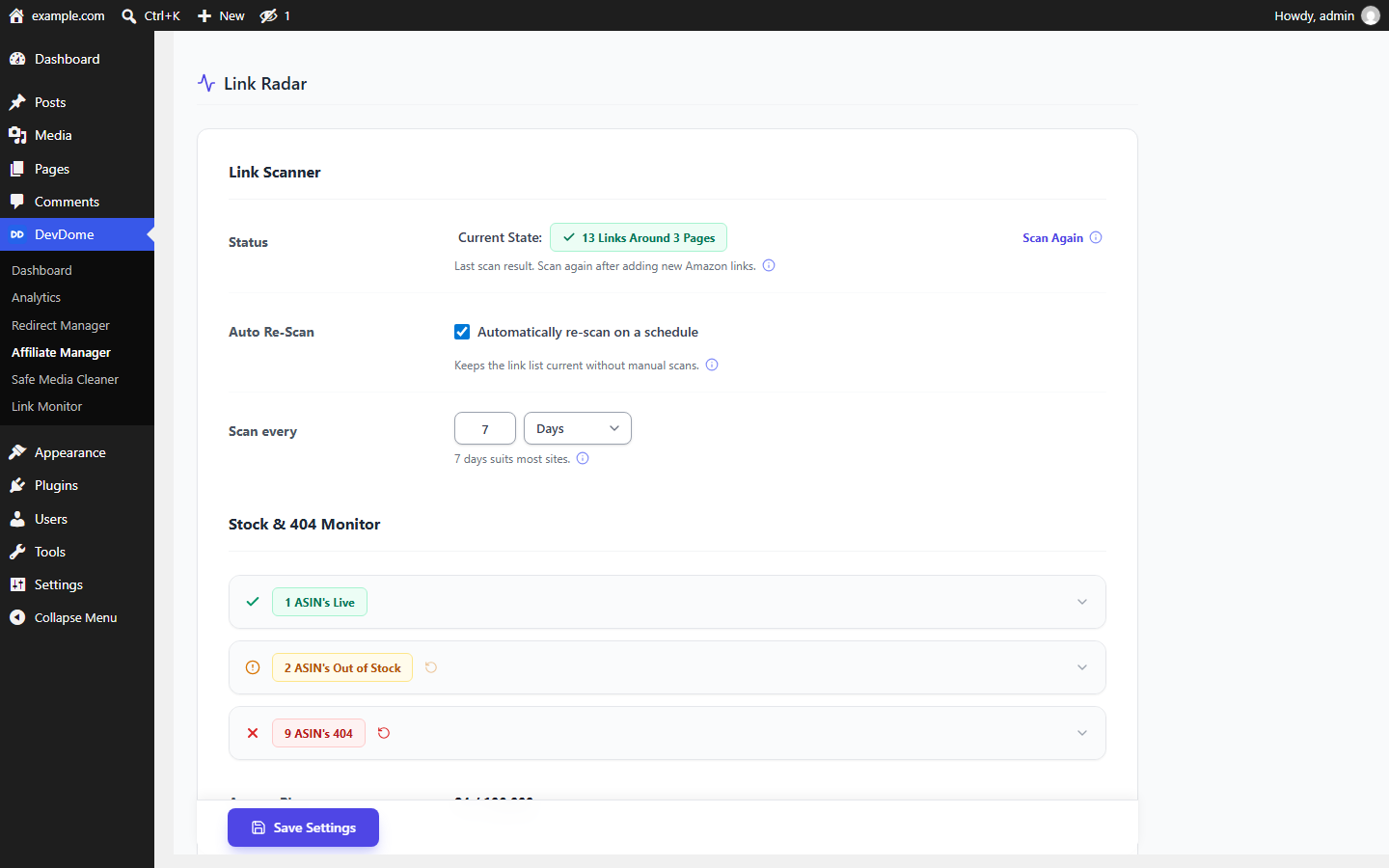
Link Radar scans WordPress content and WooCommerce external products for Amazon links, then monitors product availability. It classifies links as:
- Live.
- Out of stock.
- 404 / unavailable.
Run checks manually or enable scheduled monitoring. Scheduled auto-scan is off by default; run a scan or enable the schedule to start monitoring.
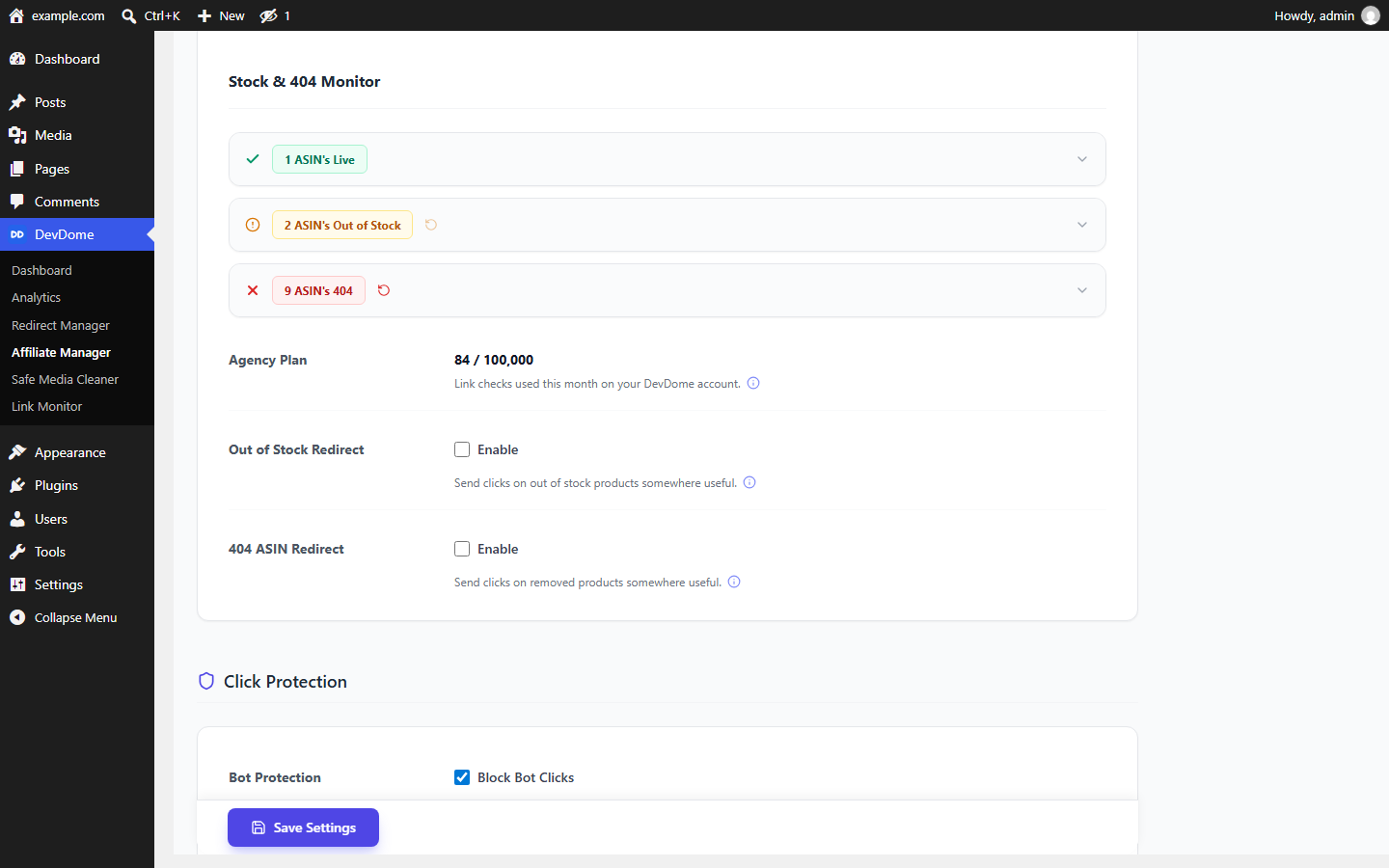
Status checks use the hosted DevDome service and require a connected account, which is free to create. The free plan includes 500 checks plus searches per month per account. The settings screen shows your live usage meter.
Dead Amazon Link Recovery
Products can disappear or go out of stock. Enable recovery for each link status to route affected clicks to:
- A relevant live replacement product.
- An Amazon search results page.
- The original destination.
The bulk Replace ASIN tool also lets you replace broken Amazon products from the WordPress dashboard. Replacement searches use the hosted Link Radar service.
Affiliate Link Tracking
Route Amazon clicks through the plugin’s /go redirect endpoint for affiliate tracking in WordPress. View:
- Total affiliate clicks.
- Unique clicks.
- Link performance.
- Amazon product activity.
The endpoint validates Amazon destinations to prevent an open redirect. It resolves an Amazon shortlink, such as amzn.to or a.co, before validating and tagging the final product URL.
Unique-click counts use a temporary pseudonymous fingerprint: a hash of the visitor’s IP address and browser user agent, kept for 30 minutes. Click statistics do not store the raw IP address or user agent.
Keyword Auto-Linker and Blog Monetization
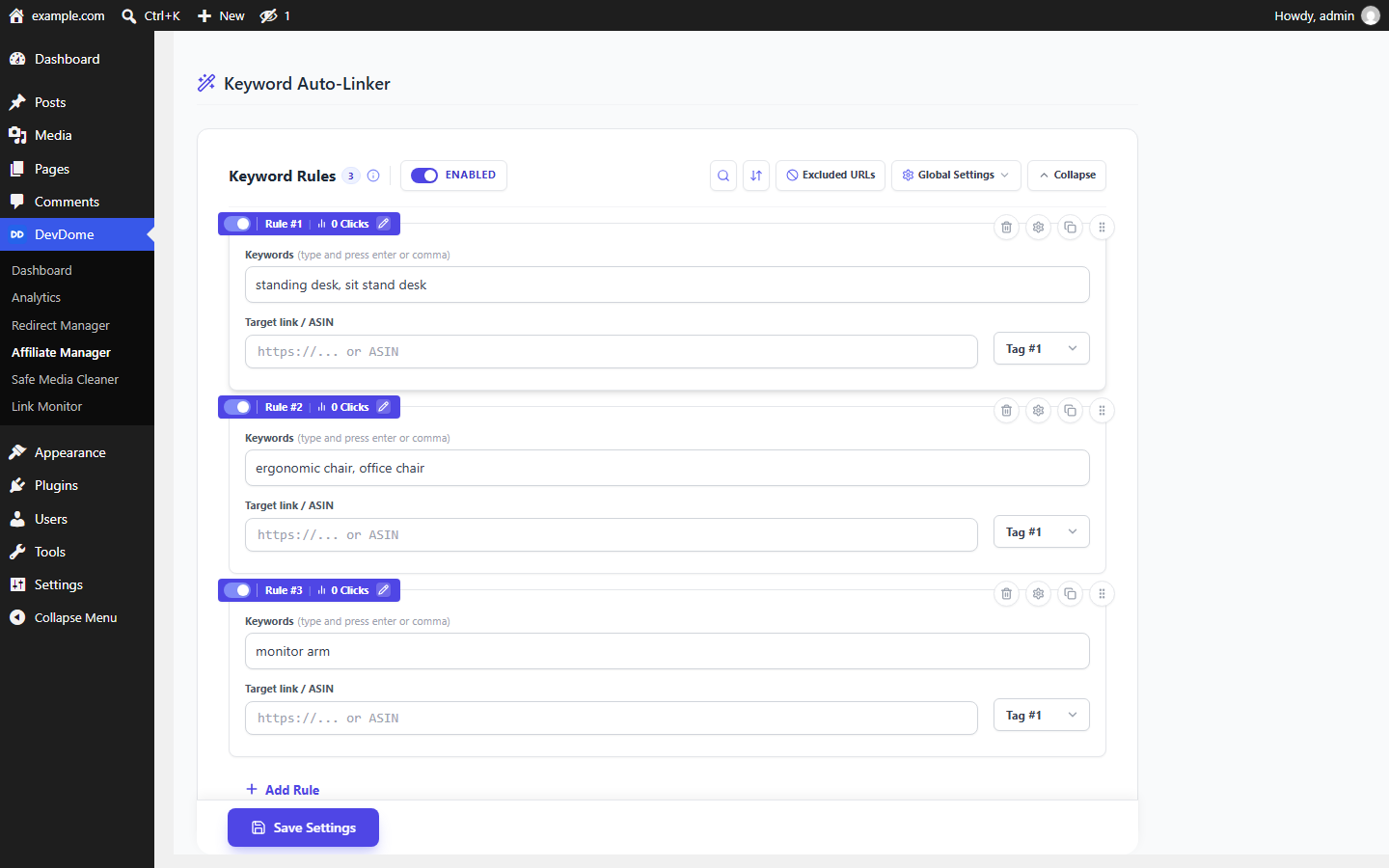
Turn selected words and phrases into Amazon affiliate links. This supports affiliate marketing through Amazon Associates on an affiliate blog, including older articles you want to update without manually adding links to each one.
Keyword rules support: Create Amazon auto links from selected words and phrases with the Keyword Auto-Linker.
- Exact or flexible matching.
- Per-page link limits.
- Automatic Amazon tagging.
- Existing-link exclusions.
- Heading and code exclusions.
WooCommerce Affiliate Product Links
For an affiliate store using WooCommerce external or affiliate products, the plugin can automatically route external product buttons through its affiliate-link system and apply the correct Amazon Associates tag.
Generated WooCommerce buttons use the Amazon marketplace you select. Link Radar also scans WooCommerce external products for Amazon links.
Click Protection
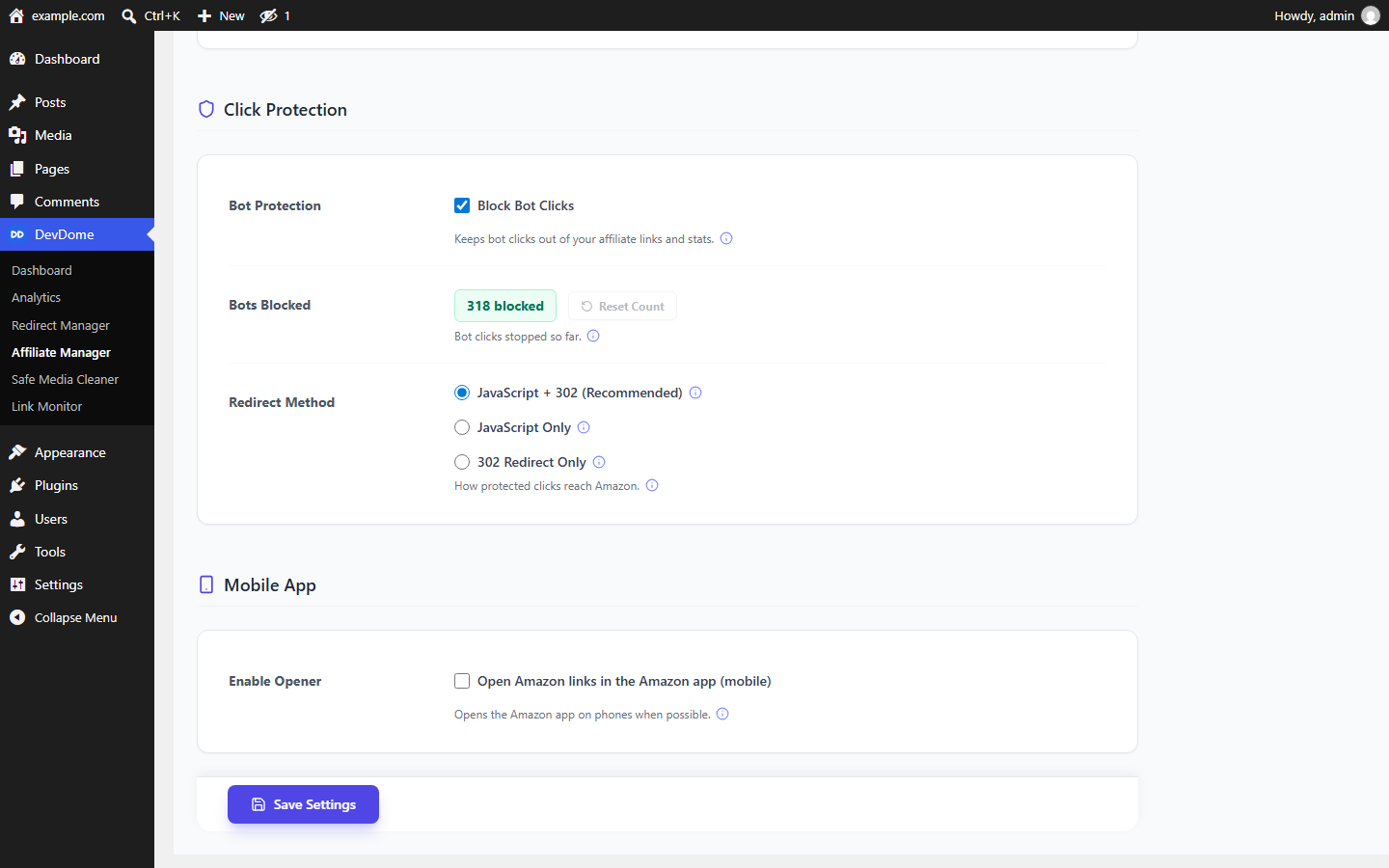
Click Protection prevents known bots and automated crawlers from generating misleading affiliate click statistics. Blocked bot clicks are counted.
It uses a built-in bot list and requires no external bot-detection service.
Amazon Mobile App Opener
Optionally help mobile visitors open supported Amazon product links in the Amazon app. Android visitors can use the Amazon app intent.
Supported iOS in-app browser situations can offer an Open in Safari option.
AI and Agent Support
On WordPress 6.9 and newer, the plugin registers 16 WordPress Abilities. Compatible AI agents and MCP clients can discover and use them when your site exposes them, for example through the official WordPress MCP Adapter.
The abilities cover:
- Reading and updating every setting, including tags, auto-linker rules, exclusions and the buy button.
- Adding and removing a tag or rule.
- Reading the Link Radar overview, dead and out-of-stock list, links by status and account quota.
- Running the link scan, status check and ASIN replacement.
- Reading click statistics and resetting the bot counter or per-tag clicks.
Every ability runs the same code as the plugin screen under the same administrator capability.
ASIN replacement, removing a tag or rule, and counter resets require explicit confirmation and are annotated destructive. Enabling geo-localization or scheduled checks, or turning Click Protection off, also requires confirmation.
Agent output never includes e-mail addresses, the site token or server paths. On an unconnected site, no ability contacts DevDome except a status check or quota read you invoke on purpose.
Independent Amazon Associates Tool
The plugin combines Associates auto tagging, geo localization, link checking, dead-link monitoring and recovery, click tracking, keyword auto-linking and WooCommerce affiliate links. Choose the features you want to use.
DevDome Affiliate Manager is an independent project. Amazon, Amazon Associates and OneLink are trademarks of Amazon.com, Inc. or its affiliates. This plugin is not endorsed by, sponsored by or otherwise affiliated with Amazon.
External services
Plugin catalog (devdome.com). The DevDome Dashboard inside wp-admin fetches the list of DevDome plugins (names, descriptions, logos, links, WordPress.org slugs) from https://devdome.com/wp-plugins/catalog.json at most once every 12 hours, so the list stays current. Only the bundled core version is sent in the request; no site or visitor data. Service provider: DevDome. Terms: https://devdome.com/terms-of-service Privacy policy: https://devdome.com/privacy-policy
This plugin talks to the DevDome server at https://api.devdome.com for the features that need data a plugin cannot ship (a geo-IP database, an Amazon status checker). API keys stay on the server; you never paste one.
Terms of service: https://devdome.com/terms-of-service
Privacy policy: https://devdome.com/privacy-policy
Link Radar status checks, https://api.devdome.com/amazon-404-oos-checker
/check-batch sends the Amazon ASINs found by your link scan, with each one’s Amazon domain, to classify them as live / out of stock / 404. It runs when you press Check Now, and on the Link Radar schedule only while automatic re-scans are enabled; a fresh install that has never scanned makes no request.
/search sends a product keyword (built from the product’s title or metadata) to find a live replacement product. It is used by the bulk Replace ASIN tool and, when you enable per-status dead-link recovery, at click time. No visitor data is in either request.
Both are part of the hosted Link Radar service and require a connected DevDome account. Creating the account costs nothing: each request carries this site’s domain and secret token so the service can meter usage. The free plan includes 500 checks + searches per month per account; paid plans raise the limit (20,000 / 50,000 / 100,000, see devdome.com/pricing). The plugin shows your live usage meter on its settings screen. When the site is not connected or the monthly limit is reached, the service answers with an error and the plugin simply leaves link statuses unchanged, so nothing on your site breaks.
Geo-localization, https://api.devdome.com/geo-resolve
Off by default. When you enable it, each /go click sends the visitor’s IP address and the destination ASIN/domain, plus this site’s domain and secret token, so the server can pick the visitor’s local Amazon store from the stores you have a tag for. The IP is used for the country lookup only and cached briefly. Enable this feature only if you want visitor IPs used for country detection. Geo store-routing is part of the hosted DevDome service and is free with a connected DevDome account; without one, visitors simply keep the original link.
DevDome account, https://api.devdome.com/plugin/account, /plugin/disconnect and https://analytics.devdome.com/api/plugin/connect/*
Made by the shared DevDome library bundled with every plugin in the suite, and never before you have acted: until you press a Connect button, save an Account ID or complete a connection, no account request is made. The account check is a POST carrying this site’s domain and its secret token, answered with the Account ID and account email address the token belongs to. Starting a connection (the Connect button) is a POST with the same two fields plus the wp-admin address to return you to; completing it is a POST with the same two fields plus the one-time request token and its nonce of that connect attempt. Disconnect is a POST with the same two fields, sent only when you press Disconnect. Pressing Connect registers a short-lived connect request (/api/plugin/connect/start, a POST with the site domain and token) and, after you authorize on devdome.com, the plugin collects the resulting Account ID server-to-server (/api/plugin/connect/claim, same fields plus the request handle); the Account ID and token never travel in your browser’s URL. https://devdome.com/connect/ is a link you click, not a request the plugin makes: your browser goes there to sign in and comes back.
When you connect from the DevDome Tools dashboard, whose Connect card states this before you press the button, those account checks also carry the slug and version of each active DevDome plugin on the site plus the bundled DevDome library, WordPress and PHP versions, so your DevDome account can show your sites and their DevDome plugins for support and update notices. Nothing about other plugins, users, email addresses, content or visitors is included. Sites connected before this was introduced, and sites connected from a button that does not show that text, do not send the list. Disconnecting stops the plugin list.
Amazon
At click time the /go endpoint requests the destination server-side from Amazon (a HEAD request, GET when HEAD is refused) and follows its redirects (up to seven hops, Amazon hosts only), so a shortlink (amzn.to, a.co, …) or a redirecting product URL resolves to the final product page that is then validated and tagged. The result is cached for 12 hours per destination. Only the destination URL is requested with a generic user agent; no visitor data is sent to Amazon by the plugin.
This service is provided by Amazon.com, Inc.: Conditions of Use, Privacy Notice.
Error reports, https://devdome.com/api/plugin/error-report
Only when you press „Report this error“ under a failure message. The report carries the plugin name and version, the shared library version, the WordPress and PHP versions, whether the site is a multisite, the site language, this site’s domain and site id, the DevDome account id when the site is linked, the admin screen the error appeared on, the error text shown to you, the plugin’s recent log lines for that error, and the site’s administration e-mail address so support can reply. Nothing is sent without that click.
Not contacted on this WordPress.org build
The bundled shared library also references endpoints this build never calls: the https://api.devdome.com/bot-protection/ signature feeds (Click Protection here uses the plugin’s built-in bot list; no feed is fetched and no feed cron is scheduled) and https://api.devdome.com/plugin-updates/ (self-hosted updates, disabled here; updates come only from WordPress.org).
Never sent, in any request
- Passwords and password hashes.
- Visitor form input, names or email addresses.
- Post, page, comment or any other WordPress content: the link scanner runs locally, and only the extracted ASINs leave the site. The one exception is the replacement search described above: while dead-link recovery is on, up to six words built from the linking post’s title (or its product metadata) are sent as the search keyword.
Source & build
All PHP and JavaScript in this plugin ship human-readable. The admin screen bundle (assets/admin/index.js / index.css) is compiled with Vite from the JSX source included in this plugin at admin-ui-src/src/, and is deliberately built without minification, so the shipped file is the readable, running code. The stylesheet is likewise unminified.
To rebuild the bundle from source: cd admin-ui-src, then npm install and npm run build. The build writes index.js and index.css into assets/admin/. The bundle inlines its npm dependencies, whose exact versions are pinned in admin-ui-src/package-lock.json: React and ReactDOM (MIT), and Lucide React (ISC); react-dom’s production build contains pre-compressed code from the upstream npm package.
Screenshots
Installation
- Upload the plugin ZIP via Plugins Add New Upload Plugin, or copy the folder to
wp-content/plugins/. - Activate it.
- Go to the DevDome Affiliate Manager admin page, add your Amazon affiliate tag(s), and configure the features you want.
FAQ
-
Do I need an account or an API key?
-
No API key is needed. Tagging, the auto-linker, exclusions, the buy button, click tracking and click protection work without an account. The hosted parts need a free DevDome account linked from the DevDome Tools screen: Link Radar status checks and replacement search, and geo-localization. Without one, those features stay off.
-
Does geo-localization need every regional Amazon tag?
-
It only redirects to stores you have added a tag for. Visitors from other countries keep the original link, preserving its existing affiliate tag rather than sending them to a store without one.
-
What happens when a product is discontinued?
-
The monitor flags it. If recovery is enabled, clicks are redirected to a live replacement product or the Amazon search page instead of a dead page.
-
How can I monetize blog posts with Amazon links?
-
Add your Associates tracking IDs to tag existing links, then create keyword rules to turn selected words and phrases into tagged Amazon links. Set per-page limits and exclusions to control where links appear.
-
Can this help me make money blogging with Amazon Associates?
-
It provides link management for Amazon Associates monetization: tagging, buy buttons, keyword links, availability checks and click tracking. These tools help you maintain the links on your blog; they do not guarantee earnings.
-
Can I use WooCommerce affiliate products linked to Amazon?
-
Yes. The plugin supports WooCommerce external products that link to Amazon. It can route their buttons through the affiliate-link system, apply your Associates tag and scan their Amazon destinations with Link Radar.
-
How do I manage Amazon affiliation links for different countries?
-
Add your Associates IDs for the supported marketplaces you use. With geo-localization enabled and a connected DevDome account, qualifying links can route visitors to their local Amazon marketplace. If no tag is configured for that store, the original link stays in use.
-
What does affiliate link tracking record?
-
It records total and unique clicks, link performance and Amazon product activity through
/go. Unique counts use a hash of the visitor’s IP address and browser user agent for 30 minutes; the raw values are not stored in click statistics. Click Protection filters known bots using the built-in list. -
Yes. Create a button from an ASIN or custom Amazon URL using
[devdaffi_button]. Choose the marketplace through Button Link and Edit / Regenerate, and choose whether to include the affiliate tag.
Rezensionen

Mitwirkende und Entwickler
„DevDome Affiliate Manager: Amazon Affiliate Links & Amazon Associates“ ist Open-Source-Software. Folgende Menschen haben an diesem Plugin mitgewirkt:
Mitwirkende
Übersetze „DevDome Affiliate Manager: Amazon Affiliate Links & Amazon Associates“ in deine Sprache.
Interessiert an der Entwicklung?
Durchstöbere den Code, sieh dir das SVN-Repository an oder abonniere das Entwicklungsprotokoll per RSS.
Änderungsprotokoll
1.1.1
- Bundled DevDome library 1.7.6: if you connect a DevDome account from the DevDome Tools dashboard, the Connect card now says exactly what is shared, including the list of active DevDome plugins and their versions. Sites that were already connected, and sites that never connect, send nothing new. See External services.
- Listing text rewritten: new title, short description, tags and a restructured description. No change to how the plugin works.
1.1.0
- WordPress Abilities (6.9+): 16 abilities so AI agents and MCP clients can read and change settings, manage tags and auto-linker rules, run the Link Radar scan and status check, replace an ASIN and read click stats, with confirmations on every destructive action.
- Shared DevDome core 1.7.4: plugin updates succeed on hosts where a previous update left the plugin folder owned by another system user.
- Sites with plain permalinks: the /go links use the query form the site can route (clicks are tagged and counted there too), and the content picker’s REST call no longer answers 404.
- Honest answers everywhere: a failed database read is reported as such instead of „no clicks“ or „nothing to fix“; settings saves are read back before „Saved“; a partial settings request never wipes tags or rules; the ASIN replacement checks every write and names the posts it could not change; a Link Radar outage never overwrites a known status; the Reset clicks icon now really resets; /go records clicks only for your own tags and refuses a shortlink that leaves Amazon.
1.0.7
- Connect fix (shared DevDome core 1.6.6): the connect claim now waits up to 30 seconds and keeps the handshake for 20 minutes so a refresh retries it, the DevDome hub shows why a connect failed with a Try again link, and the verify file is served through a query form for hosts that answer /.well-known/ before WordPress.
1.0.6
- Settings: every option now shows a one line hint under the control, with the info icon holding the full explanation, the same layout as DevDome Malware Scanner.
- DevDome Dashboard: installing another DevDome plugin from the dashboard no longer activates it, you activate it yourself from its card. Output escaping tightened.
1.0.5
- DevDome Dashboard polish: Activate stays on the dashboard, notices dismiss on their own, a Fix button on every issue, clearer counters and connected badge.
- Plugin author link on the Plugins screen.
1.0.4
- DevDome Dashboard: the plugin list, descriptions, logos and versions now come from devdome.com, so new plugins appear without updating this plugin.
- One-click Install of other DevDome plugins from WordPress.org directly in the dashboard.
- Docs link and a short description on every plugin row; connected-account badge.
1.0.3
- The plugin logo is now a percent glyph, matching the WordPress.org listing, in the plugin header and the DevDome dashboard.
1.0.1
- The two redirect pages emit their scripts via
wp_print_inline_script_tag(). - The admin bundle’s JSX/Vite source is included at
admin-ui-src/; build steps are in the Source & build section. - The External services section links Amazon’s Conditions of Use and Privacy Notice.
1.0.0
- WordPress.org release. Every identifier the plugin owns now uses its own
devdaffi_prefix (options, tables, cron hooks, REST namespace, script handles, shortcode; the button shortcode is now[devdaffi_button]). Self-hosted upgrades migrate stored settings, click stats and the link index automatically, and the old button shortcode keeps working via an alias. - Click Protection now has a built-in bot list, so it works with no external service or feed.
- Link Radar’s scheduled auto-scan is off by default; run a scan or enable the schedule to start link monitoring.
- Removed the robots.txt writer and unused legacy settings;
/goredirects now always send anX-Robots-Tag: noindex, nofollowheader, the standard behavior for a redirect endpoint. - The admin bundle ships unminified.
0.5.4
- Expanded External services disclosure.
0.5.3
- Readme copy polish.
0.5.2
- WordPress.org build support: the self-hosted suite updater is excluded from this package (updates come from WordPress.org only), the shared bot-list feed and the suite dashboard’s one-click installs are disabled in WordPress.org builds, the bundled devdome-core library was updated, uninstall now removes the remaining plugin options, transients and scheduled events, and the External services disclosure was extended.
0.5.1
- Click attribution privacy: outbound hops now carry an opaque token instead of the site hostname in the URL; the token is resolved server-side. (Version numbering: 0.4.9 is followed by 0.5.1. No version segment goes above 9.)
0.4.9
- Fixed: in DevDome Analytics, a
/gobutton click is now attributed to the page it was clicked from instead of appearing as a separate page.
0.4.8
- Click reports to DevDome Analytics now declare the link type explicitly, so click classification keeps working even if the
/goslug is ever renamed.
0.4.7
- Fixed: the mobile App Opener bridge page now sends the same no-referrer policy as every other redirect path.
0.4.6
/goredirects now send aReferrer-Policy: no-referrerheader so the redirecting page is not exposed to the destination.
0.4.5
- Fixed: WooCommerce generated buttons now use the Amazon store you selected instead of always amazon.com.
- Fixed: a link scan that fails part-way no longer wipes the link index; the previous index is kept until a full scan completes.
- Fixed: the keyword auto-linker keeps the original text when a regex limit is hit instead of blanking the content.
0.4.4
- Split into a public edition and an in-house edition; controls that are not part of the public plugin were removed from this build.
0.3.8
- WordPress.org readiness pass: security and escaping review, Plugin Check fixes.
0.3.0
- Button Link: choose the Amazon marketplace for generated links via Edit / Regenerate, with an option to omit the affiliate tag.
- Custom button links now support an {ASIN} placeholder that is filled with the product’s ASIN at render time.
0.2.0
- Per-status dead-link routing (replacement product / search page) for Out-of-Stock and 404.
- WooCommerce external-button rewrite; bulk Replace ASIN tool.
- Geo-localization, click protection, mobile app opener, link monitor.