

Beschreibung
EqualFix Accessibility scans your site’s public pages for specific accessibility issues and applies a built-in set of safe, invisible fixes to the rendered HTML:
- Adds the missing page language attribute
- Adds empty alt text to decorative images missing it
- Adds accessible names to icon-only buttons and links (derived from existing title attributes and inline SVG titles/descriptions — never invented)
- Associates form fields with their visible labels where a unique match exists
- Adds a skip-to-content link where your theme lacks one
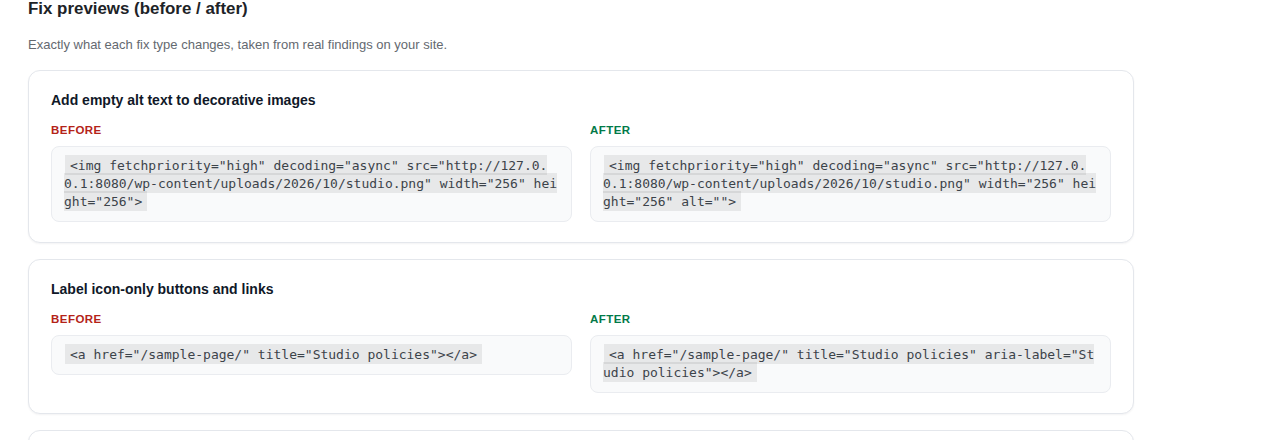
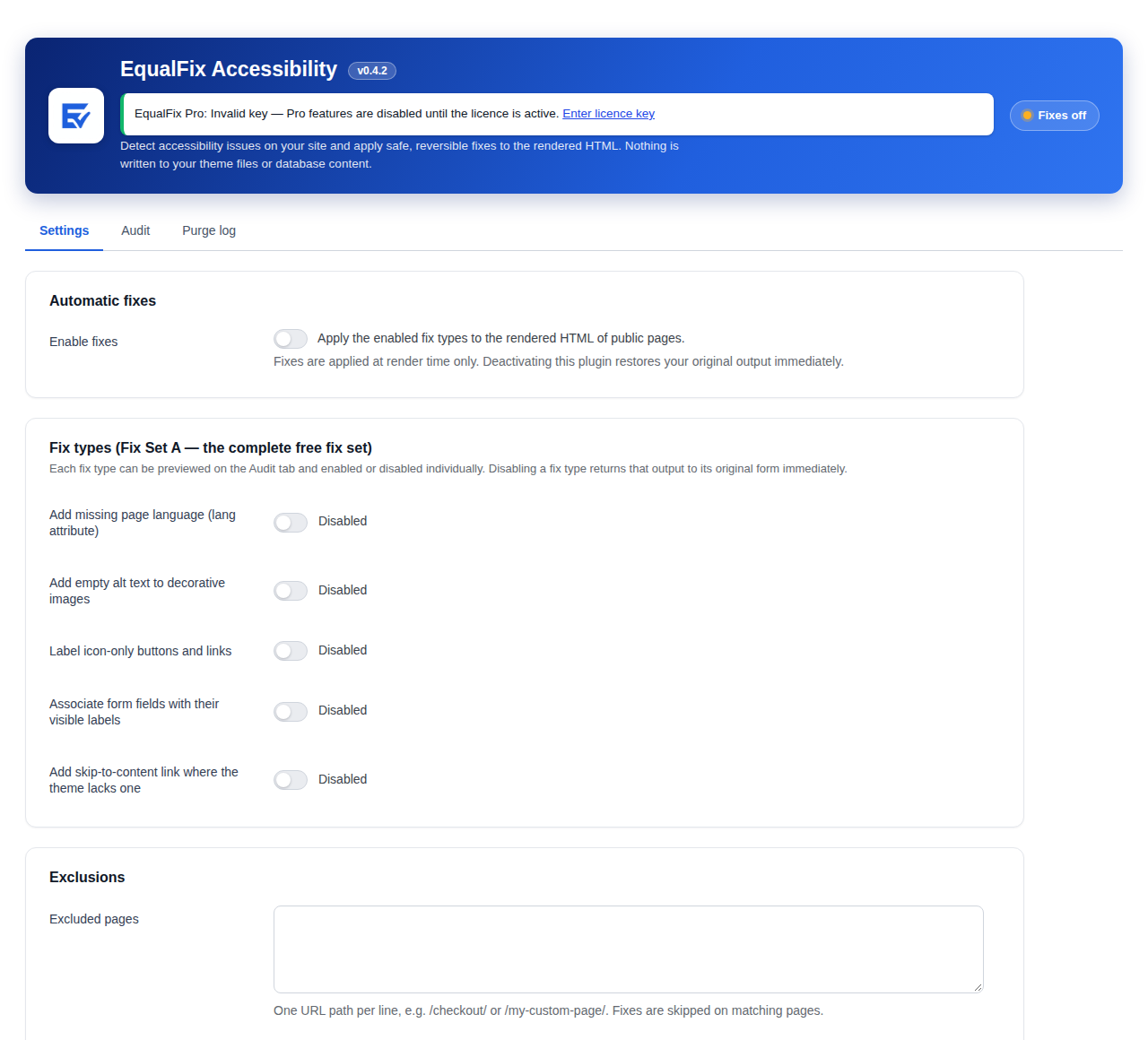
Every fix type can be previewed (before/after) and enabled or disabled individually. Fixes are applied at render time only — your theme files and post content are never modified, and deactivating the plugin restores your original output immediately.
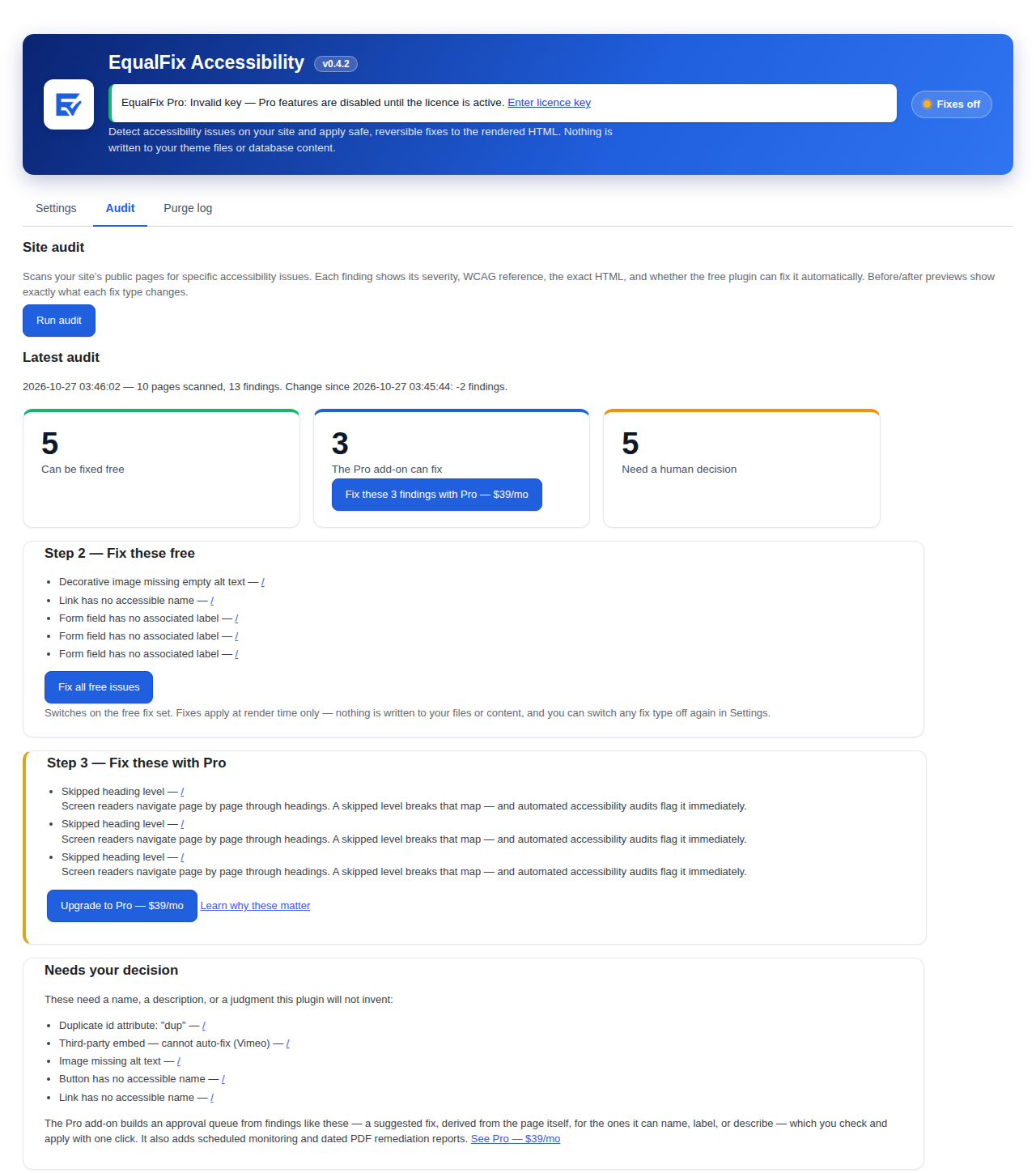
The built-in audit shows each finding with its severity, WCAG reference, the exact HTML, and a plain-English explanation. Findings are honestly categorized: auto-fixable by this plugin, auto-fixable by the Pro add-on, needs human review, or third-party embed (cannot be auto-fixed).
A service connection is planned for a future release: the opt-in appears in settings but is not active yet, and the plugin sends nothing anywhere today. The free plugin is complete as-is and works forever without payment.
This tool assists with identifying and remediating specific accessibility issues in your site’s HTML output. It does not provide legal advice and does not guarantee compliance with the ADA, WCAG, or any other law or standard. Accessibility is an ongoing process, and some issues require manual review and fixes. Responsibility for your site’s accessibility remains with you, the site owner.
Privacy
Default state: this plugin makes no external network requests and stores data only in your own database (settings, audit summaries, and a cache-purge log).
The service connection is not active in this release: the opt-in on the settings screen is inert and the plugin transmits nothing. When the connection becomes active in a future release, opting in may transmit: your site URL, audited page URLs, and rendered HTML of those pages for accessibility analysis. It will never transmit visitor data, customer data, order data, or personal data.
Screenshots
Installation
- Upload the plugin files to the
/wp-content/plugins/equalfix-accessibilitydirectory, or install the plugin through the WordPress plugins screen directly. - Activate the plugin through the ‚Plugins‘ screen in WordPress.
- Go to Settings EqualFix to review the fix types and run your first audit.
FAQ
-
Will this plugin make my site ADA compliant?
-
No plugin can guarantee compliance with the ADA, WCAG, or any other law or standard — and any tool that claims it can should not be trusted. This plugin helps improve accessibility by detecting specific issues and applying safe, reversible fixes to the rendered HTML. Some issues always need human review, and responsibility for your site’s accessibility remains with you.
-
Does it change my theme or content?
-
No. Fixes are applied to the rendered HTML as pages are served. Theme files, plugin files, and database content are never edited. Deactivate the plugin and your output returns to its original form immediately.
-
What data does the plugin send anywhere?
-
By default, nothing leaves your site: the audit and fixes run locally. A service connection is planned for a future release: the opt-in appears in settings but is not active yet, and the plugin sends nothing anywhere today. If it becomes active, it will only ever send your site URL, page URLs, and rendered HTML for analysis — never visitor, customer, order, or personal data. See the Privacy section below.
-
Why are some findings marked „needs human review“?
-
Some issues cannot be fixed safely by automation — for example, writing meaningful alt text for a product image, or renaming duplicate id attributes. The plugin reports these honestly instead of guessing.
Rezensionen
Zu diesem Plugin liegen noch keine Rezensionen vor.
Mitwirkende und Entwickler
„EqualFix – AI Accessibility Auto-Fixer“ ist Open-Source-Software. Folgende Menschen haben an diesem Plugin mitgewirkt:
Mitwirkende
Übersetze „EqualFix – AI Accessibility Auto-Fixer“ in deine Sprache.
Interessiert an der Entwicklung?
Durchstöbere den Code, sieh dir das SVN-Repository an oder abonniere das Entwicklungsprotokoll per RSS.
Änderungsprotokoll
1.0.3
- Maintenance re-release of 1.0.2: the first 1.0.2 package was built from incomplete files, so 1.0.3 supersedes it with the complete, verified build. Everyone on 1.0.2 should update. No feature changes beyond the 1.0.2 notes below.
1.0.2
- More free fixes, from your own pages: a form field whose only name is its placeholder text now gets an accessible label using that placeholder text, and an image the page already describes — in its title attribute or its figure caption — gets that text as its alt. Nothing is invented; the words were already on the page.
- Clearer results: one Pro card now states Pro’s full coverage — what it fixes automatically plus how many findings its approval queue can draft suggestions for — and the free step explains what the free fixes do even when a particular audit’s findings fall outside the free set.
- The Run audit button now shows that the audit is running (spinner and status text) instead of sitting silent until the results load.
1.0.1
- Fixed the fallback page render (used when a host blocks loopback requests) on sites where the audit runs from wp-admin — including WordPress Playground, where 1.0.0 could not scan at all. Pages are now resolved directly by their identity instead of relying on request simulation, and the simulation path presents itself as the front end. Audits on loopback-blocked hosts should now scan rendered pages instead of reporting them unscanned.
1.0.0
- Rebuilt scan engine: pages are parsed with a standards-compliant HTML5 parser, and every captured page is verified before it is analysed — a page that cannot be verified is reported as not scanned, never as clean.
- Rebuilt fix delivery: fixes are now applied as small, targeted edits to the page exactly as your theme produced it, instead of rewriting the whole page. Scripts, styles, and templates pass through untouched.
- More accurate results: accessible names are computed the way assistive technology sees them (hidden text no longer counts), skip-link targets are checked reliably, and issues inside page templates are no longer missed.
- Fixes now also reach content your theme prints through WordPress filters (post content, search forms), not only full pages.
- Cache handling: fix changes now clear cached pages reliably across popular caching plugins and object caches.
0.5.0
- New: when a page cannot be fetched — the signature of a host that blocks loopback requests, including WordPress Playground and some budget hosts — the audit now renders that page inside WordPress instead of failing to scan it. Rendered pages are labelled in the results: they reflect a logged-out view without any external page cache, so their results can differ slightly from a live visit. Pages that can neither be fetched nor rendered are still reported as not scanned, never as clean.
0.4.5
- Fix: inline scripts and styles are now shielded while a page is being fixed, so JavaScript that builds HTML strings (and any script or style content) passes through byte-for-byte — previously, tag-shaped text inside script strings could be silently removed on pages where a fix applied.
- Fix: the audit no longer reports findings inside
- Fix: deeply nested page content (beyond the HTML parser’s default depth limit) is now fully audited and fixed instead of being silently skipped.
- Fix: an audit that discovers no pages at all now says so, instead of displaying „no issues found“.
0.4.4
- Fix: an audit whose page fetches ALL failed (hosts that block loopback requests, local development tools, WordPress Playground) no longer displays as a clean result. It now shows a clear error state — what happened, the exact error your server returned, and how to fix it — instead of „no issues found“. The audit completion notice no longer claims success when nothing was scanned.
0.4.3
- Correctness pass. Untitled embedded frames on your own site are now reported (previously only third-party embeds were), the audit and the fixer agree on which images are decorative, sitemap URLs with encoded characters are followed correctly, and non-ASCII text inside scripts and styles is no longer corrupted when fixes are applied. Heading order is now judged in document order, exactly as assistive technology encounters it (mixed sequences like h1, h3, h2 are scored correctly in both the audit and the Pro heading fix). A skip link whose target does not exist is now reported instead of counted as present. The file-name alt check no longer flags ordinary sentences or a meaningful alt that happens to match the file name, and ignores hidden images. Fixed output is no longer served stale after you edit content — the output cache is invalidated when posts, menus, or terms change. Long audits save their progress as they go and report honestly if a hosting time limit interrupts them (including how many pages could not be fetched). Excluded-URL patterns match by path prefix, so /checkout no longer also excludes /checkout-info. First-run redirect no longer interrupts form submissions, and journey steps renumber when a section is absent.
0.4.2
- New audit check: alt text that is just the image’s file name (for example „IMG_9921_edit_v2.png“) is now flagged for human review — screen readers announce a file name verbatim, and it describes the file, not the image.
0.4.1
- Honesty pass: the „Needs your decision“ panel now describes the Pro approval queue accurately — it suggests fixes derived from the page itself for the findings it can name, label, or describe, rather than implying every finding gets one.
0.4.0
- New: the Audit tab is now a guided journey. Activating the plugin takes you straight to a „Run your first audit“ prompt. Audit results are then presented in working order: the free-fixable issues listed first with the one-click „Fix all free issues“ button, then the issues the Pro add-on can fix — each with a plain-language note on why it matters and an upgrade button — then the issues that need your decision.
0.3.0
- New: a guided fix flow on the Audit tab. Fresh installs now start with fixes off — nothing changes on your site until you run an audit and click „Fix all free issues“ to switch the free fix set on. A „What’s left“ panel then shows what the Pro add-on can fix and what needs a human decision.
- Fix: duplicate-id findings no longer cite WCAG 4.1.1, which WCAG 2.2 retired; the WCAG cell now shows a dash for this finding, as it does for findings with no single mapping.
0.2.4
- Fix: third-party embeds are now only flagged when the iframe is missing a title. A titled embed is already named for assistive technology, so it is no longer reported as a finding; an untitled embed is reported with its WCAG 2.4.1 reference and instructions to add a title where it is embedded.
0.2.3
- Updated: the plugin directory screenshots now show the current interface, including the real before/after fix previews.
- Internal: small robustness fix in preview generation. No behaviour change.
0.2.2
- Fix: before/after fix previews now show the real change taken from your actual pages. Previously several fix types showed identical before and after text because the preview ran without the page context the fix depends on.
- Fix: the audit now always measures your site’s original HTML. Previously, running an audit while fixes were enabled could miss fixable issues, because the audit saw pages the fixer had already repaired.
- Fix: an aria-labelledby that points at missing or empty content no longer hides a missing accessible name or form label — in the audit or in the fix engine.
- Fix: images already hidden from assistive technology (role=“presentation“ or aria-hidden) are no longer reported as missing alt text.
- Fix: when an audit finds more issues than the 300 stored for display, the totals now report the true count and label the list as partial.
- Docs: plugin description and service-connection wording corrected (the connection is planned, not active).
0.2.1
- Fix: the word beside each fix-type switch now reflects its actual state (Enabled/Disabled) instead of always reading „Enabled“.
- Fix: admin success notices stay readable when WordPress places them inside the header band.
- Fix: correct singular/plural wording for audits with exactly one finding or one page.
- Fix: findings with no single WCAG mapping (third-party embeds) now show a dash in the WCAG column instead of a blank cell.
0.2.0
- Added: audit results now open with a plain summary — how many findings the free plugin can fix, how many the Pro add-on can fix, and how many need a human decision — with a link to Pro pricing when Pro-fixable findings exist.
- Added: a note in the audit results about Pro’s dated remediation reports (PDF).
- Changed: the Pro box on the settings screen now shows Pro pricing and links to the pricing page.
- Changed: redesigned admin screens — branded header with live status, at-a-glance audit stat cards, toggle switches, severity and category badges, and a full Pro upgrade card with pricing.
0.1.3
- Fix: a control whose accessible name comes from a contained image’s alt text (or an image input’s own alt) is no longer reported as having no accessible name.
- Fix: controls hidden with aria-hidden are no longer flagged for missing names, and the fix engine no longer adds labels to them.
- Fix: a control whose only text is a non-breaking space is now correctly reported as having no accessible name.
- Fix: the fix engine no longer overrides an image-alt-derived name with a title-derived label.
0.1.2
- Fix: the audit and fix engines now handle pages whose element ids contain quote characters instead of stopping early.
- Fix: the admin stylesheet cache-busting version now tracks the plugin version.
- Added: plugin directory screenshots.
0.1.1
- Fix: text domain corrected to match the plugin slug for directory translation support.
- Fix: form fixes no longer overwrite an existing field id when associating a label.
- Fix: output buffering now skips non-GET/HEAD requests so POST responses are never cached.
0.1.0
- Initial release: on-site audit, Fix Set A (lang, decorative alt, aria-labels, label association, skip link), per-fix toggles with before/after previews, exclusions, cache purging, uninstall cleanup.