

Beschreibung
Bulkzy for WooCommerce is the all-in-one B2B wholesale and bulk sales toolkit designed to skyrocket your store’s average order value (AOV). Turn your standard WooCommerce store into a high-converting wholesale portal with automated volume discounts, role-based tiered pricing, Minimum Order Quantity (MOQ) controls, and instant bulk order matrix tables.
Whether you run a B2B wholesale store, commercial supply business, distribution network, or retail shop offering volume breaks („Buy More, Save More“), Bulkzy provides seamless tools with zero bloat and full High-Performance Order Storage (HPOS) compatibility.
This plugin requires WooCommerce and is independently developed to support WooCommerce store owners.
🌟 Key Features at a Glance
- Role-Based Wholesale Pricing: Deliver tailored pricing tiers for regular retail customers and verified wholesale accounts (
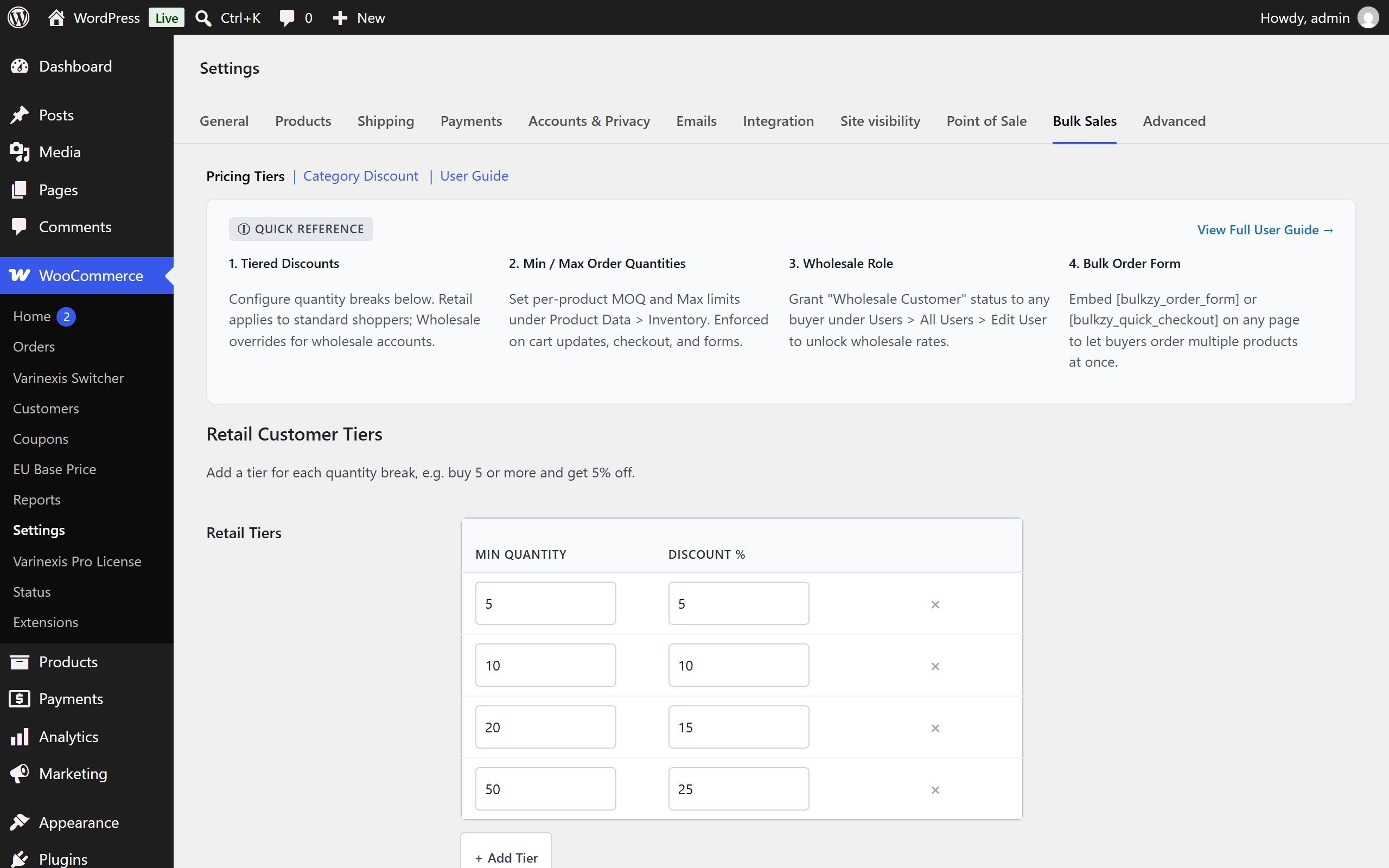
Wholesale Customer). - Dynamic Tiered Pricing & Quantity Breaks: Set unlimited quantity-based discount tiers (e.g., Buy 5+ get 5% off, Buy 10+ get 10% off, Buy 25+ get 20% off).
- Interactive Tier Builder UI: Configure and manage quantity breaks effortlessly with live in-dashboard rule previews.
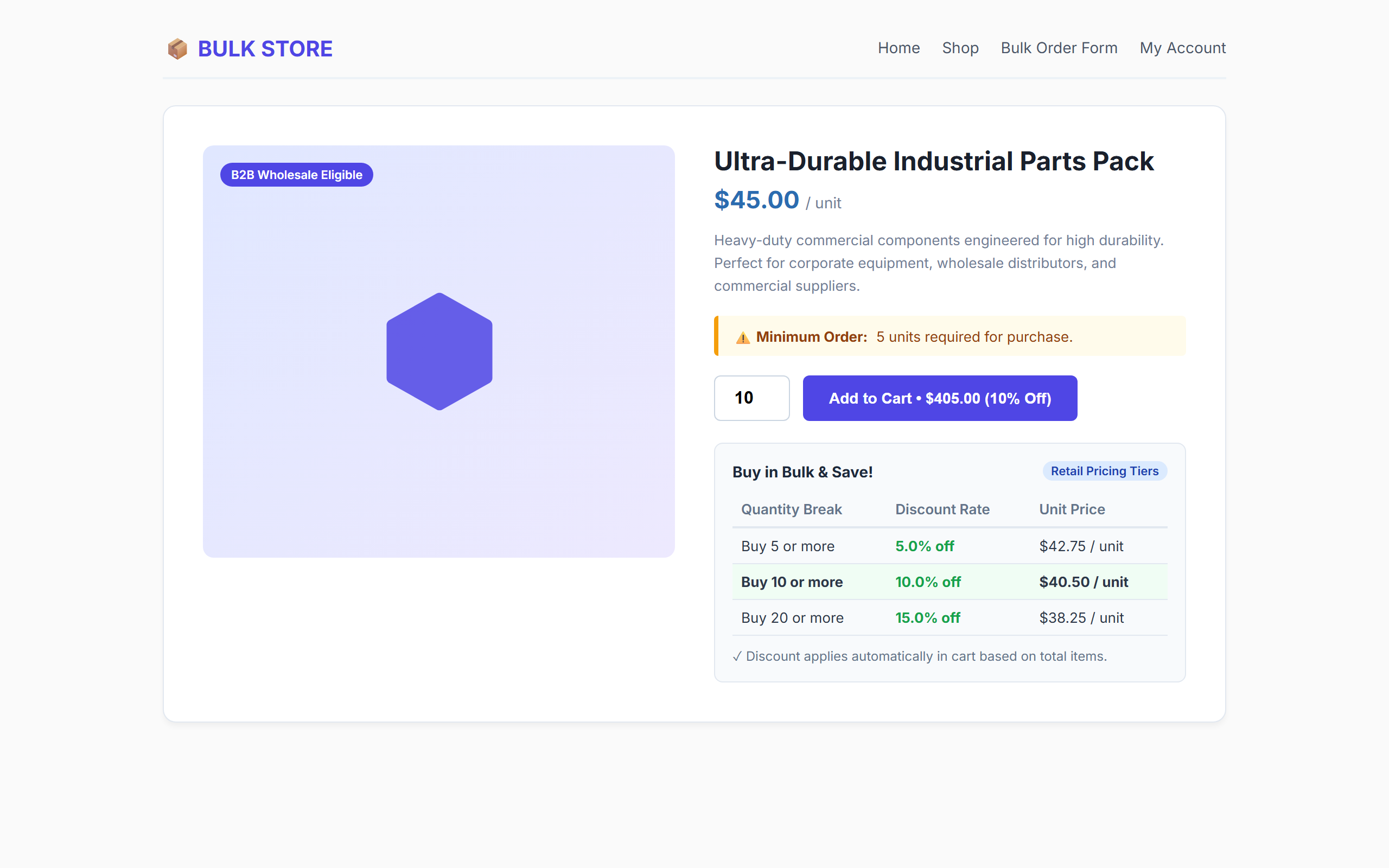
- Minimum Order Quantity (MOQ): Enforce minimum unit purchase requirements globally per product on single product pages, cart updates, and checkout.
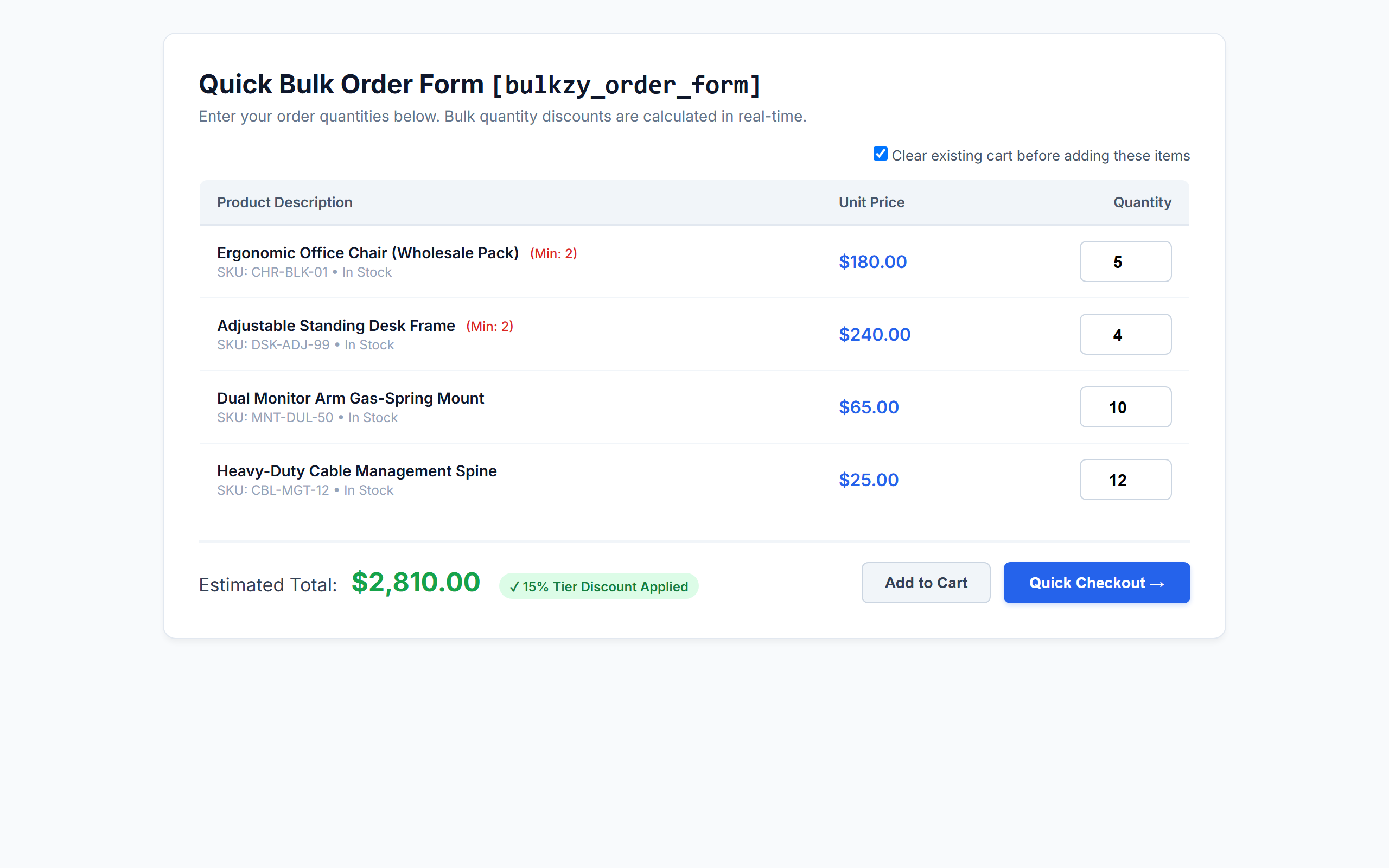
- AJAX Bulk Order Form Shortcode (
[bulkzy_order_form]): Provide high-volume buyers with a fast, one-page ordering table featuring live dynamic total calculations. - Quick Checkout Landing Page (
[bulkzy_quick_checkout]): Allow wholesale buyers to fill quantities and skip directly to checkout with cart reset capability. - Visual On-Page Bulk Pricing Tables: Automatically showcase available quantity discounts right below the „Add to Cart“ button on single product pages.
- Category-Specific Bulk Discounts: Apply volume discounts exclusively to products within designated categories.
- WooCommerce HPOS Compatible: 100% compatible with High-Performance Order Storage (Custom Order Tables) and legacy post storage.
- Blazing Fast & Lightweight: Zero external bloat, vanilla frontend scripts, and clean standard WooCommerce cart fee engine.
💼 Perfect for B2B & Wholesale Niches
- Manufacturers & Wholesalers: Supply commercial buyers with wholesale price tiers and enforced batch minimums (MOQ).
- Corporate & Office Supplies: Enable businesses to order bulk office furniture, stationary, and tech gear in seconds.
- Apparel, Merch & Print-on-Demand: Reward volume orders with automated quantity discount tables.
- Food, Beverage & Grocery Distributors: Sell bulk cases and pallets using category-specific thresholds.
- Retail Stores with Volume Discounts: Increase cart sizes by showing retail shoppers clear incentive tables to buy more units.
⚡ Shortcodes & How to Use Them
Bulkzy includes two shortcodes designed for wholesale ordering pages:
[bulkzy_order_form]– Displays a bulk ordering grid with live total calculation and standard Add to Cart actions.[bulkzy_quick_checkout]– Renders a wholesale bulk matrix with a direct „Quick Checkout“ button and optional one-click cart clearing.
Shortcode Attributes:
* limit (optional) – Number of simple products to display (default: 50). Example: [bulkzy_order_form limit="20"]
* category (optional) – Comma-separated category slugs to filter products. Example: [bulkzy_order_form category="hardware,office-supplies"]
* orderby (optional) – Order products by title, date, price, or popularity (default: title).
* order (optional) – Sort direction, ASC or DESC (default: ASC).
🔒 100% Secure, Native & Developer Friendly
- Clean standard WooCommerce cart calculation hook (
woocommerce_cart_calculate_fees). - Safe uninstallation routine with multisite network support.
- Strict nonce verification and capability validation (
promote_users,manage_woocommerce). - Fully translatable with included POT file (
languages/bulkzy-for-woocommerce.pot).
Screenshots
Installation
- Upload the
bulkzy-for-woocommercefolder to your/wp-content/plugins/directory, or install the ZIP file via Plugins > Add New > Upload Plugin. - Activate the plugin through the Plugins screen in WordPress.
- Ensure WooCommerce is active.
- Navigate to WooCommerce > Settings > Bulk Sales to set up your retail and wholesale tiered discounts.
- (Optional) Edit any product under Product Data > Inventory to define a Minimum Order Quantity (MOQ).
- (Optional) Create a new page and add
[bulkzy_order_form]or[bulkzy_quick_checkout]to launch your bulk ordering page.
FAQ
-
Does Bulkzy require WooCommerce to work?
-
Yes. Bulkzy for WooCommerce requires WooCommerce 5.4 or newer. If WooCommerce is deactivated, Bulkzy will automatically display an admin notice and safely pause execution.
-
Do I need to create a „Wholesale Customer“ role manually?
-
No! Bulkzy automatically registers the „Wholesale Customer (Bulkzy)“ role (
bulkzy_wholesale_customer) when the plugin is activated. To grant wholesale pricing to any customer, simply edit their profile in Users > All Users and check the „Wholesale Status“ box. -
How does role-based wholesale pricing work?
-
Bulkzy maintains separate tier matrices for retail shoppers and verified wholesale accounts. When a customer with wholesale status logs in, Bulkzy automatically applies your Wholesale Tiers to their cart instead of standard retail tiers.
-
How do Minimum (MOQ) and Maximum Order Quantities work?
-
You can define both a Minimum Order Quantity (MOQ) and a Maximum Order Quantity for any product under Product Data > Inventory. Limits are automatically enforced on the single product quantity stepper, when adding items to the cart, during cart quantity updates, on checkout, and in bulk order form matrices.
-
Can I apply bulk discounts only to specific product categories?
-
Yes! In WooCommerce > Settings > Bulk Sales > Category Discount, check „Enable Category Discount“, select your target category, set the minimum required category quantity, and define the discount percentage.
-
Are tiered discounts compatible with WooCommerce coupons?
-
Yes. Bulkzy applies discounts as negative cart fees using native WooCommerce fee APIs, ensuring full compatibility with shipping rates, taxes, and standard promotional coupons.
-
Is this plugin compatible with WooCommerce HPOS (High-Performance Order Storage)?
-
Yes, Bulkzy is fully declared and tested compatible with WooCommerce HPOS (Custom Order Tables).
-
What happens if I uninstall the plugin?
-
Bulkzy includes a clean
uninstall.phproutine. If uninstalled via the WordPress dashboard, all plugin settings, post metadata (_bulkzy_moq,_bulkzy_max_qty), and the wholesale role are safely cleaned up across single sites and multisite networks.
Rezensionen
Zu diesem Plugin liegen noch keine Rezensionen vor.
Mitwirkende und Entwickler
„Bulkzy for WooCommerce – Wholesale Pricing, B2B Tiered Discounts, MOQ & Bulk Order Forms“ ist Open-Source-Software. Folgende Menschen haben an diesem Plugin mitgewirkt:
Mitwirkende
Interessiert an der Entwicklung?
Durchstöbere den Code, sieh dir das SVN-Repository an oder abonniere das Entwicklungsprotokoll per RSS.
Änderungsprotokoll
1.0.1
- Fix: Hook
woocommerce_quantity_input_minandwoocommerce_quantity_input_maxso Minimum Order Quantity (MOQ) and maximum order limits enforce directly at the product level. - Fix: Ensure product variations inherit parent product MOQ and maximum order quantity constraints.
- Fix: Extend quantity constraints to block-based cart, checkout, and WooCommerce Store API endpoints.
- Fix: Boost CSS selector specificity on pricing and bulk order tables to prevent theme stylesheets (e.g., OceanWP) from clearing cell padding and forcing uppercase text.
- Fix: Preserve table cell padding inside single product cart forms across themes.
1.0.0
- Initial release of Bulkzy for WooCommerce.
- Role-based tiered pricing engine (Wholesale vs. Retail).
- Interactive tier builder settings interface with live previews.
- Minimum Order Quantity (MOQ) configuration and validation.
- Category-specific bulk volume discounts.
- Visual pricing table on single product pages.
[bulkzy_order_form]and[bulkzy_quick_checkout]AJAX bulk matrix shortcodes.- Full WooCommerce HPOS (High-Performance Order Storage) compatibility.