

Beschreibung
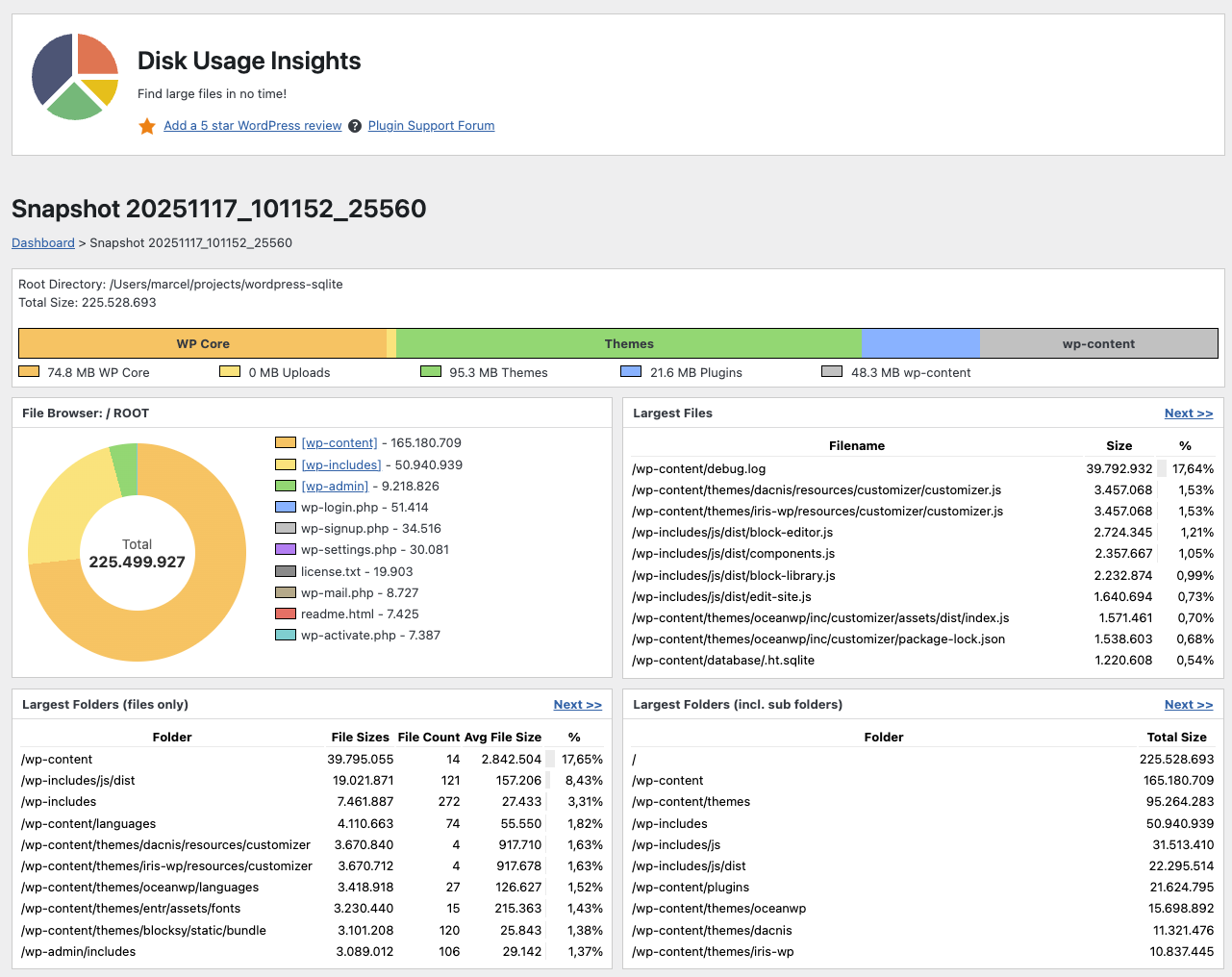
Is your WordPress website running out of disk space? Disk Usage Insights helps you find large files and heavy folders in no time.
This lightweight storage analyzer scans your entire WordPress installation, counts all files and folders, sums up their sizes, and outputs useful statistics to help you hunt down unwanted large objects. Perfect for server cleanup and performance optimization!
Key Features
- TOP 10 Insights: Instantly pinpoint the 10 largest files and folders with the most disk usage.
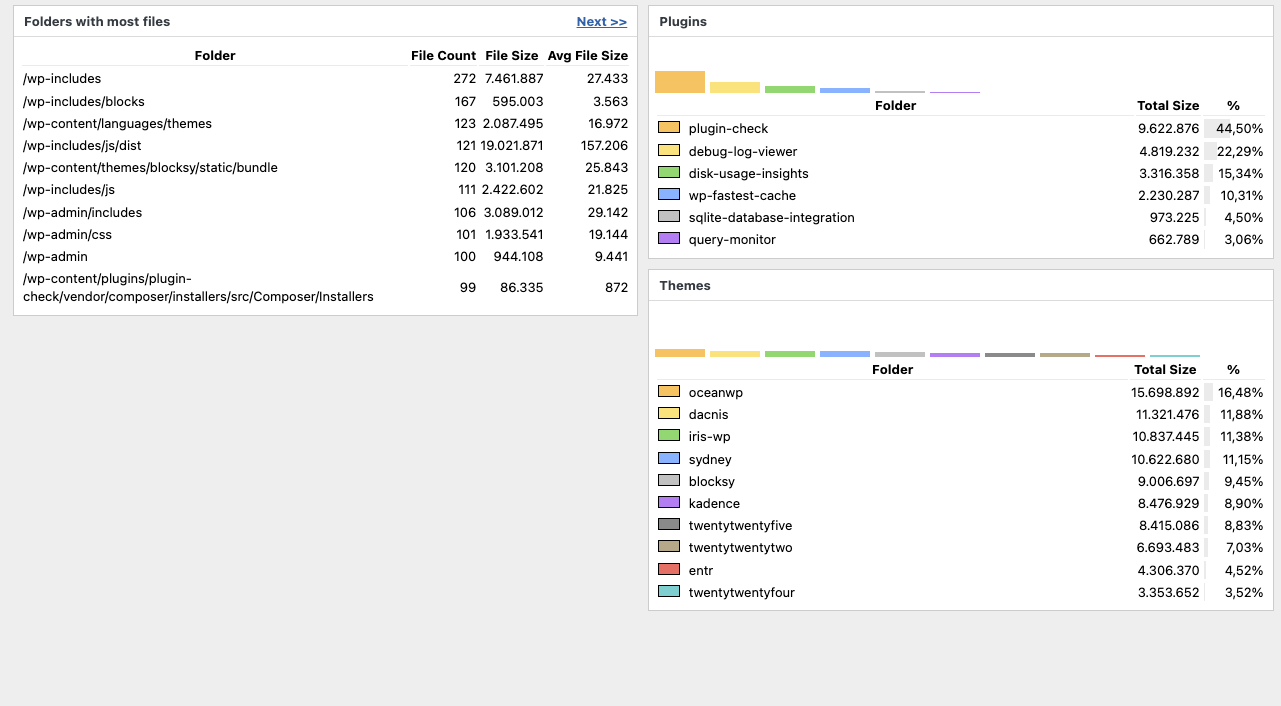
- Visual Charts: Navigate through folders using interactive donut and vertical bar charts.
- Deep Directory Scans: View dedicated breakdowns for the largest plugin and theme folders.
- Multisite Support: Fully compatible with WordPress Multisite networks (requires
manage_sitesprivilege). - Built for Large Sites: Re-engineered with SQLite and job queues to handle massive and slow installations efficiently.
Please note: This plugin only visualizes and analyzes your storage. It does not delete files automatically. You retain full control and must delete files manually.
Screenshots
Installation
- Upload the plugin folder to your /wp-content/plugins/ folder.
- Go to the Plugins page and activate the plugin.
FAQ
-
Wie benutze ich dieses Plugin?
-
You have two options:
* Open the Tools section in the Admin Area and select „Disk Usage Insights“.
* Click the pie chart in the admin bar. -
Wie kann das Plugin deinstalliert werden?
-
Simply deactivate and delete the plugin. All previous snapshot databases will be deleted, too.
-
Does this plugin delete files?
-
No, this plugin only shows big files and directories. You need to delete them manually.
-
Where are the snapshot database files stored?
-
All data is stored within the plugin directory of this plugin. If you update or delete this plugin, previous snapshots will be deleted.
-
Is a different wp-content directory location possible?
-
No, but it is planned for the future.
-
Is a different plugin directory location possible?
-
No, but it is planned for the future.
-
Is a different uploads directory location possible?
-
No, but it is planned for the future.
-
Wird Multisite unterstützt?
-
Yes, but only for users with the „manage_sites“ privilege, which Super Admins have by default.
-
Welche PHP-Version wird unterstützt?
-
Du brauchst eine PHP-Version >= 7.4.
-
Are symlinks supported?
-
No, symlinks are completely ignored (for now) to prevent getting into loops.
Rezensionen


Mitwirkende und Entwickler
„Disk Usage Insights“ ist Open-Source-Software. Folgende Menschen haben an diesem Plugin mitgewirkt:
Mitwirkende
„Disk Usage Insights“ wurde in 2 Sprachen übersetzt. Danke an die Übersetzer für ihre Mitwirkung.
Übersetze „Disk Usage Insights“ in deine Sprache.
Interessiert an der Entwicklung?
Durchstöbere den Code, sieh dir das SVN-Repository an oder abonniere das Entwicklungsprotokoll per RSS.
Änderungsprotokoll
1.12 (upcoming)
- Optimized readme.txt and plugin header
- Maintenance Release
- Cleaned up CSS
- Cleaned up PHP (checks with phpstan)
- Migrated templates from include(…) to load_template(…)
1.11 (2026-06-26)
- Prevent looping by ignoring symlinks (Thanks, @djf3)
- In case of error added the URL of the ajax request for debugging purposes
- Added a stopwatch „Running for xx seconds…“ in the status bar for debugging purposes
- Fix for Multisite installations (Thanks, @mattenser)
- Subtracted uploads size from wp-content size (Thanks, @kaiyoma)
- Security updates (plugin checker warnings)
1.10 (2025-12-15)
- WordPress 6.9 compatability =
1.9 (2025-11-18)
- File Browser: Donut Chart + Navigate through folders
1.8 (2025-11-11)
- Better Bar Chart
- Percentage Display for Plugins and Themes
- Changed the Review and Help links
- Vertical Bar Charts for Plugins and Themes
1.7 (2025-11-06)
- Added Bar Charts
- Error Output to Website so it can be reported to the WordPress Forum
1.6 (2025-04-08)
- Pagination for result tables
- New visuals of the data analysis phases
1.5 (2025-03-16)
- Plugin is now 2-5x faster in scanning and analysis
1.4 (2024-12-20)
- Plugin läuft jetzt mit PHP >=7.4 ()
1.3 (2024-12-19)
- Reimplemented „Largest Plugin Folder“ and „Largest Theme Folders“ from v1.1
- Bugfix: Report „Largest Folders (incl. sub folders)“ was sorted by count instead of size
- Bugfix: Fix issues with the playground demo version
1.2 (2024-12-19)
- Support for really big and slow installations (complete code rewrite, usage of sqlite as a database and job queues on top of it)
1.1 (2024-12-19)
- Support for Multisite installations (user must have privilege „manage_sites“ which Super Admins have by default)
- Disk Usage in percent is now visualized with a bar in the background of the first column
1.0 (2024-08-20)
- Plugin released.