

Beschreibung
Der Header Footer Code Manager von 99 Robots bietet eine einfache Schnittstelle, um Snippets zur Kopfzeile oder Fußzeile oder über oder unter dem Inhalt deiner Seite hinzuzufügen.
VORTEILE
- Mach dir keine Gedanken darum, dass du versehentlich durch Hinzufügen von Code deine Website zerschießen könntest
- Vermeide es, Snippets versehentlich an der falschen Stelle zu platzieren
- Mach ein Dutzend oder mehr unsinnige Plugins überflüssig, um einfach nur ein kleines Code-Snippet zu ergänzen – weniger Plugins sind immer besser!
- Verliere deine Code-Snippets nie mehr, wenn du Themes umschaltest oder wechselst
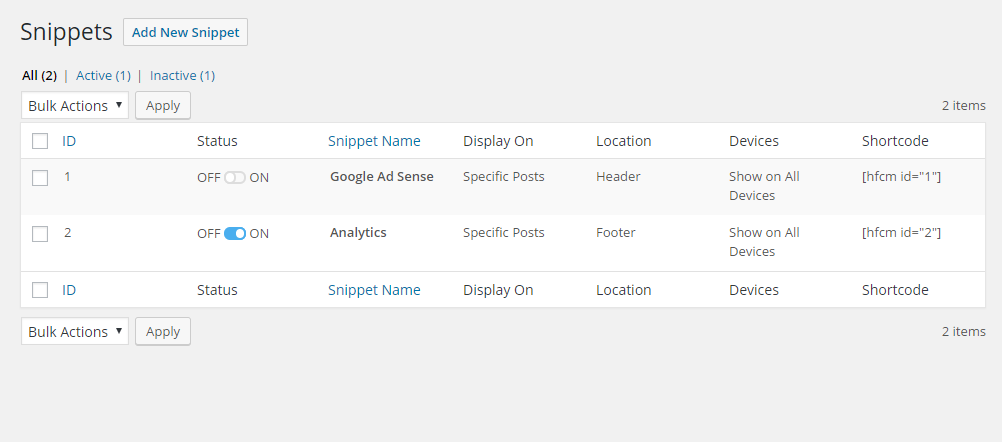
- Wisse genau, welche Snippets auf deiner Website laden, wo sie angezeigt werden und wer sie hinzugefügt hat
FUNKTIONEN
- Füge beliebig viele Skripts und Styles überall und auf allen Beiträgen / Seiten hinzu
- Verwalte, in welchen Beiträgen oder Seiten das Skript lädt
- Unterstützt individuelle Inhaltstypen
- Bietet die Möglichkeit, nur in einem bestimmten Beitrag / auf einer bestimmten Seiten oder in den letzten Beiträgen zu laden
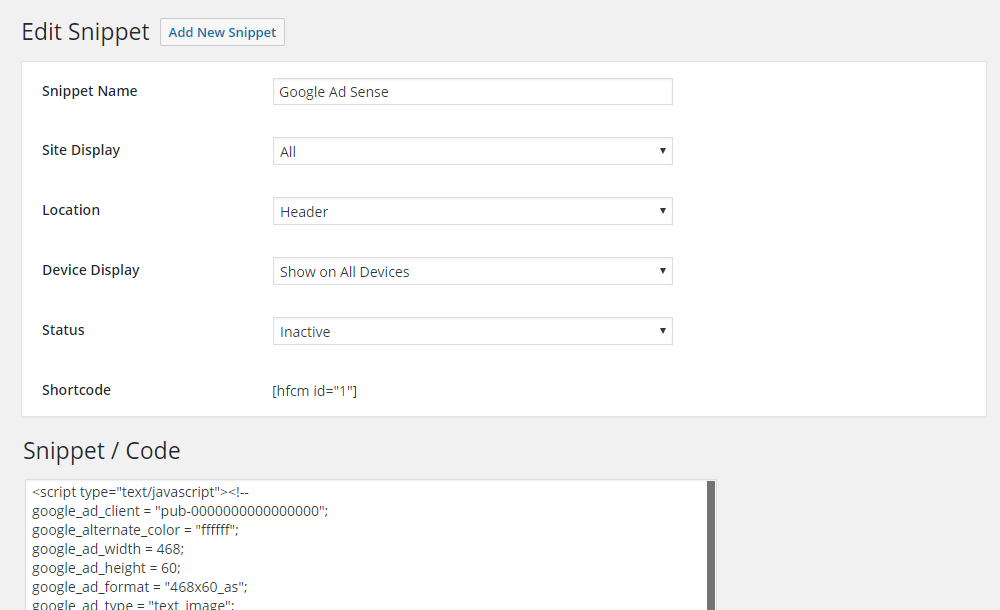
- Kontrolliere, wo genau auf der Seite das Skript geladen wird – Head, Footer, vor dem Inhalt oder danach
- Das Skript kann nur auf Desktops oder mobil laden. Aktiviere oder deaktiviere das eine oder das andere.
- Verwendet Shortcodes, um den Code manuell beliebig zu platzieren
- Benenne jedes Snippet für einfache Referenz
- Das Plugin protokolliert, welcher Benutzer das Snippet hinzugefügt und zuletzt geändert hat, und wann
OPTIONEN ZUR ANZEIGE AUF SEITEN
- Site wide on every post / page
- Bestimmter Beitrag
- Bestimmte Seite
- Bestimmte Kategorie
- Bestimmtes Schlagwort
- Bestimmte individuelle Inhaltstypen
- Nur die letzten Beiträge (du wählst, wie viele)
- Manuelle Platzierung mittels Shortcodes
POSITIONEN ZUM EINFÜGEN
- Head-Abschnitt
- Footer
- Am Beginn des Inhalts
- Am Ende des Inhalts
GERÄTE-OPTIONEN
- Auf allen Geräten anzeigen
- Nur Desktop
- Nur Mobilgeräte
UNTERSTÜTZTE DIENSTE
- Google Analytics
- Google AdSense
- Google Tag Manager
- Clicky-Web-Analytics sowie andere Analytics-Tracking-Skripts
- Chat-Module wie Olark, Drip, oder
- Pinterest Site Verification
- Facebook-Pixel, Facebook-Skripts, Facebook-og:image-Tag
- Google-Conversion-Pixel
- Heatmaps aus Crazy Egg, Benachrichtigungen von Hello Bar usw.
- Es kann JEDES Code-Snippet (HTML / Javascript / CSS) von jedem Dienst verarbeiten
- und die Liste wird länger und länger …
MULTISITE-HINWEIS
Wenn du dieses Plugin in einem Multisite-Netzwerk nutzt, stelle bitte sicher, dass das Plugin nur auf Unterseiten-Ebene aktiviert ist.
Plugin-Informationen
Screenshots

Installation
- Lade
header-footer-code-managerins Verzeichnis/wp-content/plugins/hoch - Aktiviere das Plugin im „Plugins“-Menü in WordPress
- Geh zur Plugins-Seite und sieh dir die Anleitungen für Shortcode und PHP-Template-Tags an
HINWEIS: Wenn du dieses Plugin in einem Multisite-Netzwerk nutzt, stelle bitte sicher, dass das Plugin nur auf Unterseiten-Ebene aktiviert ist.
FAQ
-
F. Warum erscheinen meine Skripts als Text auf der Website?
-
A. Bitte stell sicher, dass du dein Skript in Skript-Tags einfügst – <> Skript hier einfügen <>.
-
F. Wo findet man die Einstellungen dieses Plugins?
-
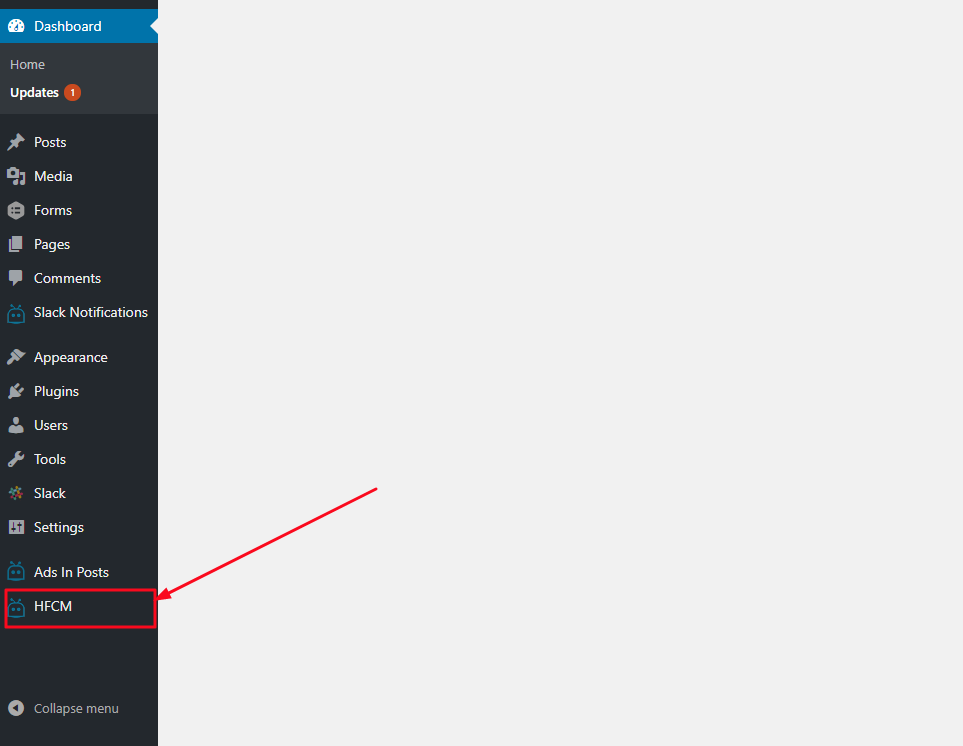
A. Nachdem du das Plugin aktiviert hast, kannst du entweder auf den Link „Einstellungen” unter dem Namen des Plugins klicken ODER auf die Registerkarte „HFCM” auf der linken Navigationsleiste. Von dort aus kannst du Code-Schnipsel hinzufügen, bearbeiten, entfernen und überprüfen.
-
F. Wie füge ich Code-Snippets zu all meinen Beiträgen/Seiten hinzu?
-
A. Mit Version 1.1.4 des HFCM-Plugins haben wir Ausgewählte Individuelle Inhaltstypen durch die Möglichkeit ersetzt, Code zu Allen Beitragstypen hinzufügen inklusive Beiträge, Seiten, Anhänge und Individuelle Inhaltstypen.
-
F. Ich habe eine Frage
-
A. Da dies ein kostenloses Plugin ist, stell bitte alle Fragen im Supportforum hier bei WordPress.org. Wir werden uns bemühen, jede Frage innerhalb von 48 Stunden zu beantworten.
-
F. Wie kann ich eine Funktion anregen oder die Weiterentwicklung fördern?
-
A. Kostenlose Plugins leben vom Feedback der Benutzer. Deshalb kannst du uns am besten helfen, indem du eine Bewertung hinterlässt, um andere dazu zu ermutigen, das Plugin auszuprobieren. Je mehr Benutzer es gibt, desto wahrscheinlicher ist es, dass neue Funktionen hinzugefügt werden. Das ist eine ganz kleine Bitte als Gegenleistung für ein KOSTENLOSES Plugin.
-
F. Unterstützt Ihr die Tracking-Skripts von X oder Y?
-
A. Wenn dein Skript nicht unterstützt wird, sag uns einfach Bescheid und wir kümmern uns sofort darum. Wir geben unser Bestes, um sicherzustellen, dass alle seriösen Dienste unterstützt werden. Wenn du Support für ein bestimmtes Skript anforderst, wäre es super, wenn du uns ein Beispiel des Skripts schicken könntest, damit wir uns die Struktur ansehen können.
-
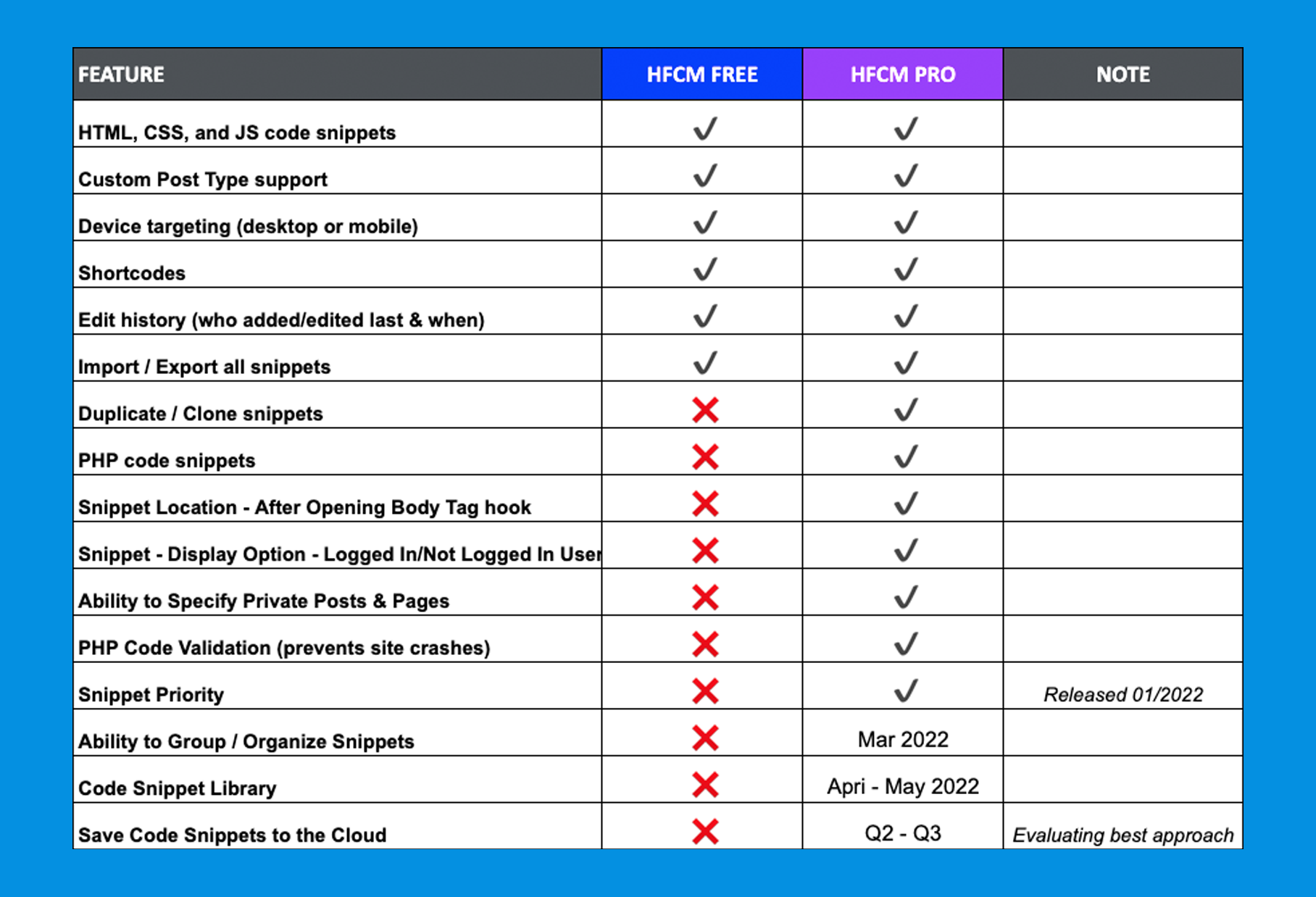
F. Was sind die Unterschiede zwischen HCFM Pro und Kostenlos?
-
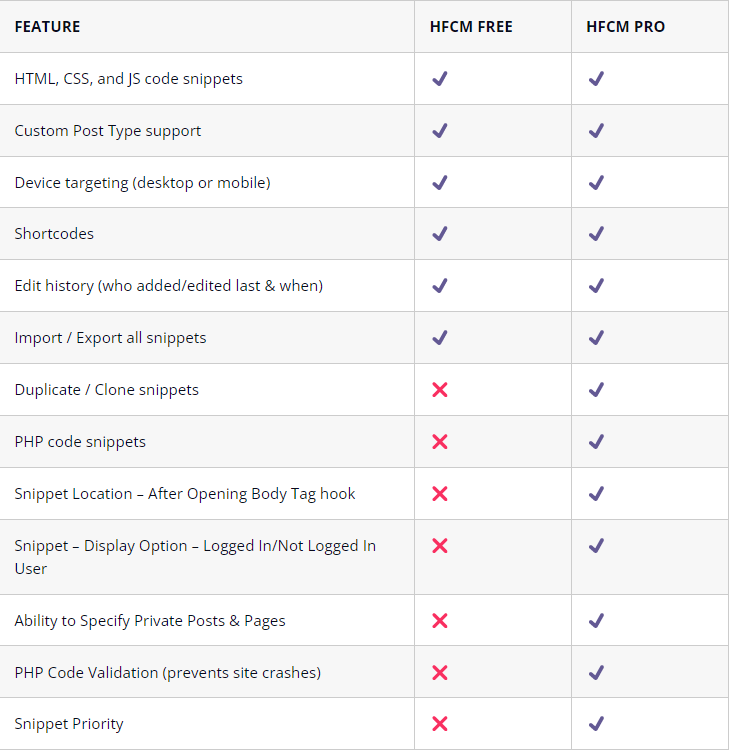
A. Die PRO-Version hat viele weitere coole Funktionen, die in der KOSTENLOSEN Version nicht drin sind, und dazu noch ein paar Funktionen, die bald kommen. Schau dir die Unterschiede zwischen PRO und KOSTENLOS an.
Rezensionen


Mitwirkende und Entwickler
„Header Footer Code Manager“ ist Open-Source-Software. Folgende Menschen haben an diesem Plugin mitgewirkt:
Mitwirkende


„Header Footer Code Manager“ wurde in 14 Sprachen übersetzt. Danke an die Übersetzer für ihre Mitwirkung.
Übersetze „Header Footer Code Manager“ in deine Sprache.
Interessiert an der Entwicklung?
Durchstöbere den Code, sieh dir das SVN-Repository an oder abonniere das Entwicklungsprotokoll per RSS.
Änderungsprotokoll
1.1.46
2026-07-15
* ADDED: Compatibility with WordPress 7.0.1
1.1.45
2026-06-09
* ADDED: Security setting to optionally enforce DISALLOW_UNFILTERED_HTML when managing snippets
1.1.44
2026-01-22
* ADDED: Compatibility with WordPress 6.9
1.1.43
2025-10-03
* ADDED: Compatibility with WordPress 6.8.3
1.1.42
2025-08-27
* FIXED: Import functionality not working
1.1.41
2025-08-05
* ADDED: Compatibility with WordPress 6.8.2
* IMPROVED: Specific Post Types now includes options to display snippet on only posts, or archives, or both
* FIXED: Snippets not showing on archives of specific post types
1.1.40
2025-05-06
* ADDED: Compatibility with WordPress 6.8.1
1.1.39
2024-09-27
* ADDED: Compatibility with WordPress 6.6.2
* FIXED: NULL parent slug value in the submenu
1.1.38
2024-06-06
* ADDED: Compatibility with WordPress 6.5.4
1.1.37
2024-01-31
* ADDED: Compatibility with WordPress 6.4.3
1.1.36
2023-09-04
* ADDED: Compatibility with WordPress 6.3.1
1.1.35
2023-07-04
* ADDED: WordPress nonce checks while performing bulk actions on the snippets
1.1.34
2023-06-27
* FIXED: Check if Woocommerce installed before using its functions
1.1.33
2023-06-26
* FIXED: Snippets not showing up on Woocommerce product categories and tags
* UPDATED: Compatibility with WordPress 6.2.2
* UPDATED: Compatibility with PHP 8.2
1.1.32
2022-12-16
* ADDED: Warning message to caution about file editing
* FIXED: Snippet including in case of rest api in some cases
1.1.31
2022-12-09
* ADDED: Warning message to caution users of using improper code or untrusted sources code that can break site or create security risks.
* UPDATED: Compatibility with WordPress 6.1.1
1.1.30
2022-11-09
* FIXED: Proper checks for user access and capabilities
* UPDATED: Compatibility with WordPress 6.1
1.1.29
2022-09-21
* FIXED: Description not showing on the RSS feed page
1.1.28
2022-09-18
* FIXED: Check for not rendering the snippets on the RSS feed page
* UPDATED: Compatibility with WordPress 6.0.2
1.1.27
2022-07-15
* FIXED: Internationalization support for PO Translation files. Plugin now supports translation to additional languages in addition to the base language, English.
* ADDED: 1 Translation for Hindi.
* UPDATED: Compatibility with WordPress 6.0.1
1.1.26
2022-07-01
* FIXED: Code snippet sanitization, removed due to incompatibility with functionality
1.1.25
2022-06-29
* UPDATED: Code improvements as per WordPress standards
1.1.24
2022-06-25
* FIXED: XSS Security Vulnerability fix
1.1.23
2022-06-10
* UPDATED: Compatibility with WordPress 6.0
1.1.22
2022-05-10
* FIXED: PHP warnings when adding/editing snippets
* UPDATED: Add confirmation before deleting snippets
* UPDATED: Copy shortcode button
1.1.21
2022-04-21
* ADDED: Copy shortcode to clipboard buttons on edit snippet page and on snippet list page
* UPDATED: Compatibility with WordPress 5.9.3
* UPDATED: Included Custom Taxonomies for snippets
* UPDATED: Snippet code editor size
* ADDED: Increased Number of Allowed Posts/Page Exclusions to 200K+ posts.
1.1.20
2022-03-26
* FIXED: MultiSite issue with subsites in network
1.1.19
2022-03-24
* FIXED: MultiSite slow query issue
* UPDATED: Compatibility with WordPress 5.9.2
1.1.18
2022-03-05
* ADDED: Ability to apply snippets to search, home, archive page only
* ADDED: Snippet search functionality
* ADDED: Snippet type filter
* ADDED: Snippet sort by location
* ADDED: Delete snippet button on edit snippet page
1.1.17
2022-02-17
* FIXED: XSS vulnerability with request parameter page in the HFCM snippet listing screen
* UPDATED: Compatibility with WordPress 5.9
* UPDATED: Text & Plugin assets
* UPDATED: Snippet column length
1.1.16
2021-12-13
* FIXED: Author not showing on Add/Edit snippet screen
* ADDED: PRO banner
* UPDATED: Text & Plugin icon
1.1.15
2021-10-26
* UPDATED: Code improvements as per WordPress standards
* Proper escaping
* Proper variable naming
* Added recommended spacing by WordPress
1.1.14
2021-10-08
* FIXED: SQL Vulnerability with listing orderby
* FIXED: DbDelta query
* UPDATED: Compatibility with WordPress 5.8.1
1.1.13
2021-09-06
* FIXED: bool function return type
* UPDATED: Minimum required PHP version
* UPDATED: Lowest WordPress version that the plugin will work on
1.1.12
2021-09-04
* FIXED: Import upload file type error
* FIXED: Location options for site display (specific categories)
* UPDATED: File format for the import/export files
* UPDATED: Compatibility with WordPress 5.8
1.1.11
2021-08-10
* FIXED: Warnings – Undefined Variables
* FIXED: Selectize issue of not able to select first option from the dropdown
* ADDED: Snippet types
* ADDED: Code Editor in place of textarea
* ADDED: Import/Export Snippets
* UPDATED: Compatibility with WordPress 5.8
1.1.10
2021-04-23
* FIXED: Warnings – Undefined Variables
* UPDATED: Compatibility with WordPress 5.7.1
1.1.9
2021-02-18
* UPDATED: Compatibility with WordPress 5.6.1
1.1.8
2020-09-01
* FIXED: Specific Taxonomy Snippets showing on archives with at least one instance.
* UPDATED: Compatibility with WordPress 5.5.0
1.1.7
2020-04-20
* UPDATED: Compatibility with WordPress 5.4.0
* FIXED: Warnings and Exclude Pages/Posts showing up on Shortcode Only screen
1.1.6
2019-09-22
* FIXED: Specific Pages targeting Blog index page, even when it is not selected.
1.1.5
2019-08-29
* FIXED: Unable to target Blog index page
1.1.4
2019-08-15
* UPDATED: All snippets list now shows 20 snippets in the first page instead of 10
* ADDED: Replaced Specific Custom Post Types under Site Display to include the functionality to add code snippets to all post types, including posts, pages, custom post types & attachments
* UPDATED: Compatibility with WordPress 5.2.2
1.1.3
2019-05-03
* UPDATED: Compatibility with WordPress 5.1.1
1.1.2
2019-01-07
* FIXED: Blank page on dismissing notice when on a few admin pages
* UPDATED: Admin notice will now only show on the HFCM plugin admin pages
1.1.1
2018-12-31
* FIXED: Warning – Unexpected Output – headers already sent
1.1.0
2018-12-31
* UPDATED: Code Optimization
* UPDATED: Added plugin settings link, and update documentation.
* Compatible with WordPress 5.0.2
1.0.9
2018-10-09
* UPDATED: Code Optimization
1.0.8
2018-10-04
* FIXED: Updated obsolete code causing errors.
1.0.7
2018-10-01
* ADDED: Functionality to Exclude Posts and Pages from the Site Wide option.
1.0.6
2018-07-10
* FIXED: Latest Posts dropdown selection always resets to 1 on save / update.
1.0.5
2018-06-14
* UPDATED: „All Snippets“ page to show 10 snippets before pagination starts.
1.0.4
2018-05-23
* FIXED: style-admin.css not loading on „Add New Snippet“ page.
* FIXED: Post List not loading when selecting „Specific Posts“ in „Site Display“ under Add New Snippet.
1.0.3
2017-06-09
* Compatible with WordPress 4.8
1.0.2
2016-9-22
* FIXED: Updated code triggering a fatal error for sites with older PHP versions.
1.0.1
2016-9-20
* FIXED: Updated code triggering a fatal error for sites with older PHP versions; now compatible.
1.0.0
2016-7-20
* Initial release – HFCM is born! 🙂