
Beschreibung
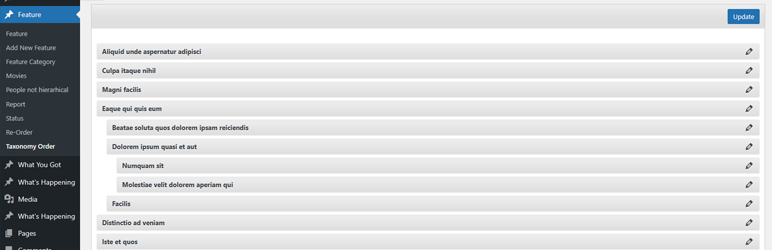
Easily control the order of Categories and any hierarchical taxonomy with a simple drag-and-drop interface. Reorder parent and child terms visually in the admin and choose whether the plugin automatically applies your custom term order to front-end queries.
Key features
- Intuitive drag-and-drop reordering for Categories and all hierarchical taxonomies.
- Option to auto-apply the custom term order to front-end queries (no theme/plugin edits required).
- Keep the admin term lists in your new order (makes management and editorial workflows consistent).
- Works with multiple taxonomies per post type — switch between taxonomies from the same interface.
- Multisite aware and regularly updated for modern WordPress and PHP versions (see changelog for compatibility notes).
How it works
After activating the plugin, a new Taxonomy Order page becomes available under the custom post type menu. Simply open it and drag terms into the exact order you want — including parent/child hierarchy.
Use the plugin’s Taxonomy Order screen to drag terms into the order you want. To apply the custom order automatically across your site, enable the Autosort option — the plugin will adjust term queries on the fly so your chosen order shows without template changes. If you prefer to control ordering in code, include orderby => ‚term_order‘ when calling get_terms() to use the plugin’s order programmatically.
This plugin is developed by Nsp-Code
Schau dir Advanced Taxonomy Terms Order an, wenn du noch mehr Funktionen möchtest.
Lokalisierung
Available in Catalan, Chinese (China), Chinese (Taiwan), Czech, Dutch, Dutch (Belgium), English (Australia), English (Canada), English (New Zealand), English (UK), English (US), French (France), Galician, German, Italian, Japanese, Norwegian (Bokmål), Polish, Portuguese (Portugal), Russian, Spanish (Chile), Spanish (Spain), Spanish (Venezuela), Swedish, and Turkish.
Whant to contribute with a translation to your language? Please check at https://translate.wordpress.org/projects/wp-plugins/taxonomy-terms-order
Gibt es keinen muttersprachlichen Übersetzer unter den Plugin-Mitwirkenden? Dann kannst du beim Moderieren mithelfen! https://translate.wordpress.org/projects/wp-plugins/taxonomy-terms-order/contributors
Screenshots
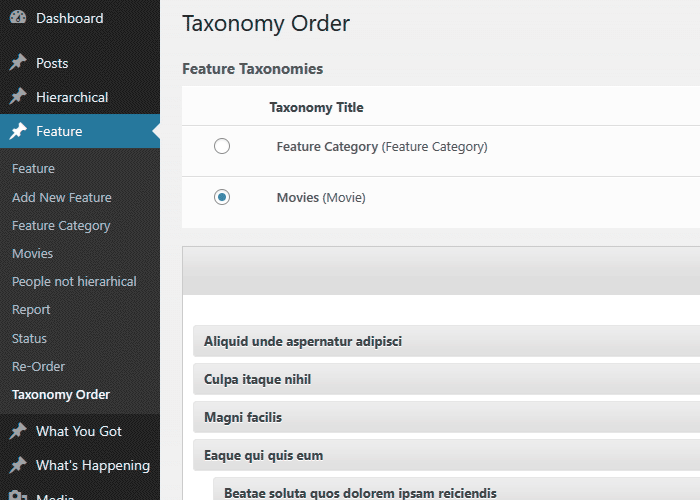
Benutzeroberfläche der Kategoriereihenfolge 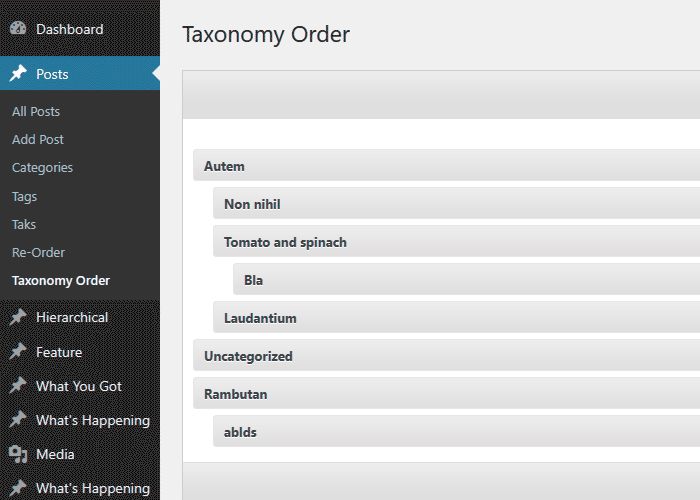
Benutzeroberfläche der mehrfachen Taxonomien
Installation
- Lade den Ordner
taxonomy-terms-orderin dein Verzeichnis/wp-content/plugins/hoch. - Aktiviere das Plugin Admin-Bereich unter dem Menüpunkt „Plugins“.
- Nach dem Aktivieren solltest du unter Einstellungen > Taxonomy Terms Order nachschauen.
- Verwende den „Taxonomy Order“-Link, der in jedem Abschnitt von Inhaltstypen erscheint, um die Sortierung festzulegen.
FAQ
Kontaktiere mich gerne unter electronice_delphi@yahoo.com
-
Since I have no PHP knowledge at all, is this plugin for me?
-
Absolutely, you can!
Unlike many other plugins, you don’t have to do any code changes to make your post order to apply, accordingly to custom-defined order. There is an option to auto-update the WordPress queries so the posts will be returned in customised order. This can be turned off (Autosort) to allow customized code usage. -
Ich bevorzuge es, die Sortierung im Code festzulegen. Wie kann ich dies tun?
-
Füge ein ‚orderby‘ => ‚term_order‘ innerhalb deines get_terms() Arguments ein.
-
Welche Taxonomien kann ich sortieren?
-
You can sort ALL taxonomies ( hierarhically active ), including the default Categories.
-
Gibt es eine Möglichkeit, dass meine Administrator-Oberfläche die individuelle Begriffsreihenfolge verwendet?
-
Absolutely, the plugin can do that. In fact you can configure so only the admin will update and the front side template will display the terms as before.
-
Es gibt eine Funktion, die ich gerne integriert hätte. Kannst du da etwas machen?
-
All ideas are welcome and i put them on my list to be implemented into the new versions. Anyway this may take time, but if you are in a rush, please consider a small donation and we can arrange something.
-
Ich benötige noch mehr Funktionen
-
Consider upgrading to our advanced version of this plugin at a very resonable price Advanced Taxonomy Terms Order Order
Rezensionen


Mitwirkende und Entwickler
„Category Order and Taxonomy Terms Order“ ist Open-Source-Software. Folgende Menschen haben an diesem Plugin mitgewirkt:
Mitwirkende
„Category Order and Taxonomy Terms Order“ wurde in 25 Sprachen übersetzt. Danke an die Übersetzer für ihre Mitwirkung.
Übersetze „Category Order and Taxonomy Terms Order“ in deine Sprache.
Interessiert an der Entwicklung?
Durchstöbere den Code, sieh dir das SVN-Repository an oder abonniere das Entwicklungsprotokoll per RSS.
Änderungsprotokoll
1.9.5
- Add a Settings link for the plugin in the Plugins area to make it easier for users to access and get started.
- Implement minor code improvements.
1.9.4
- On Rest Request, evaluate the admin sort settings to apply or not the customized order.
1.9.3
- Improved plugin page description
- Use sanitize_text_field and wp_unslash for the options form
- Include FALSE argument in the wp_register_script
- WordPress 6.9 compatibility check
- WordPress 6.9 tag update
1.9.1
- Replace all _e with escaping function esc_html_e
- Use esc_url when output an image url
- Use esc_attr when output html attribute value
- Use isset before using an array argument.
- Minor CSS enhancements
- Other Minor code changes
1.9
- Style and layout updates for the re-order interface.
- Add version to the CSS/JavaScript files to ensure latest data is loaded instead cached.
- WordPress 6.8.2 compatibility tag
1.8.8
- PHP 8.3.4 compatibility check
- Slight CSS and layout adjustments.
- WordPress 6.8 compatibility tag
1.8.7
- CSS adjustments for span action section.
- Option for term edit link.
- Include the term edit link on the ReOrder interface.
- WordPress 6.7 compatibility check and tag update.
1.8.6
- Fix: TTO_addons class not loaded which makes the compatibility routines not triggering.
1.8.5
- Temporary placeholder function to prevent fatal errors when using the Uncode theme.
1.8.4
- Code structure improvements.
- New option „Show / Hide re-order interface“ – Display the Taxonomy Order interface for the specified post types
- WordPress 6.6.1 compatibility check and tag update
1.8.2
- Polylang fix – Ignore the ‚language‘ to avoid unnecessarily sorting.
- Set-up the Live Preview for the plugin.
- WordPress 6.5.4 compatibility check and tag update
1.8.1
- WordPress 6.5 compatibility check and tag update
1.8
- Check if the terms table still includ the custom column, to avoid errors ( mainly when upgrading WordPress )
- Code improvements
- WordPress 6.4.2 compatibility check and tag update
1.7.9
- Trigger wp_cache_flush when saving the order to clear the internal caches
- WordPress 6.3 compatibility tag
1.7.7
- Use term name for admin queries, when the admin sort is active, to avoid „random“ returns on certain servers, when term order are empty.
- WordPress 6.2.2 compatibility tag
1.7.5
- New filter tto/admin/plugin_options/capability to add custom roles and capabilities.
- Compatibility tag update for WordPress 6.2
1.7.4
- Compatibility tag update for WordPress 6.1.1
1.7.3
- Use esc_html to escape the ajax response message, to avoid single quotes which will break the code.
1.7.1
- Add the required column when create a new site, when running under MultiSite environment.
1.7
- Create the required columns for all sites, when running under MultiSite environment.
- Compatibility tag update for WordPress 6.0.1
1.6.1
- Compatibility tag update for WordPress 6.0
1.6
- Readme file updates, typos fixes.
- Compatibility tag update for WordPress 5.9.1
1.5.9
- Remove Twitter button
- Compatibility tag update for WordPress 5.8.2
1.5.7.7
- Minor code updates
- Code cleanup
- Compatibility tag update for WordPress 5.8.1
1.5.7.6
- Clear the term cache to ensure the updated order reflect for certain caches
1.5.7.5
- Apply the order within admin if ignore_term_order argument is set and not true
- Compatibility tag update for WordPress 5.7
1.5.7.4
- Fix: Call to undefined function wc_get_attribute_taxonomies()
- Compatibility tag update for WordPress 5.6
1.5.7.3
- Compatibility tag update for WordPress 5.5
1.5.7.2
- Compatibility tag update for WordPress 5.4
1.5.7.1
- Kompatibilitätsupdate für WordPress 5.3
1.5.7
- Ignore WooCOmmerce Attributes order as being changed through default interface
1.5.6
- Rely on ‚terms_clauses‘ filter than ‚get_terms_orderby‘ as producing issues with the $maybe_orderby_meta backward compatibility.
- Fix WooCommerce category order apply
1.5.5
- Ignore admin sort when using columns order within Taxonomy interface
1.5.4
- Replaced serialize with JSON when saving terms order
- New filter to/get_terms_orderby/ignore to allow sort ignore when Autosort is turned On
- Addon code to ignore term_order sorting when Co-Authors plugin term query
1.5.3.2
- Add nonce field for AJAX sort update
1.5.3.1
- Removed Google Plus share button which triggered some JavaScript errors
1.5.3
- Use JSON instead serialize method when sending order through AJAX
- PO-Übersetzungsdatei aktualisiert
1.5.2.2
- Default admin capability changed from install_plugins to manage_options to prevent DISALLOW_FILE_MODS issue. https://wordpress.org/support/topic/plugin-breaks-when-disallow_file_mods-is-set-to-true/
- Plugin als Composer-Paket vorbereitet
- Darstellung des th-Kopfzeilenelements: links ausgerichtet
- Darstellung des Zählers der Taxonomie-Begriffe korrigiert
1.5
- Included ‚ignore_term_order‘ to force menu_order ignore when autosort active.
- Übersetzungsfehler aktualisiert
1.4.9
- Übersetzungen aus dem Paket entfernt
- Spendenbanner entfernt
- PHP-7-Korrektur
- Nicht genutzte Aktion entfernt
1.4.8
- Textdomain-Ordner korrigiert
- Übersetzung von Benutzerrollen korrigiert
- Filter the_title durch terms_walker ersetzt
- Nonce zu den Admin-Einstellungen hinzugefügt
1.4.7
- Textdomain in taxonomy-terms-order geändert, um Übersetzungen durch translate.wordpress.org zu ermöglichen
- Kompatibilität mit WordPress 4.4 hinzugefügt
- CSS aktualisiert
1.4.6.1
- Sicherheitsfehler behoben
1.4.5
- Textdomain für Übersetzung korrigiert (Dank an Pedro Mendonça)
- Portugiesische Übersetzung aktualisiert (Pedro Mendonça)
1.4.4
- Benutzerrollen von veraltetem user_level zu Berechtigungen geändert
- Taxonomie-Reihenfolge für Medien
- Administrator-Optionen aktualisiert
1.4.2
- Persische Übersetzung (ydaaad@gmail.com)
- Admin-CSS aktualisiert
1.4.1
- Polnische Übersetzung (Pozdrawiam – www.difreo.pl und Mateusz – www.czar-net.com)
1.4.0
- Ungarische Übersetzung (Adam Laki – http://codeguide.hu/)
- Ukrainische Übersetzung (Michael Yunat – http://getvoip.com)
- Tschechische Übersetzung
1.3.7
- Übersetzung in brasilianisches Portugiesisch (Rafael Forcadell – http://www.rafaelforcadell.com.br)
1.3.6
- Übersetzung in traditionelles Chinesisch (Danny – http://sofree.cc)
- Kleine Gestaltungsanpassung des Adminbereichs
1.3.4
- Walker-Menü aktualisiert
- Laden der Übersetzungen korrigiert
- Japanische Übersetzung
1.3.0
- Bug im Header korrigiert
- Slowakische Übersetzung (Branco Slovak – http://webhostinggeeks.com/user-reviews/)
1.2.9
- Kleinere Aktualisierungen
- Deutsche und französische Übersetzungen
1.2.7
- Niederländische und rumänische Übersetzung
- Vielen Dank an Anja Fokker (http://www.werkgroepen.net/)