

Beschreibung
Das Plugin User Role Editor für WordPress erlaubt es dir, Benutzerrollen und Berechtigungen einfach zu ändern.
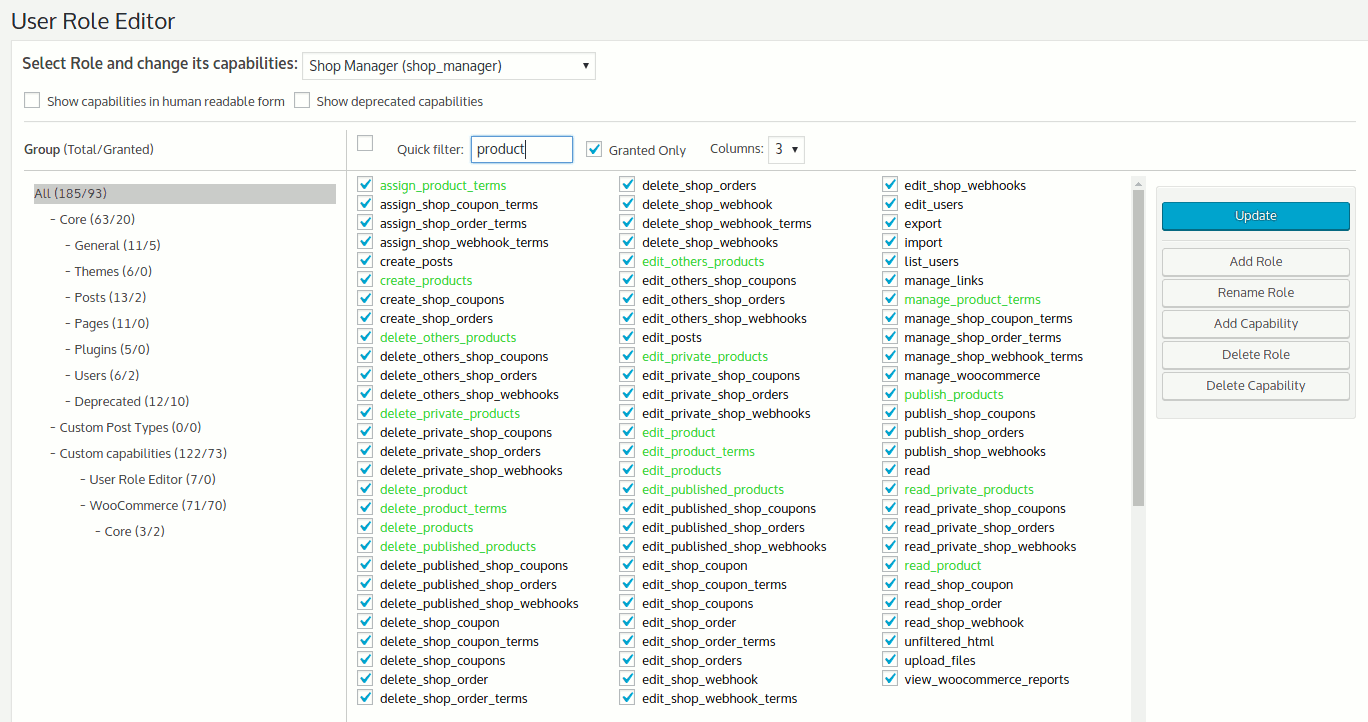
Füge die Berechtigungen mit Auswahlkästchen zur ausgewählten Rolle hinzu und klicke auf „Aktualisieren“, um die Änderungen zu speichern. Das war es schon.
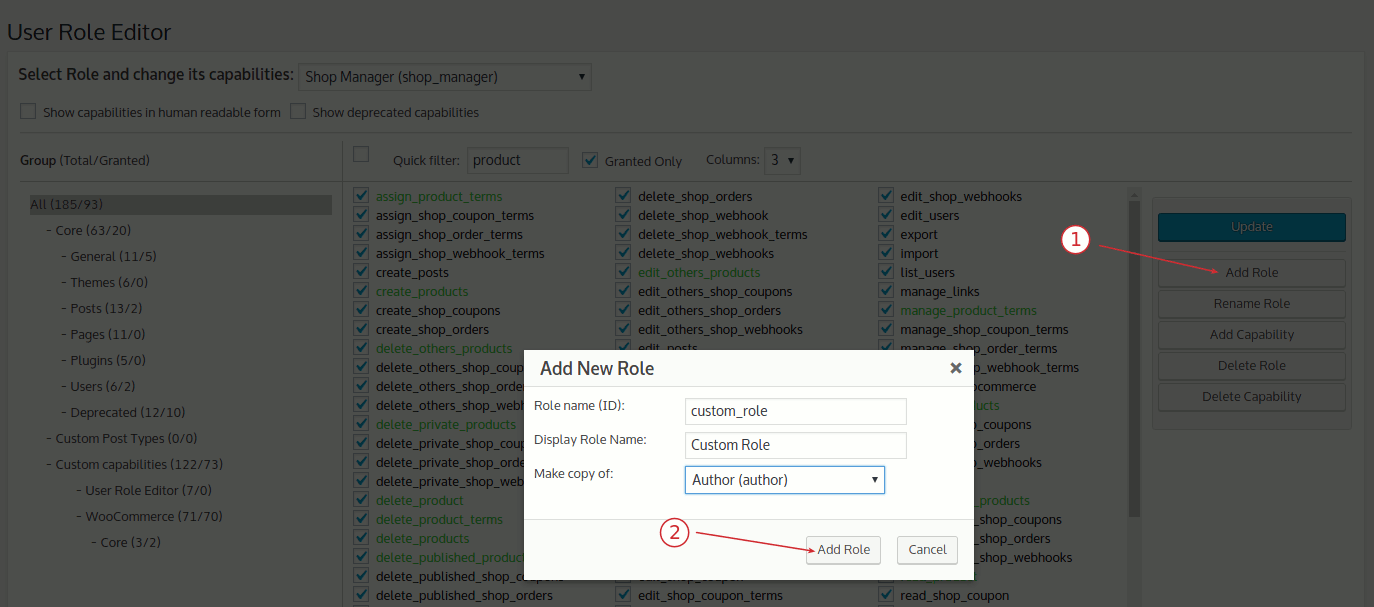
Füge neue Rollen hinzu und passe die Berechtigungen nach deinen Bedürfnissen an, komplett neu gestaltet oder als Kopie bestehender Rollen.
Werden selbst erstellte Rollen nicht mehr benötigt, können diese gelöscht werden, wenn kein Benutzer mehr dieser Rolle zugewiesen ist.
Die standardmäßig zugewiesene Rolle für neu erstellte Benutzer kann auch geändert werden.
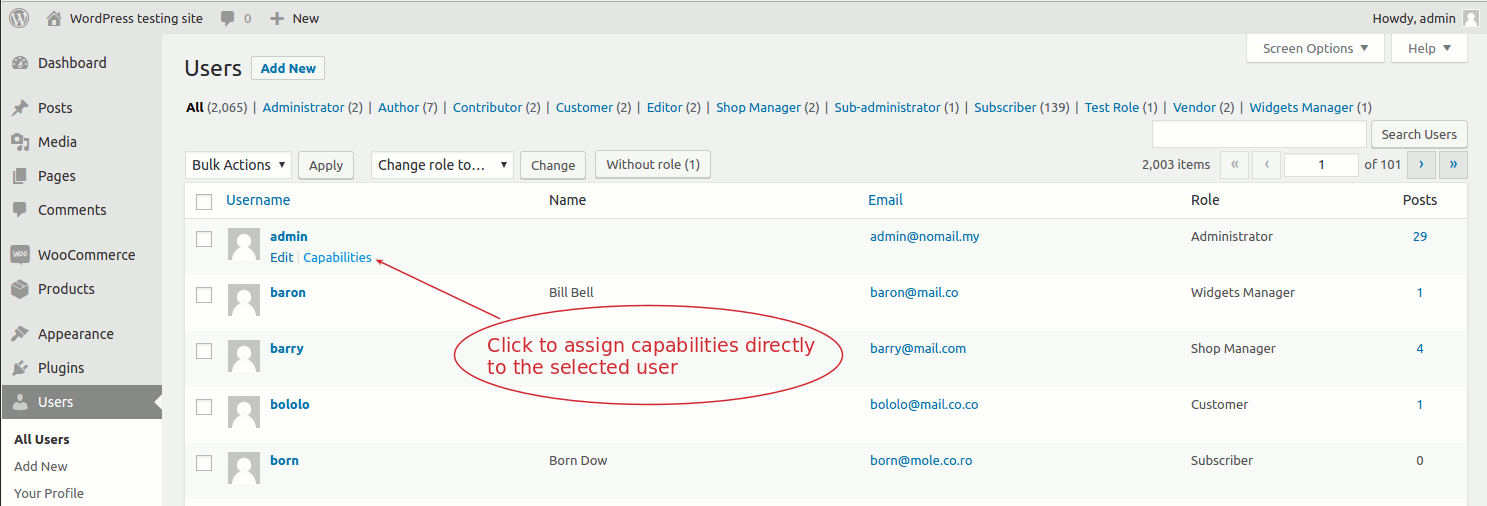
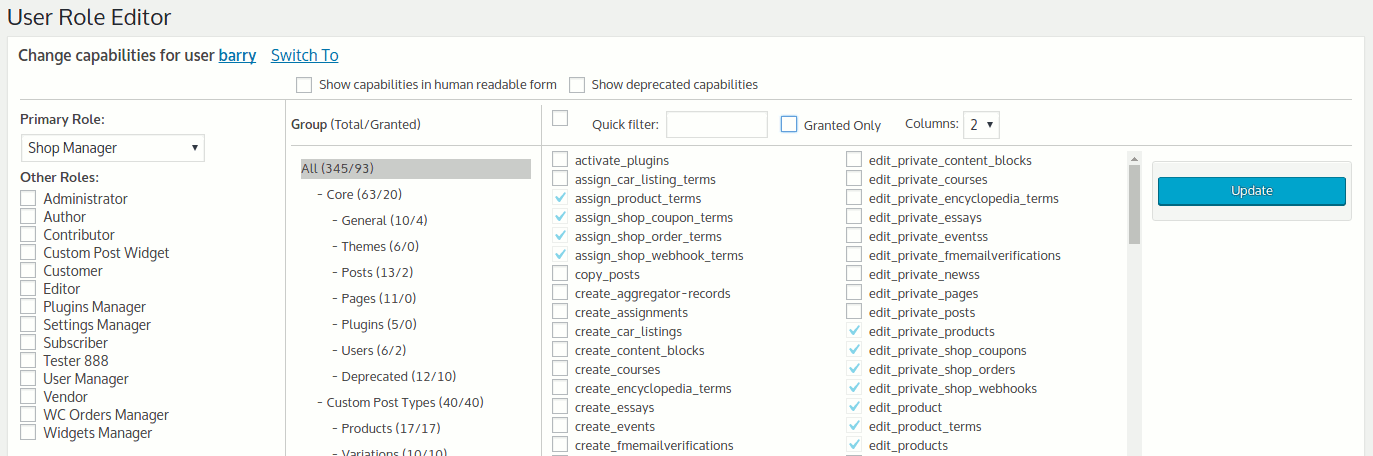
Berechtigungen können einzelnen Benutzern individuell zugewiesen werden. Mehrere Rollen können gleichzeitig einem Benutzer zugewiesen werden.
Du kannst neue Berechtigungen hinzufügen und unnötige löschen, die von deinstallierten Plugins übrig geblieben sind.
Multisite-Unterstützung ist gegeben.
To read more about ‚User Role Editor‘ visit this page
Benötigst du mehr Funktionen und hochwertigen, kurzfristigen Support? Möchtest du die Werbung in den Editor-Seiten entfernen?
Kaufe die Pro-Version.
User Role Editor Pro enthält zusätzliche Module:
- Ausgewählte Elemente im Admin-Menu für Rollen blockieren.
- Ausgewählte Menu-Einträge im Frontend für nicht-eingeloggte Benutzer, eingelogggte Benutzer oder Rollen verbergen.
- Ausgewählte Widgets unter „Design“ für Rollen blockieren.
- Widgets im Frontend nur für bestimmte Rollen anzeigen
- Ausgewählte Meta-Boxen für Rollen blockieren (Dashboard, Beiträge, Seiten, individuelle Inhaltstypen).
- „Export/Import“ module. You can export user role to the local file and import it to any WordPress site or other sites of the multi-site WordPress network.
- Roles and Users permissions management via Network Admin for multisite configuration. One click Synchronization to the whole network.
- „Other roles access“ module allows to define which other roles user with current role may see at WordPress: dropdown menus, e.g assign role to user editing user profile, etc.
- Manage user access to editing posts/pages/custom post type using posts/pages, authors, taxonomies ID list.
- Per plugin users access management for plugins activate/deactivate operations.
- Per form users access management for Gravity Forms plugin.
- Shortcode to show enclosed content to the users with selected roles only.
- Anzeigebeschränkungen (Seiten und Beiträge) für ausgewählte Rollen.
- Backend-Seiten für Administratoren zur Anzeige der Berechtigungen
Die Pro-Version ist werbefrei. Premium-Support ist inklusive.
Weitere Dokumentation
Mehr Infos über das Plugin „User Role Editor“ findest du auf dieser Website.
Ich beantworte deine Fragen zur Benutzung des Plugins sehr gerne. Benutze hierzu die Kommentarfunktion auf dieser Seite.
Screenshots
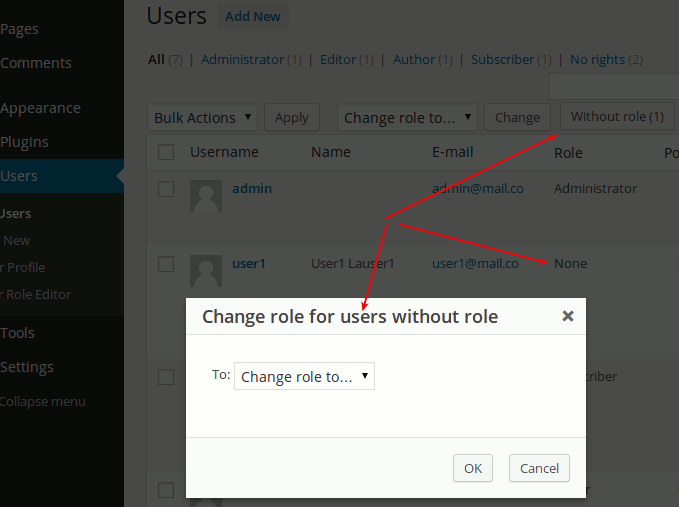
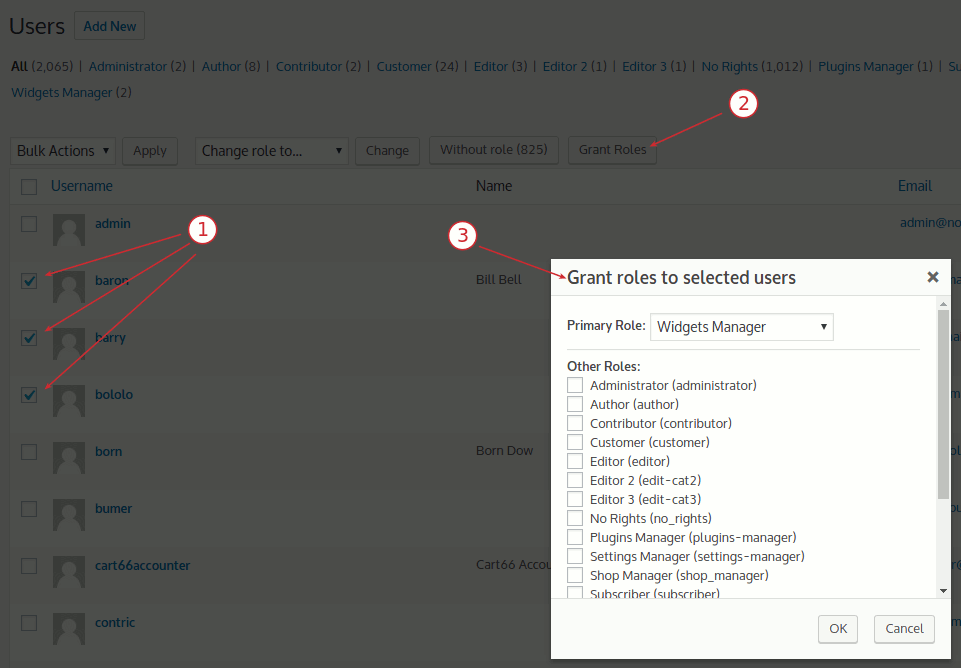
Installation
Installation:
- Deactivate plugin if you have the previous version installed.
- Extract „user-role-editor.zip“ archive content to the „/wp-content/plugins/user-role-editor“ directory.
- Activate „User Role Editor“ plugin via ‚Plugins‘ menu in WordPress admin menu.
- Go to the „Users“-„User Role Editor“ menu item and change your WordPress standard roles capabilities according to your needs.
FAQ
- Does it work with WordPress in multi-site environment?
Yes, it works with WordPress multi-site. By default plugin works for every blog from your multi-site network as for locally installed blog.
To update selected role globally for the Network you should turn on the „Apply to All Sites“ checkbox. You should have superadmin privileges to use User Role Editor under WordPress multi-site.
Pro version allows to manage roles of the whole network from the Netwok Admin.
To read full FAQ section visit this page at shinephp.com.
Rezensionen


Mitwirkende und Entwickler
„User Role Editor“ ist Open-Source-Software. Folgende Menschen haben an diesem Plugin mitgewirkt:
Mitwirkende
„User Role Editor“ wurde in 30 Sprachen übersetzt. Danke an die Übersetzer für ihre Mitwirkung.
Übersetze „User Role Editor“ in deine Sprache.
Interessiert an der Entwicklung?
Durchstöbere den Code, sieh dir das SVN-Repository an oder abonniere das Entwicklungsprotokoll per RSS.
Änderungsprotokoll
[4.66.2] 25.09.2026
- Security Fix: administrator-role protection (URE_Protect_Admin::exclude_admin_role()) only excluded the „administrator“ role from the assignable-roles list on the classic user edit screens, not on the plugin’s own admin-ajax.php actions; a user holding the „promote_users“ capability (without the plugin’s own key capability) could therefore grant themselves or another user the „administrator“ role via the „Add Role“/“Grant Roles“ AJAX action, bypassing the same protection the classic Users screen correctly enforced. Discovered and responsibly reported by Humberto (SVO, https://svo.com.br).
- Fix: the „Grant Roles“ dialog’s AJAX request (get_grant_roles) incorrectly required the plugin’s own key capability instead of „promote_users“, refusing users who only had „promote_users“ – the capability the Grant Roles feature is designed for – with an „Insufficient permissions“ error.
- Fix: „Add Role“ dialog kept showing the previously entered Role name (ID) and Display Role Name after a role was added, instead of blank fields.
- Fix: opening a user’s edit-profile screen and leaving without making any changes could show a spurious „Changes you made may not be saved“ browser warning whenever the user had any „Other Roles“ assigned; the Other Roles multi-select now renders its selected options directly in HTML instead of relying on JavaScript to select them after page load.
- Update: „Delete Role“ dialog now lists deletable roles in a checkbox table (Role Name / Role ID columns) instead of a single-select dropdown, so multiple roles can be deleted in one action; the old „Delete All Unused Roles“ option is replaced by a „select all“ checkbox in the table header.
- Update: „Delete Capability“ dialog now has a „Quick Filter“ text field next to its „select all“ checkbox, to narrow down the capability list the same way the main page’s „Quick filter“ field does.
- Update: The multisite „Allow non super administrators to create, edit, and delete users“ option is narrowed to „Allow non super administrators to edit users“. The „create“ part duplicated WordPress core’s own „Allow site administrators to add new users to their site via the ‚Users -> Add User‘ page“ network setting, and the „delete“ part granted a capability that WordPress core never actually lets a single site administrator exercise (user deletion is blocked outside Network Admin regardless of capability) – both are dropped, along with the temporary superadmin-impersonation workaround they relied on.
- Update: Plugin’s own JavaScript files (ure.js, settings.js, users.js, user-profile-other-roles.js, users-grant-roles.js) now have minified .min.js builds, generated with esbuild; each is enqueued via WordPress’s SCRIPT_DEBUG constant, same convention already used for the vendored notify.js/multiple-select.js (unminified source when SCRIPT_DEBUG is on, minified build otherwise).
- Update: Plugin’s own CSS (css/ure-admin.css) now has a minified .min.css build, generated with esbuild; it’s enqueued via WordPress’s SCRIPT_DEBUG constant, same convention already used for the plugin’s own JS files (unminified source when SCRIPT_DEBUG is on, minified build otherwise).
- Update: js/users-grant-roles.js’s loose global functions (Grant Roles dialog, Add/Revoke role buttons on the Users page) were consolidated into a single URE_Users_Grant_Roles object.
- Update: Replaced the deprecated jQuery .click()/.click(fn) event-binding shorthand with .on(‚click‘, fn) in users-grant-roles.js and users.js, clearing a jQuery Migrate deprecation warning on the Users page.
- Update: js/users.js’s loose global functions (the „Without role“ button’s dialog on the Users page) were consolidated into a single URE_No_Role_Users object; the button’s onclick markup in URE_Assign_Role::show_html() was updated to match.
- Update: js/user-profile-other-roles.js’s loose global functions (the user profile „Other Roles“ multi-select control) were consolidated into a single URE_User_Profile_Other_Roles object.
- Update: js/settings.js’s loose global functions (the Settings page’s „Reset User Roles“ confirmation dialog) were consolidated into a single URE_Settings object.
[4.66.1] 25.08.2026
- Fix: URE_Assign_Role::$lib property was changed to protected.
- Fix: URE_Uninstall::delete_options() private function changed to protected.
- Fix: URE_Uninstall::init_options_list() referenced ‚ure_task_queue‘, which never matched URE_Task_Queue::OPTION_NAME (‚ure_tasks_queue‘), so that option was never deleted on uninstall.
- Fix: URE_Core::define_files() – class URE_Uninstall was not added correctly, null was written instead of class name.
- Fix: activating Pro while free was already active caused a fatal „Cannot redeclare ure_log_error()“ error; the function declaration is now guarded with function_exists().
- Fix: activating this plugin while the paired Pro plugin was already active silently left both active instead of deactivating the paired one, because the register_activation_hook() call never ran in that request; it’s now registered as a standalone function directly in the main plugin file, ahead of the class_exists(‚URE_Loader‘) guard that was skipping it.
[4.66] 19.08.2026
- Update: Marked as compatible with WordPress 7.1
- Required PHP version increased up to 7.4
- Required WordPress version increased up to 4.6
- Update: Plugin loading code is enhanced.
- Update: Plugin does not use self-defined PHP global constants. Needed data moved inside classes.
- Update: URE_Admin_Notice class output was escaped with esc_attr(), wp_kses_post() functions.
- Security Fix: SQL queries in URE_Editor::direct_network_roles_update() and leave_roles_for_blog() are passed to $wpdb->prepare() with real %s placeholders.
- Security Fix: URE_Editor::get_caps_columns_quant() now requires a valid nonce before writing a display-preference transient from $_POST, closing a minor CSRF gap.
- Fix: URE_Protect_Admin used a bitwise „&“ instead of a logical „&&“ when checking a capabilities array, which could throw a PHP 8 TypeError; fixed to use „&&“, and the related IN() SQL clause is now hardened with array_map(‚absint‘, …).
- Update: nonce actions used on the Settings/Tools pages are now scoped per form (ure_settings_update, ure_addons_settings_update, ure_default_roles_update, ure_settings_ms_update, ure_settings_tools_exec) instead of one shared string.
- Update: additional output escaping was added across URE_View, URE_Role_View and URE_Role_Additional_Options (role/capability slugs, wp_json_encode() instead of json_encode(), esc_url() on form actions), plus a defense-in-depth capability check in URE_Role_Additional_Options::save().
- Update: rel=“noopener noreferrer“ was added to external links opened with target=“_new“.
- Update: hardcoded text strings in the role editor toolbar are now translatable.
- Fix: URE_Assign_Role used the %i SQL placeholder, which needs WordPress 6.2+, below the plugin’s declared minimum; replaced with direct interpolation of internal table names.
- Fix: URE_Editor::reset_user_roles() had an unescaped wp_die() message; further output escaping (esc_url(), esc_html(), absint()) was added across URE_Base_Lib, URE_Editor, URE_User_Other_Roles and URE_User_View.
- Fix: several request-var/database-result comparisons that could be bypassed by PHP type juggling are now strict, including URE_Grant_Roles::is_try_remove_admin_from_himself()’s „can’t remove your own admin role“ check.
- Fix: URE_Base_Lib::set() now correctly rejects unknown properties instead of silently creating them; URE_View declares its $advert property explicitly.
- Update: $_SERVER[‚REQUEST_URI‘] is now validated and unslashed before sanitizing in URE_Lib::is_right_admin_path() and URE_User_Other_Roles::is_user_profile_extention_allowed().
- Update: posted role IDs are now sanitized (sanitize_key(), wp_unslash()) in URE_Editor, and its ‚object’/role-selection request parameters are constrained to known values.
- Update: URE_Base_Lib::get_blog_ids() now uses get_sites() instead of a raw database query.
- Update: URE_Capability::revoke_caps() now uses get_users() instead of a raw database query.
- Update: URE_Protect_Admin::has_administrator_role() now uses user_can() instead of a raw database query.
[4.65] 21.05.2026
- Update: Marked as compatible with WordPress 7.0
- Update: Pages markup are modified to correspond WordPress 7.0 CSS changes.
- Update: „defined(‚ABSPATH‘)“ guard was added to all PHP files to exclude PHP files direct execution.
- Update: sanitize_text_field(), sanitize_key(), sanitize_url() functions are used to secure user input before processing.
- Update: _nonce field checking was added before data update in addition to test made already on the higher level.
Die Datei „changelog.txt“ enthält die vollständige Liste der Änderungen.